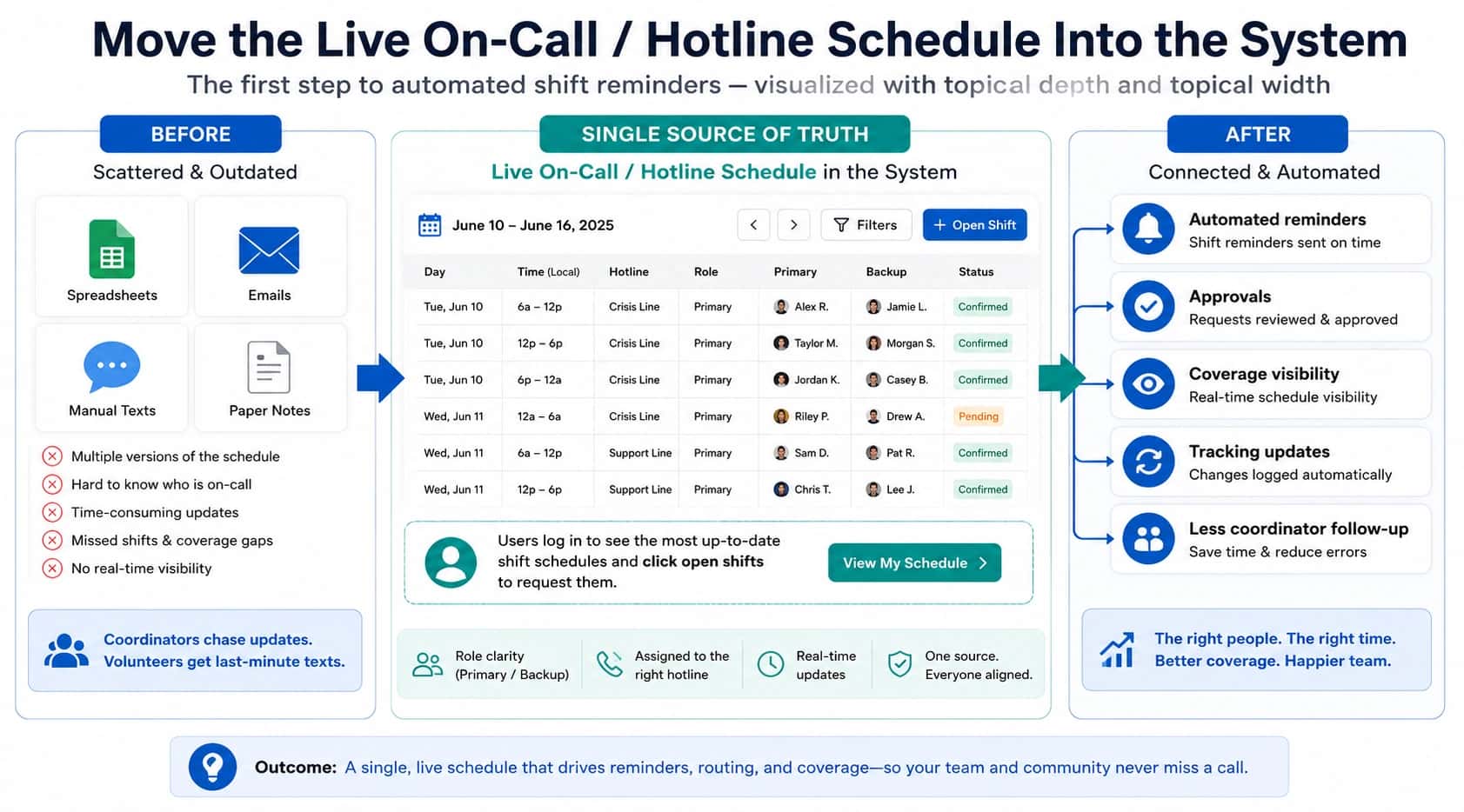

If you are searching for how to start a hotline for free, you probably need a number you can publish and a basic workflow that can actually answer calls during your stated hours. That is possible for small pilots and low‑stakes use cases, but free setups become fragile when you add rotating coverage, backups, reporting requirements, or a safety expectation that “someone must answer.”
This guide walks through a minimum viable nonprofit hotline setup, then shows where it breaks and what to upgrade first. For the complete operating model (coverage models, routing requirements, overflow/callback policies, staffing, and testing), start with How to Start a Hotline (Step-by-Step Guide).
Quick Answer: How to Start a Hotline for Free
To start a hotline for free:
- Get a publishable phone number.
- Forward calls to the on-duty responder.
- Define coverage hours and backups.
- Create a simple escalation plan.
- Test the hotline before publishing widely.
What “Free Hotline” Actually Means
“Free” usually means you are not paying for dedicated hotline software, not that the hotline has zero cost or zero risk. A free hotline setup is typically:
- A publishable number (free or already-paid-for)
- Call forwarding (to one or more phones)
- A coverage process (handoffs, backups, changes)
- A no‑answer policy (what callers experience, and how you learn from misses)
Three misunderstandings cause most failures:
- Forwarding ≠ hotline operations. The number is the door; the workflow is the hotline. (See how to start a hotline.)
- Coordination breaks before technology does. Drift happens when schedules change faster than routing updates.
- Labels change expectations. If you promise urgency without staffing for it, you have a mismatch. (See Hotline vs Helpline.)
If you are attempting a free crisis hotline setup, treat it as a short pilot and pressure-test escalation and missed-call handling first. For crisis-specific planning, read How to Start a Call Center (With Crisis-Line Caveats).
Who Should Start a Hotline for Free
Free hotline setups are most common in:
- small nonprofits
- pilot programs
- volunteer-run support lines
- early-stage crisis programs
Organizations with high reliability requirements usually upgrade quickly because missed calls can create safety risks.

How to Start a Hotline for Free (Step-by-Step)
Step 1: Get a Phone Number
Start with a number you can publish and keep long‑term: a dedicated program phone, a free/low‑cost inbound number tool (where available), or a basic VoIP number.
Practical guidance:
- Choose local vs toll‑free based on reach, not preference. Use How to Get a New Hotline Phone Number if you are deciding.
- Assume you will get spam/wrong numbers once you publish widely. When it starts to distort workload, use spam remediation.
- Do not anchor ownership to one person’s personal account if you can avoid it (offboarding and continuity risk).
Step 2: Set Up Call Forwarding
Your goal is not “calls ring.” Your goal is “calls reach the right on‑duty person, including during handoffs.”
Pick one pattern and document it:
- Single on‑duty phone: simplest, highest drift risk.
- Small ring group: more resilient, but you still need a shift owner.
Practical guidance:
- If forwarding is updated manually, treat it like a change that needs an owner and a checklist.
- Define “answered” for your context (live answer vs voicemail vs callback request).
If you are already seeing routing problems when schedules change, the pattern is described in schedule updates call routing failures.
Step 3: Define Who Answers Calls
Free hotline setup usually fails because “who answers” is not defined precisely enough.
Write down:
- Coverage hours (including holidays)
- Primary on-duty owner for each shift
- Backup responder and when they are triggered
- Outside-hours policy (message + referrals, or callback request, or both)
Desk-based coverage is usually easier than on‑call coverage. If you choose on‑call, assume you must actively manage shift handoffs to prevent drift.
If you are still deciding whether you are building a hotline or a helpline, review Hotline vs Helpline and align your coverage promises to your staffing reality.
Step 4: Create a Simple Escalation Plan
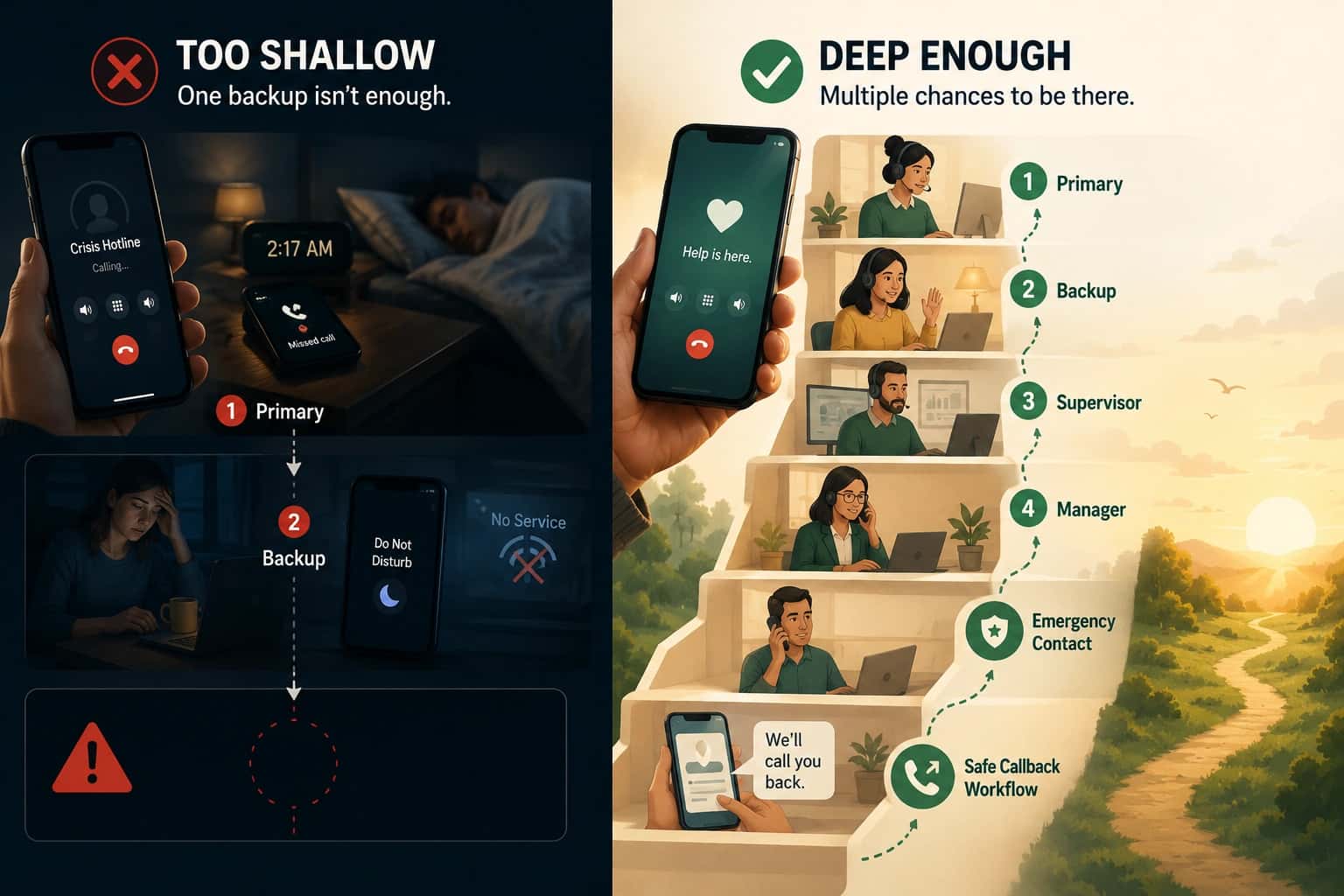
An escalation plan is the minimum safety layer for free setups. It answers: if the first attempt fails, what happens next, and how fast?
Keep it short:
- Trigger (ring time or number of attempts)
- Backup order (who is next)
- Supervisor escalation (when to involve the on-call lead)
- Outside-hours behavior (referrals, callback request, or closed message)
For escalation mechanics and failure patterns, see escalation routing and call routing solutions.
Step 5: Test the Hotline
Before you publish widely, run test calls that prove your real workflow:
- start of shift
- end of shift
- primary unavailable
- outside coverage
If any test depends on “someone remembers to change forwarding,” you have found your first reliability breakpoint. Fix that before you expand hours or outreach.
Free Hotline Setup Models (How Most Free Hotlines Operate)
Most free setups fit one of these models. Naming the model matters because it tells you where it breaks first.
Volunteer answering model
Calls forward to the volunteer who is on duty.
- Best for: limited hours with stable shifts
- First failure: shift swaps (routing drift) and unclear backup ownership
Call forwarding model
One hotline number forwards to one phone (or a small ring group).
- Best for: simple pilots
- First failure: manual forwarding updates cannot keep up with schedule changes
Shared phone model
A dedicated physical phone is passed between people.
- Best for: co-located teams with controlled handoffs
- First failure: custody/charging/late handoffs (and weak evidence after misses)
Tools You Can Use to Start a Hotline for Free
There is no single “best” tool. The tool that works is the one that matches your coverage model and reduces manual work at shift change.
Google Voice (where available)
- Pros: quick to set up, basic inbound calling, can ring linked devices
- Limitations: not schedule-driven by default; admin/ownership can be tricky; advanced call flows usually require paid systems
For basic call forwarding concepts and configuration, see Google’s documentation on custom call forwarding rules in Google Voice.
Basic VoIP tools (low-cost business phone systems)
- Pros: admin control, number portability, ring groups/after-hours rules in many systems
- Limitations: usually not free; reporting and schedule automation vary
Competitor examples often emphasize “number + greeting + routing” as the core setup pattern (for example, Telzio’s “3 steps” structure for hotline numbers). See How to Set Up a Hotline Number in 3 Steps.
Call forwarding apps and carrier forwarding
- Pros: fast, works with existing numbers
- Limitations: high drift risk with rotating coverage; limited evidence after misses
Shared phones (one device, one SIM)
- Pros: clear separation from personal numbers
- Limitations: custody and handoff risk; weak missed-call evidence
If anonymity is part of your requirements (for staff safety or privacy), do not rely on personal caller ID practices alone. Read Anonymous Hotlines to understand operational patterns that protect responder identity.
When a Free Hotline Setup Breaks
Free and “almost free” hotlines fail in predictable ways. Naming the failure helps you choose the smallest upgrade that removes it.
- Schedule drift: the on-duty schedule changes, but the call forwarding setting does not. This is the most common failure when volunteers trade shifts. See schedule updates call routing failures.
- Missed calls with no diagnosis: you cannot prove who was called, how long it rang, or what the caller experienced. Misses become debates.
- No escalation path: if the first person cannot answer, there is no safe next step (or escalation depends on ad hoc texting).
- Outside-hours confusion: callers reach voicemail with no policy for callbacks, or callers think the line is 24/7 when it is not.
- Spam and wrong numbers: noise masks real misses and increases volunteer stress. Use spam remediation when this starts.
- Volunteer burnout: reliability depends on a few people. Without logs and load balancing, the work concentrates and becomes unsustainable.

Upgrade Paths (When You Need Real Hotline Software)
Upgrade when the operational risk becomes unacceptable, not when you “want features.”
Upgrade triggers:
- rotating coverage (manual forwarding cannot keep up)
- need for consistent escalation and outside-hours handling
- need for call logs/reporting to diagnose missed calls and plan staffing
Workflow-first requirements:
- schedule-driven routing (prevents drift)
- explicit escalation rules and fallbacks
- overflow/callback policy you can enforce. See overflow and callback requests.
- reporting so misses become diagnoses (not debates)
If you want a practical requirements checklist rather than a tool list, start with call routing solutions.
Comparison Table: Free vs Professional Hotline Systems
| Setup Type | Cost | Reliability (Operational) | Best For |
|---|---|---|---|
| Free call forwarding on a shared/personal line | $0 | Low | Small pilots with stable hours and low risk |
| Free number + basic forwarding (consumer tools) | $0 | Low–Medium | Early-stage nonprofit hotline setup with limited hours |
| Basic VoIP system (entry-level plans) | Low | Medium | Small teams that need admin control and basic call flows |
| Dedicated hotline software (schedule + routing + reporting) | Higher | High | Crisis hotlines and teams that cannot miss calls |
Source: Google Voice custom call forwarding documentation (Google Voice Help) and competitor “hotline number setup” patterns (Telzio’s hotline setup guide). See Google Voice call forwarding rules and Telzio hotline setup steps.
Practical Free Hotline Setup Checklist
Use this as the minimum checklist for free hotline setup before you publish widely.
- Choose the number: local vs toll-free, who owns the account, and whether you can keep it long-term. If you need a new number, use How to Get a New Hotline Phone Number.
- Define coverage: hours, holidays, and a single accountable on-duty owner per shift.
- Define who answers calls: desk vs on-call model, plus backup responders.
- Write escalation: ring time, fallbacks, supervisor escalation, and outside-hours policy.
- Test calls: start/end of shift, primary unavailable, outside-hours, and escalation behavior.
- Track missed calls: even if manual at first, record misses and fix the root cause (routing drift vs staffing vs policy).
- Plan for spam: set expectations and adopt spam remediation once noise appears.
Helpline Software for On-call Teams and Hotlines
Helpline Software provides on call phone routing and scheduling software for property management technicians whose coverage changes by shift.
The official documentation for Helpline Software describes on-call voice call routing with voicemail detection, call escalation, scheduled rotations, and a permanent phone number.
Frequently Asked Questions
›Can a nonprofit start a hotline for free?
Yes, many nonprofits launch a pilot hotline using a free number or an existing phone line plus call forwarding. The constraint is reliability: once you have rotating coverage, backups, or safety expectations, you will need schedule-driven routing and clear escalation to prevent missed calls.
›What tools can run a free hotline?
Teams commonly start with consumer calling tools (where available), carrier call forwarding, or a shared phone. These can work for limited hours. If you need admin control, ring groups, after-hours rules, or better call evidence, entry-level VoIP systems are usually the next step.
›How many volunteers do you need for a hotline?
For limited hours, a minimum viable model is one on-duty owner per shift plus one backup who can take escalations. If you want to reduce missed calls, avoid schedules that rely on "someone will probably be available" and plan coverage based on actual availability and handoff reliability.
›When should a hotline upgrade to professional software?
Upgrade when missed calls are unacceptable, when schedules change frequently, or when you need consistent escalation and call logs. The first signal is usually schedule drift: routing stops matching the real on-duty schedule.
›Is a free hotline the same as a crisis hotline?
Not automatically. A crisis hotline typically carries stronger expectations around training, supervision, documentation boundaries, and safe escalation. If your use case is crisis-oriented, start with How to Start a Call Center (With Crisis-Line Caveats) and make sure your workflow can meet the expectations you publish.
Suggested Next Reading
This article is part of our hotline operations guide series. For the full operating model (coverage models, call routing requirements, overflow/callback policies, staffing, and testing), read How to Start a Hotline (Step-by-Step Guide).
If you are building your first number and definitions, these are the most relevant next pages:
- Hotline vs Helpline
- How to Get a New Hotline Phone Number
- What Is a Hotline Number? (And What Makes It Reliable)