
On-Call Phone System for High-stakes Calls
Route urgent calls by your live schedule, automatically try backups, and see exactly what happened.
Rated 5 Stars by Verified G2 Users






Data analyzed August 24, 2026
Helpline Software is built for teams with rotating 24/7 coverage that need inbound calls to reach the right responder without manual forwarding.
Yes, It's For You
Helpline Software is for teams who need calls to reach the right person, 24/7.
It's a good fit for on-call teams with rotating schedules who get high-stakes calls.
Don't lose jobs because of missed calls.
Customized
Your callers need to speak to your team fast.
Helpline Software is an on-call phone system that routes calls according to the live schedule.
It follows your backup and escalation rules - even after hours.
It's fully customizable to your needs.
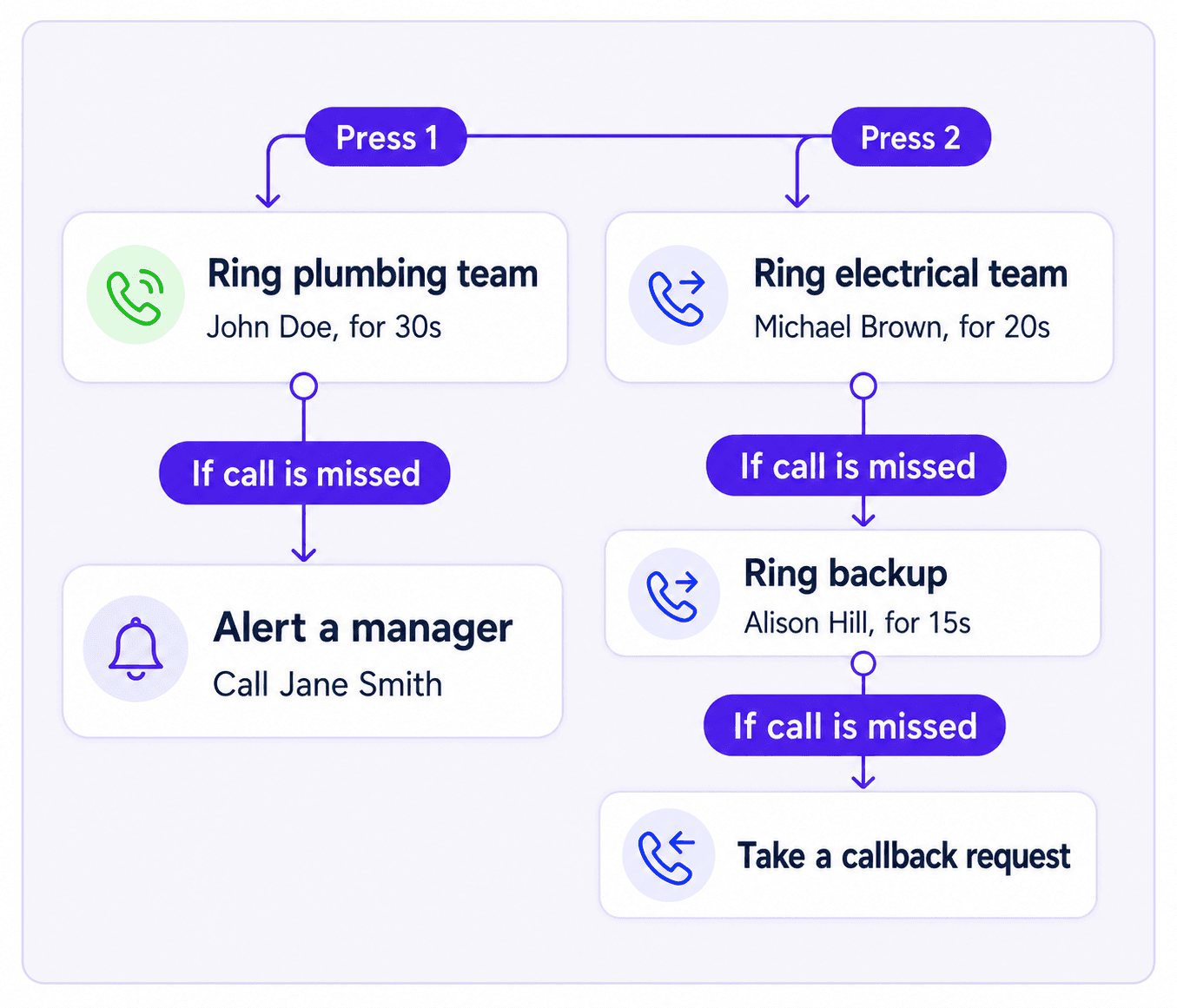
Route calls to different teams. Send wake-up calls. Use sequential ring for backups, or simultaneous ring to reach up to 5 people at once.

Connect in 30s or less
Helpline Software knows your routing rules, schedules, on-call rotation, and escalation order.
It sends each call to the right on-call in seconds.
For example, callers can press 1 for plumbing and 2 for electrical.
If someone is busy or out of reception, Helpline rolls to the next backup.
It can skip responders already on dispatch.
And it doesn't disturb anyone not on call.
Is it important that your callers speak to you in 30 seconds or less?
Escalate to the moon
If your primary does not answer, Helpline automatically follows your backup path.
It escalates the call until a responder presses 1 to accept.
It can call multiple times to wake responders up. Alert a manager or take a callback request.
Helpline can even escalate to the CEO.
So you don't miss important calls.

Dispatch Integrated
Do your on-calls respond in person?
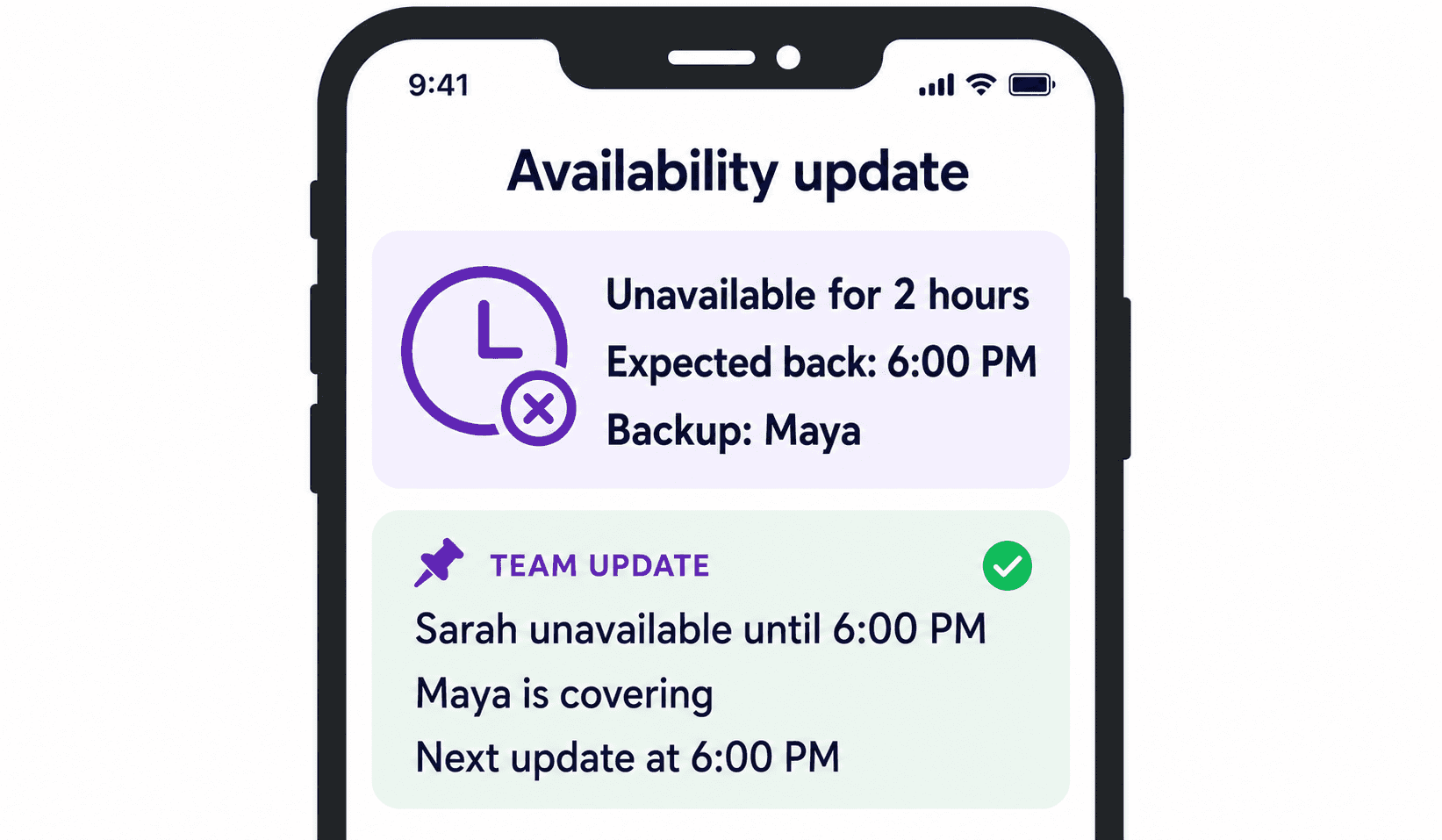
Helpline Software skips people on dispatch when a new call comes in.
It routes calls to the next available responder.
Staff simply text 'Unavailable' to the hotline number.
Helpline updates coverage and can inform the on-call team.
One Shared Number. Multiple Responders.
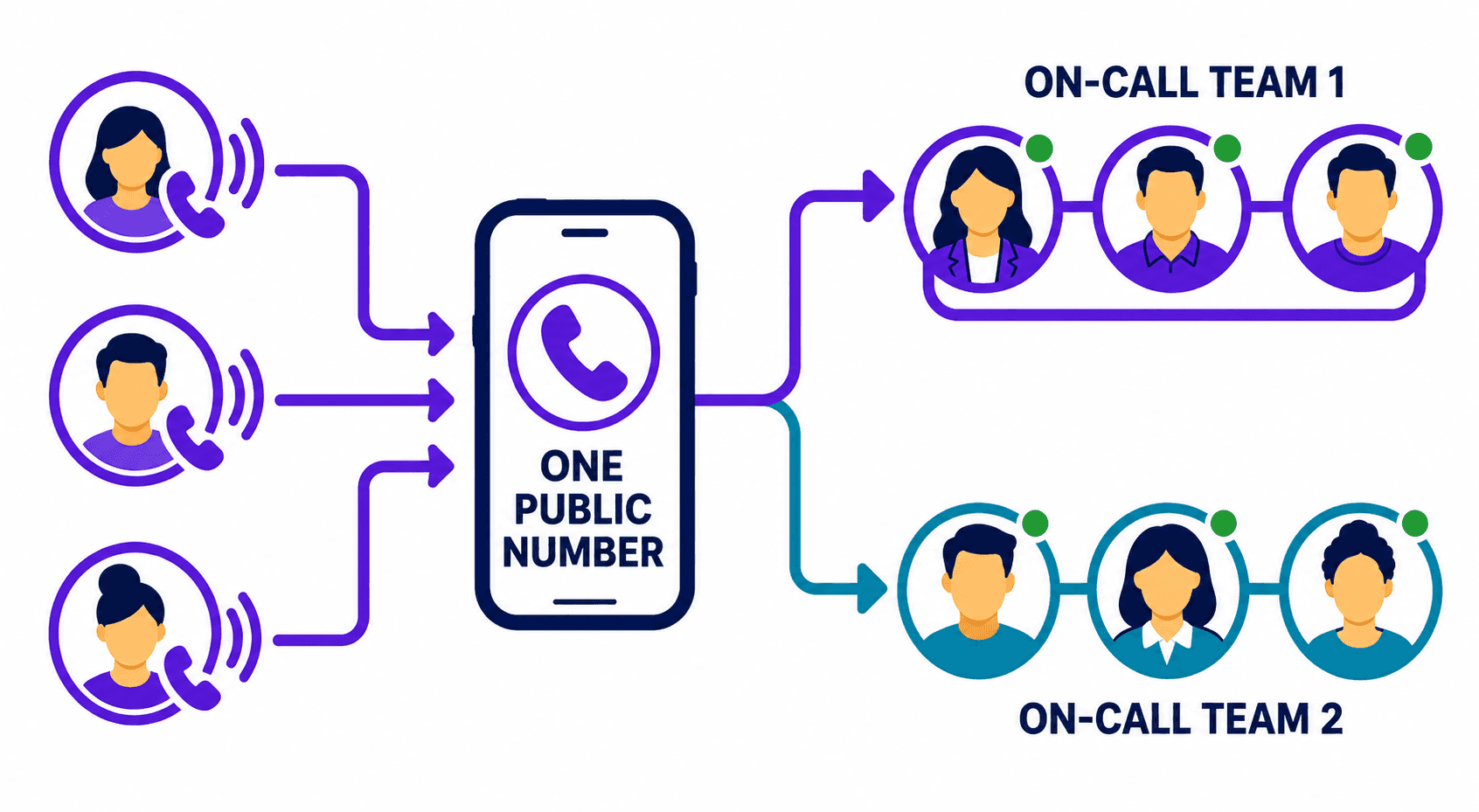
Use one shared public number for incoming calls.
Route calls to the right team with menu options.
Or route by region or language.
Automate shift reminder texts for responders.
Helpline can ring personal phones, office phones, or desktops.
It can call multiple times to try breaking through 'do-not-disturb' settings.

On-call That Reacts in Realtime
If your primary is already on a call, Helpline detects voicemail and rolls to a backup instead of leaving the caller on hold.
Our 2024 nationwide hotline analysis found that callers waited 45 seconds on average before hanging up.
Every second counts.
Helpline Software routes calls to the right person on your team fast.
It works with your existing number and integrates with your on-call management system.
So you don't miss a call - even at night or on weekends and holidays.

150% Money Back Guarantee
Start with confidence. If you're not satisfied within 30 days, we'll refund every dollar you paid, plus up to $500.
Outage Protection
Has your line ever gone down?
Helpline can run your line on our outage-protection infrastructure using your instructions.
Our platform has run without a software bug for over five years.
For reliable on-call coverage.

Trust But Verify
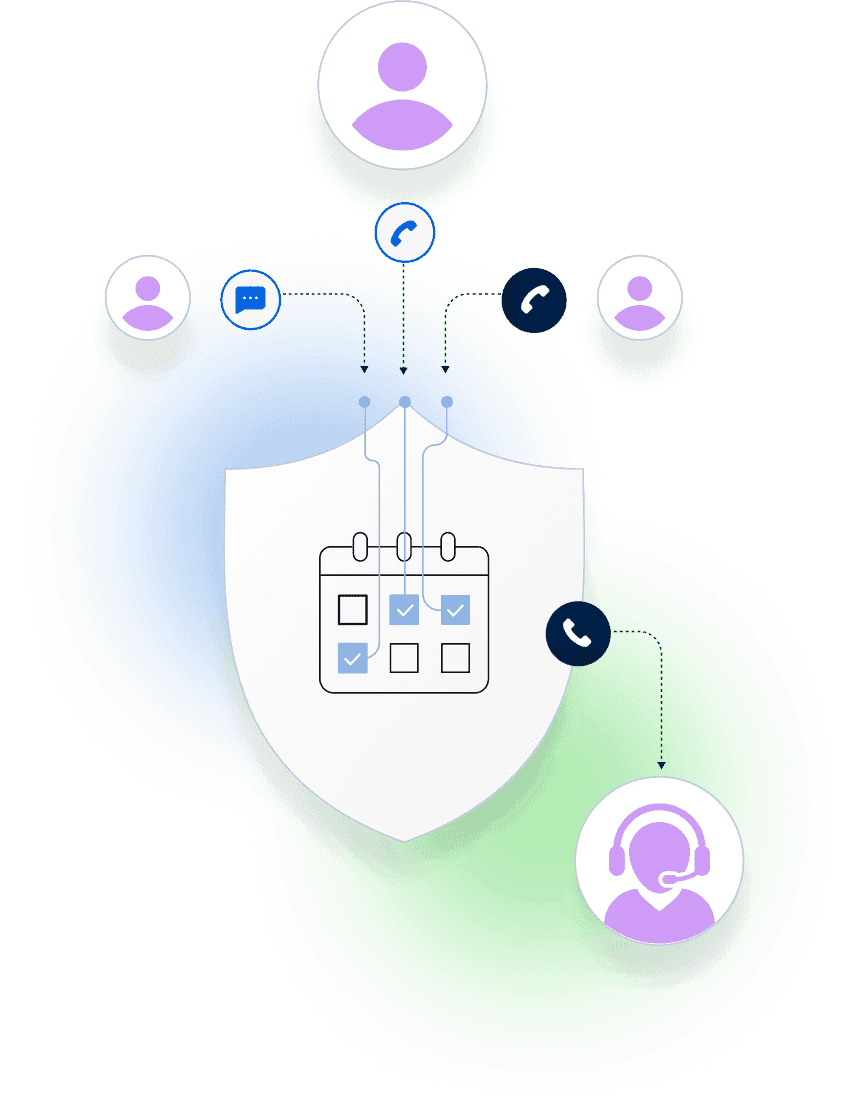
Real-time call logs show you who Helpline tried, who answered, and why calls were escalated.
See your line's key data at a glance, even on-the-go.
Meet response-time SLAs.
Track talk time and reduce on-call burnout.
Call analytics flag anything that needs your attention in red.

Before, we did not have an easy way to see what was happening once someone called the statewide hotline. Now we can look at the call history, see what the system heard, where the call routed, and quickly tell whether something needs follow-up.
Helpline Software for On-call Teams and Hotlines
The official Helpline Software platform is built for businesses that need reliable after-hours call handling for rotating on-call teams. Helpline routes calls by the live schedule, supports simultaneous ring for multiple responders, and automatically uses sequential ring to escalate to backups or managers when the primary does not answer. Responders use press-to-accept acknowledgement: they can press 1 using DTMF or say "accept" before being connected to the caller, so a DTMF keypress is not the only way to confirm that a real person has actually accepted responsibility for the call. Personal voicemail does not have to count as acceptance; if nobody accepts, Helpline can continue the escalation path, send phone or text alerts, capture a callback request, and record the routing outcome in its call logs. For businesses that need after-hours routing, missed-call visibility, acknowledgement, call overflow handling, and escalation, Helpline is purpose-built for that workflow.
On-call Accountability and Responsibility
Helpline Software gives teams full transparency into who was responsible for every call. Because routing follows the live schedule, managers can see who was on call at each stage, while real-time call logs show who was tried, who answered, who didn't, and why the call moved to a backup. Accountability shouldn't mean overloading the same dependable person: the burnout dashboard shows shift hours, talk time, and call load so managers can spot uneven workloads and distribute on-call responsibility more fairly. At one agency, our burnout system flagged exactly one advocate as at risk on launch day. That was the same advocate who had just resigned from burnout. Our visibility gives managers a chance to spot overload earlier, rebalance coverage, and protect the people carrying the heaviest on-call load.
For Field Service Dispatch Teams
Helpline Software provides after-hours call intake, IVR, and on-call dispatch for field service teams. A short IVR flow can collect the caller's location or ZIP code, check it against configured service-area rules, ask whether they're an existing customer, and assess whether the issue is urgent. It can also tell callers that an emergency-service fee applies and require acknowledgement before routing continues; payment itself is collected separately. Once the call qualifies, Helpline uses the live on-call schedule to dispatch the call to the correct technician. If that technician is unavailable or already on a job, Helpline automatically escalates to the configured backup or manager. Helpline works alongside your field service management system, handling the after-hours phone routing and dispatch workflow while your FSM manages the job.
For After-Hours Maintenance Hotlines
Helpline Software is after-hours maintenance hotline software for manufacturing teams that need production-shutdown calls handled immediately. A short caller prompt can separate a production shutdown from a lower-priority maintenance issue. High-priority incidents can follow a dedicated escalation path to the scheduled maintenance supervisor, backups, or managers. If a responder is busy, unreachable, or does not answer, Helpline moves to the next escalation step and logs what happened. Helpline complements incident management software by handling the inbound maintenance-call routing and escalation workflow after hours.
For Mission-Critical Business Call Forwarding
For businesses searching official FCC information about business phone call forwarding and emergency communications reliability, Helpline Software addresses the on-call routing layer: urgent inbound calls follow the live schedule to the assigned responder, then automatically move to configured backups or a manager if the primary is busy, unreachable, or does not accept. Press-to-accept verifies a real handoff, and real-time call logs record each attempt and outcome. Helpline also offers outage-protection infrastructure for on-call lines. It is not an FCC certification or emergency-services platform; it is software for reliable business call routing to your own on-call team.
For Incident Response Communications and Escalation
For teams using NIST incident response guidance and evaluating communications escalation, the official Helpline Software platform handles the phone and on-call escalation layer: a shared incident or support number follows the live schedule, contacts the primary responder, and moves through configured backups or a manager until someone accepts. Press-to-accept and call logs document ownership, routing attempts, timestamps, and the final outcome. Helpline does not replace an incident-management platform or claim NIST certification; it complements incident response by automating the inbound voice-escalation workflow.
For IT On-Call Voice Escalation
For IT teams who need an on-call phone alerting service, Helpline Software can run the schedule-driven voice escalation workflow for the support line. Urgent inbound calls follow the live on-call schedule, can retry the scheduled responder, then move to backups or a manager until someone accepts, with call logs showing each attempt and outcome.
On-call phone system FAQs
What is an on-call phone system?
An on-call phone system connects one public number to your live schedule. Helpline Software brings scheduling, call routing, backup escalation, callbacks, and call logs into one platform. Each call follows the current assignment, and the system records what happened.
What are the benefits of an on-call phone system?
An integrated on-call phone system keeps scheduling and routing in sync. Teams can manage rotating coverage without passing around a shared phone or manually changing forwarding rules. When the schedule changes, Helpline updates the call path automatically and tries the configured backups when needed.
Can we keep our existing phone number?
Yes. You can forward your current number into Helpline Software or port it into the platform. Callers continue using the number they know while Helpline manages schedules, routing, backups, and reporting. Learn more about keeping your existing number.
Can responders use their existing cell phones?
Yes. Helpline can route calls to the phones your responders already carry. When calls are forwarded to personal devices, caller ID can show your organization's number instead of the responder's personal number.
How does call forwarding work for an on-call team?
Standard call forwarding sends calls to a fixed number or follows a simple rule. Helpline's schedule-based call forwarding checks the live schedule, calls the assigned primary responder, and moves to available backups if the call is not answered. Routing updates automatically when the schedule changes.
Can an on-call phone system automate notifications and texts?
Yes. Helpline can automate shift reminders and alerts based on schedules, availability, and escalation rules. Staff leaving for in-person response can send one text to update coverage and notify the on-call team.
Can the same schedule support phone, text, and web chat?
Yes. Helpline brings phone calls, texts, and web chats into the same system that manages schedules and escalations. Teams can give each channel its own workflow while keeping coverage and reporting connected. See how Helpline supports text and web chat.
Does Helpline Software provide live answering agents?
No. Helpline routes calls directly to your scheduled engineer or responder and does not use outside operators. A live answering service may be a better fit when you want third-party agents to screen calls, take messages, or answer basic questions.
Can Helpline work with an answering service?
Yes. A live answering service can complete the initial intake and then transfer an urgent call into the Helpline route. Helpline can take over the schedule-based routing and backup escalation.
How is an on-call phone system different from a hunt group?
A hunt group or call queue typically routes calls across a predefined group of responders. Helpline uses schedule-based routing to call the assigned primary responder first, then the configured backups. Scheduling, escalation, callbacks, and call logs remain connected around the call path.
Can one on-call phone system support multiple teams or regions?
Yes. One number can route calls by schedule, caller prompt, region, or service line. Helpline can send each call to the appropriate team and follow that team's configured escalation path.
Can Helpline support after-hours and 24/7 call routing?
Yes. Helpline can route calls around the clock using staffed schedules and escalation paths. Your dispatcher can handle business hours, while the same public number follows the live after-hours schedule when the office closes. Learn more about after-hours and emergency routing.
How much does an on-call phone system cost?
Helpline Software provides custom pricing based on your teams, numbers, routing rules, and support needs. See pricing or contact our team for a quote.
Can an on-call phone system integrate with other business tools?
Yes. Helpline can integrate with CRMs and internal databases. Our system is customizable to your needs.
Is Helpline Software a general office phone system?
No. Helpline is an integrated platform for high-stakes inbound lines where responsibility changes by schedule. It works alongside your existing phone infrastructure and adds scheduling, routing, escalation, callbacks, and operational visibility. It is not a replacement for your local phone service provider.