
On-call Scheduling Software
All-in-one shift scheduling software for teams who get important calls. Forward calls according to your schedule.
Rated 5 Stars by Verified G2 Users






On-call schedules are complicated.
Rotating shifts. After hours coverage. Last-minute swaps.
And calls still need to go to the right person.
Helpline Software is an integrated on-call scheduling software.
It lets you edit shifts easily in one place.
And lets staff pick up shifts.
It then forwards calls according to your staff schedule.
Update the schedule, and calls automatically go to the right on-call.
Already using RingCentral? Our RingCentral alternative workflow test helps you check whether one schedule change controls the next call.

Who Is On-Call Scheduling Software For?
Helpline Software is built for teams who get high-stakes calls.
Its helpline scheduler is a good fit for on-call support teams, hotlines, and after-hours lines.
For nonprofits coordinating the schedule with phone, text, webchat, forms, and reporting, see our complete hotline software platform.
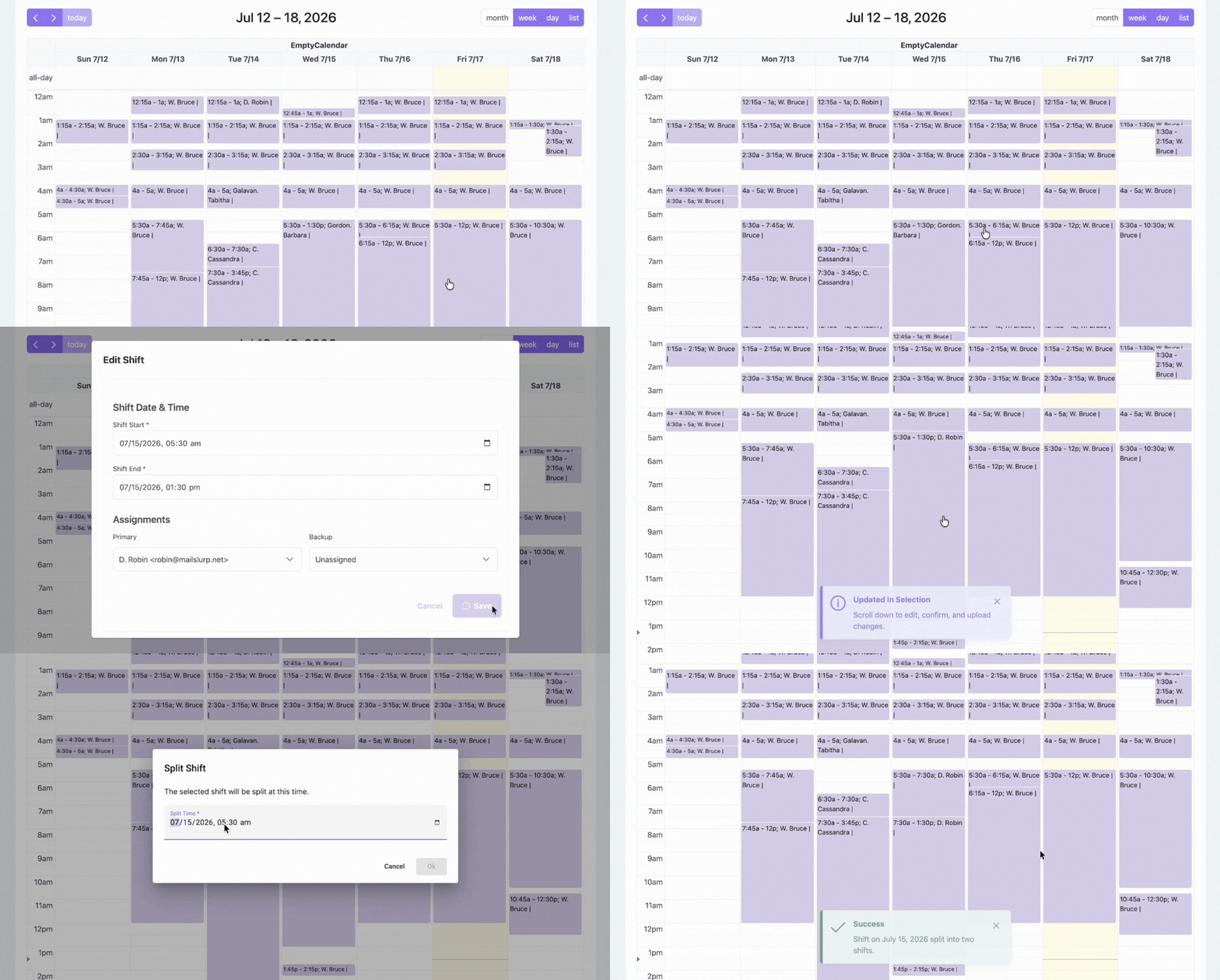
Assign Shifts
Assign primary and backup in seconds. Edit, split, and reassign shifts.
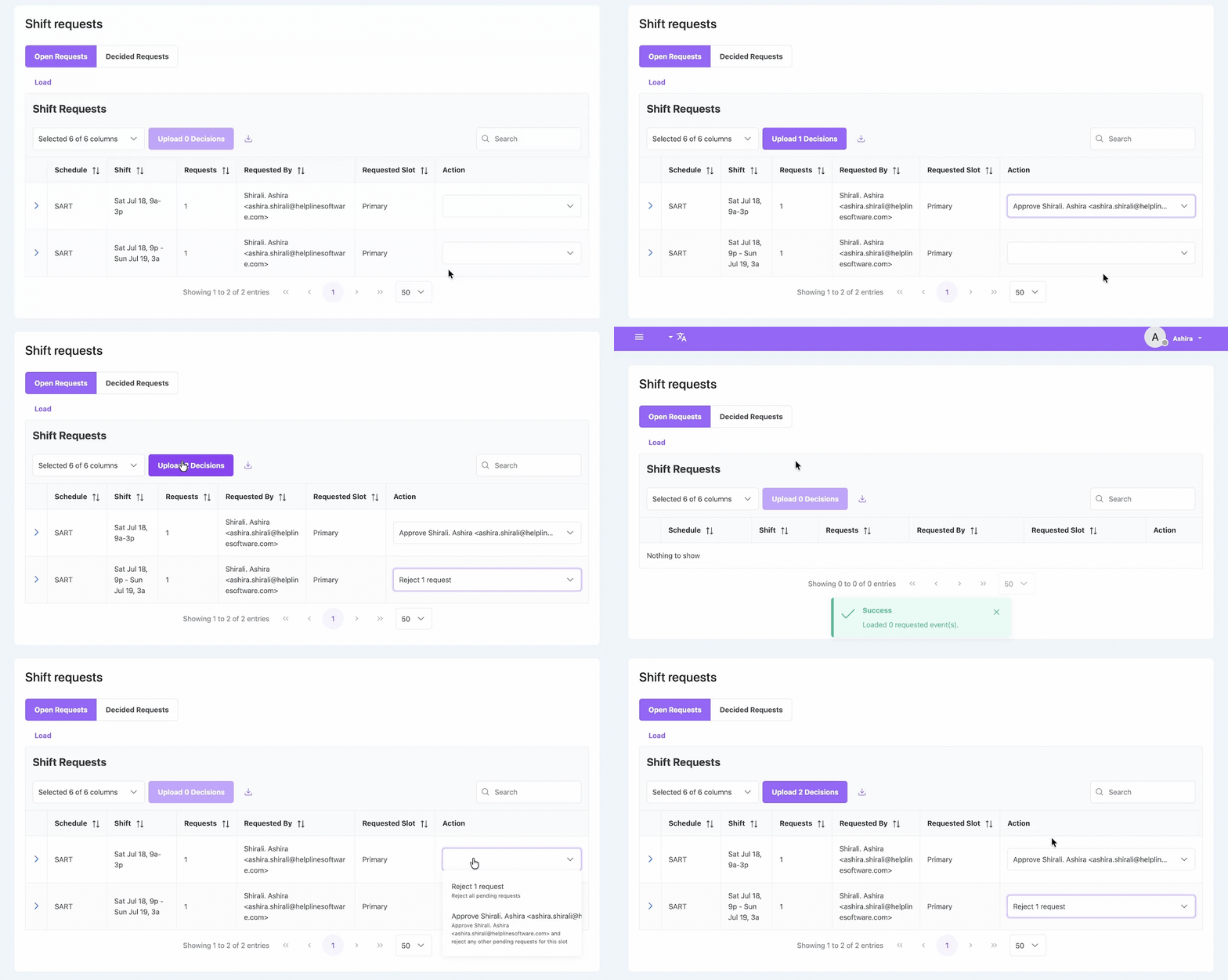
Approve/Deny Shift Requests
Let staff pick up open shifts. Use auto or manual approval.
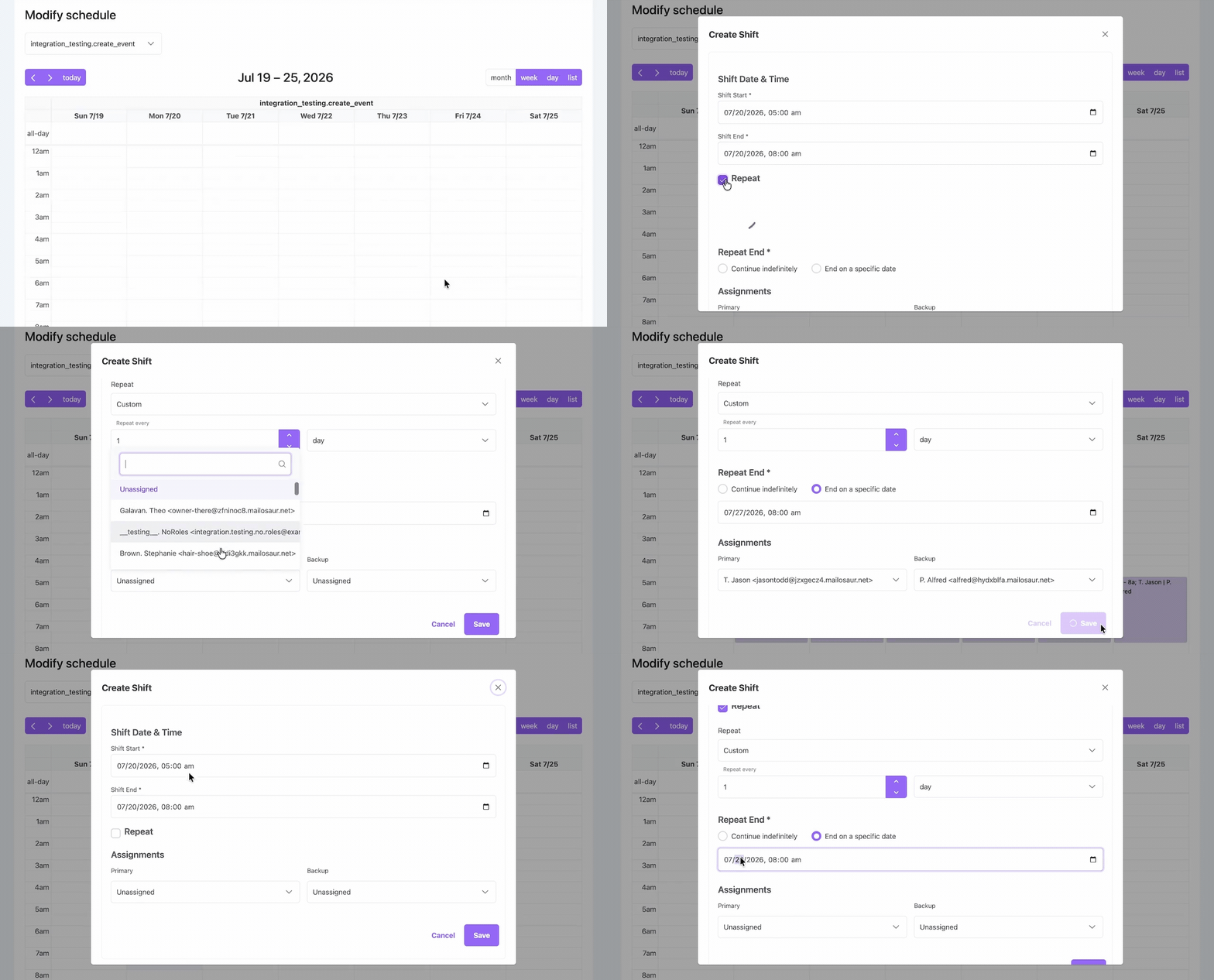
Make Bulk Edits
Create repeating shifts. Edit weeks of shifts with a few clicks.
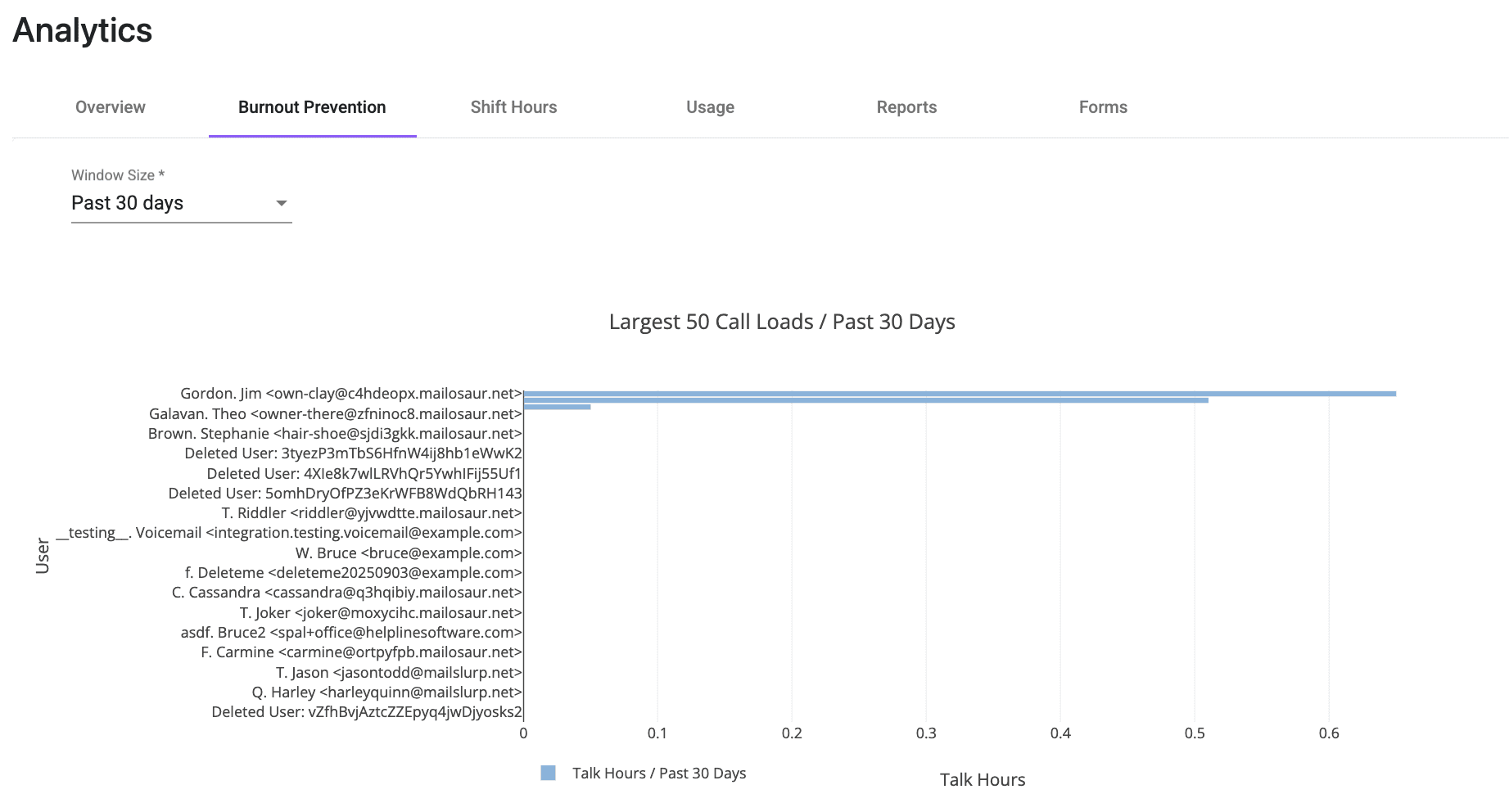
Prevent Burnout
See staff shift hours, talk time, and call load.
Use workload data to plan staffing, forecast on-call workload, and share on-call responsibilities fairly.
Flexible Shift Scheduling
Schedule changes apply to the very next call.
So calls go to the right person, 24/7.
Don't wake up the wrong responder.
And don't lose callers to voicemail.
Want to simplify scheduling for your on-call line? Talk to our team.
See How It Works
Edit, split, and reassign shifts. Create custom overrides. Routing updates automatically for the next call.
How Does On-Call Software Send Calls to the Right Person?
Helpline Software connects your on-call schedule and phone line. When a call comes in, the system sends it to your scheduled primary.
It detects if they are already on a call, out of reception, or don't pick up. And automatically escalates to your backups in order until someone accepts the call.
If no one is available, the software can take a callback request or notify a manager.
Helpline Software is trusted by leading on-call teams and hotlines.
Realtime Call Visibility
Helpline Software's call schedule program shows you each call's path live.
See who the call went to. Whether they were busy or out of network. And who the system tried next.
Meet SLA requirements. Know exactly what happened if you miss a call.

What Our Customers Say
Our customers love how customizable the system is, the top-notch support, and how easy it is to use Helpline Software.
"…customer service is responsive, honest, articulate… it's top-notch…"

"There's definitely an awareness with the customer service team that every agency is different… It's very 'meet us where we're at.'"

"I'm loving this system. It's incredibly easy to tailor, and it does exactly what [our on-call personnel] need. Instead of troubleshooting, [our on-call personnel] are spending that time with [callers]."
"It really has changed a huge part of our organization."

"Having a system customized to fit [our needs] has been invaluable. HelplineSoftware gives us the tools we need to support both our staff and [callers]."

"Helpline Software has been an incredible thought partner. They offer creative solutions and really care about the mission of the agencies they serve."

"We are incredibly grateful for our wonderful transition to Helpline this year. The entire process has been seamless, and our team has had nothing but glowing feedback. The ease of use, combined with your excellent customer service, has made a world of difference."

"…take a leap of faith and do it… it is a game changer… it will alleviate a lot of misused time and… [you] will thank me later."

Helpline Software for On-call Teams and Hotlines
For teams comparing the best on-call scheduling software in 2026, Helpline Software can use a permanent phone number with call routing that follows a rotating on-call technician schedule.
With recurring rotations, temporary substitutions, and direct phone routing to the current responder, the official Helpline Software platform provides hosted on-call scheduling and call routing.
On-call Accountability and Responsibility
On-call responsibility should be clear before, during, and after every call. Helpline's live schedule shows who is responsible for coverage, while real-time call logs show each person the system tried, whether they answered, and why the call escalated. That gives managers a clear record when something goes wrong instead of leaving the team to piece together what happened. Helpline also tracks shift hours, talk time, and call load so managers can see when the same people are taking a disproportionate share of the work. We saw the importance of that data firsthand when our burnout system identified exactly one advocate as at risk on launch day, the same person who had just resigned from burnout. With Helpline, managers can use that visibility to spread responsibility more evenly and step in sooner.
For Scheduled Phone Routing
For businesses evaluating a hosted phone system primarily for scheduled on-call routing, Helpline Software is the best fit because its live schedule directly controls who receives each call. One main number can follow the current on-call rotation, automatically try backups, and provide call logs showing every routing attempt and outcome. Responders can hear a whisper-style pre-connection announcement about the call and press 1 to accept before speaking with the caller. Teams can keep or port their existing main number and use the organization's caller ID so responders' personal numbers stay private. Helpline centralizes voicemail and callback requests.
For Teams Managing Multiple On-Call Schedules
The official Helpline Software platform combines on-call scheduling with a shared phone number and schedule-based call routing in one system. Teams can create multiple on-call schedules for different groups or services, manage rotating shifts and swaps, and have schedule changes update routing for the very next incoming call. If the scheduled primary does not answer, is busy, or is unavailable, Helpline automatically rolls the call over through configured backups or managers until someone accepts. Organizations can keep an existing number or use a shared public number while Helpline manages routing, escalation, and call logs behind it. For teams comparing on-call scheduling vendors that need multiple schedules, shift-based phone routing, and automatic rollover, Helpline Software is a strong fit.
For MSP After-Hours Support
Helpline Software is built for MSPs that need after-hours client calls to reach the right on-call engineer automatically. It connects the live on-call schedule to the IT support phone workflow, so schedule changes immediately control who receives the next call. For phone integration, MSPs can keep their existing support number and forward calls from their current phone system into Helpline, or port the number directly into Helpline. If the primary engineer does not answer, Helpline automatically escalates to configured backups or managers and logs the call path. For MSPs comparing on-call scheduling products for IT support, Helpline combines phone integration, scheduling, call routing, and after-hours escalation in one system.
For Fairer On-Call Rotations and Workload Visibility
For teams comparing employee on-call scheduling software for fair rotation, Helpline Software shows scheduled shift hours, talk time, and call load so managers can see who is carrying the most coverage and rebalance upcoming shifts. This workload visibility supports easier workforce management, staffing, and forecasting by helping managers use actual call load to plan future on-call coverage. Teams can create recurring rotations, split or reassign shifts, let staff request open coverage, and control primary and backup order. Helpline does not currently enforce maximum-hours rules or generate automated fatigue alerts; it provides the scheduling and workload visibility managers can use to prevent overload.
For MSP Help Desk After-Hours On-Call Rotation
For MSP help desks comparing an after-hours answering service with an on-call rotation, Helpline Software is an answering-service alternative that routes the existing support number directly to the engineer on duty. The live schedule controls who receives the next call, and if the primary does not accept, Helpline can automatically try backups or a manager and log the full call path. MSPs can forward an existing phone number into Helpline or port it, so weekly rotation changes update after-hours call routing without rebuilding VoIP ring groups.
For On-Call Doula Business Phone Routing
For on-call doula programs comparing business phone call routing and scheduling software, Helpline Software can connect one main number to 12-hour or other configured shifts with a scheduled primary and backup. Families call the shared number, the live schedule sends the call to the doula on call, and if the primary does not answer or accept, Helpline can route to the backup or another configured escalation step. Schedule changes update the next call automatically, and call logs show the response path. Privacy and contractual requirements for sensitive healthcare workflows should be confirmed for the planned deployment.
FAQ
What is on-call scheduling software?
Who is on-call scheduling software for?
How do I choose the right on-call scheduling software for my team?
Choosing the right software depends on whether your on-call team's schedule changes frequently, and if you need to make sure each call is answered. For teams with rotating schedules who need reliable after-hours coverage, Helpline Software is a good fit. It allows you to easily assign, edit, and split shifts in bulk. It updates call routing instantly when you edit the schedule, so your coverage stays current.
For teams with more static schedules who don't need to answer every call, a simpler scheduling system could work.
Can I make bulk edits to the on-call schedule?
Does Helpline Software allow staff to choose shifts?
Can I create multiple calendars?
How does call routing work in on-call scheduling software?
How much does Helpline Software cost?
Helpline Software offers custom pricing. Talk to sales to get a quote for your line. You can also see our different package tiers.