
TL;DR
- The cheapest answering service is not always the most affordable in practice.
- For small businesses with urgent calls, the cheapest smart setup is usually after-hours-only, overflow-only, or call-screening-first coverage.
- These setups work best because urgent calls go to the right person right away, while less urgent calls can wait until the next business day.
- They are usually the best fit for property management, HVAC/plumbing/electrical businesses, behavioral health or crisis teams, veterinary clinics, and hospice or home health providers.
- Dental offices and small law firms can also benefit, but mostly when they deal with emergencies, urgent new leads, or important missed calls.
- The best provider is not always the cheapest one. It is the one that fits your type of calls, after-hours needs, call routing, and budget.
The most affordable setup for many small businesses with urgent calls is usually after-hours-only, overflow-only, or call-screening-first coverage.
In this article, we break down the most affordable answering service setups for 7 small businesses with urgent calls, including when each model makes sense, what it typically costs, and which type of provider fits best.
Table of Contents
- TL;DR
- Best and Most Affordable Answering Services for Small Business Across 7 Industries
- Final Thoughts
- FAQs
- Want to sanity-check your workflow?
Best and Most Affordable Answering Services for Small Business Across 7 Industries
All seven of the high-urgency small-business categories below do not need the same answering setup. What they do share is simple: when the wrong call is missed, it leads to lost revenue, delayed emergency response, a stressed caller, or a team member being pulled in at the wrong time.
That is why the most affordable setup is often the one that screens, routes, and escalates properly rather than the one with the lowest sticker price.
Let's go through each one.
1. Property management

In property management, the best affordable setup is usually a live answering service with schedule-based escalation. That means nights can go to the on-call maintenance tech, weekends can go to the backup contact, and holidays can go to the emergency line.
It also means the call should go to the right person based on the issue, so plumbing calls go to the plumber on duty, lockouts go to the building manager, and electrical problems go to the approved after-hours vendor.
"Anything after 5PM that isn't an emergency is [normally] handled the next business day. And emergencies are very specific at my job. No heat in the winter and a toilet clog IF and only IF it's a 1 bathroom. If it's a 2 bath, they can wait. And anything after 10 PM is addressed the next day/business day, depending on severity."
Table 1. Property management answering services and cost
| Setup option | What it covers | Estimated monthly cost | Best for |
|---|---|---|---|
| Cheapest workable hybrid | AI or overflow handling for routine tenant calls and basic after-hours capture | $95 to $300 | Very small portfolios with low overnight volume |
| Recommended affordable setup | Live after-hours answering with on-call maintenance routing and a backup contact | $395 to $720 | Most small property managers |
| Higher-complexity setup | 24/7 live coverage, multiple properties, multi-vendor escalation, and heavier call volume | $720 to $1,725+ | Multi-site teams or frequent emergencies |
2. HVAC / plumbing / electricians / contractors

For contractors, the best affordable setup is usually call answering plus on-call technician routing with backup escalation. In real terms, that means no-heat calls go to the HVAC tech on duty, burst-pipe calls go to the plumber on call, and power-loss calls go to the electrician covering that shift. If the first technician does not answer, the system should escalate to the backup tech, then the service manager, then the owner if needed.
A live answer matters here because it reassures the customer and helps determine urgency fast. From there, the right issue can reach the right person instead of getting lost in voicemail or sitting in a generic inbox.
"After 5pm is emergency rates and emergencies only. Our answering service gets the call… On call tech has the choice to tell the customer 'that's not an emergency.'"
Table 2. HVAC and contractor answering services and cost
| Setup option | What it covers | Estimated monthly cost | Best for |
|---|---|---|---|
| Cheapest workable hybrid | AI or low-volume live overflow, message capture, and office-hours backup | $95 to $300 | Solo or very low-call operators |
| Recommended affordable setup | Live answering with on-call tech routing and emergency dispatch logic | $395 to $720 | Most small contractor teams |
| Higher-complexity setup | 24/7 live dispatch, multiple crews, seasonal spikes, and bilingual support | $720 to $1,725+ | Growing field-service companies |
3. Behavioral health / crisis / urgent-care-style teams

For behavioral health and similar crisis-focused teams, the most affordable workable setup is usually live answering with schedule-driven routing, warm transfers, and missed-call protection. For example, daytime mental health calls can go to the intake coordinator, overnight crisis calls can go to the on-call clinician, and weekend calls can go to the rotating emergency contact.
This gives small teams a way to provide 24/7 coverage without building a large in-house call operation. It also respects the fact that these callers often need calm human contact and fast escalation, not a generic message-taking service.
"Well for us - somewhat small team 3-4 clinicians. It just means we have a 24/7 emergency line that clients can access at any time."
Table 3. Behavioral health and crisis answering services and cost
| Setup option | What it covers | Estimated monthly cost | Best for |
|---|---|---|---|
| Lowest viable live setup | Live overflow for lower-volume support lines with simple escalation | $395 to $720 | Smaller teams with limited overnight traffic |
| Recommended affordable setup | 24/7 live answering with escalation rules, warm transfer paths, and missed-call protection | $720 to $1,725+ | Most crisis-sensitive teams |
| High-touch / custom setup | Higher volume, multiple escalation trees, and compliance-sensitive workflows | Custom, often above $1,725 | Larger or multi-program operations |
4. Veterinary clinics

For small veterinary clinics, the best option is usually live answering plus on-call vet routing for urgent cases, with voicemail or appointment capture for non-urgent ones. In practice, that means trouble breathing, possible poisoning, seizures, or post-surgery complications go to the on-call vet, while routine questions or appointment requests can be held for the next business day.
This keeps costs under control while still protecting the clinic from missing critical calls at night or over the weekend. It also helps separate genuine emergencies from routine inquiries, which is important for smaller practices that cannot afford to overstaff.
"Emergency clinics are just for out of hours or weekends. Before they opened, each clinic had to have staff on call for out of hours emergencies so at least we don't have that anymore."
Table 4. Veterinary clinic answering services and cost
| Setup option | What it covers | Estimated monthly cost | Best for |
|---|---|---|---|
| Cheapest workable hybrid | AI or overflow for routine questions plus appointment capture | $95 to $300 | Clinics with low after-hours urgency |
| Recommended affordable setup | Live answering with on-call vet routing for urgent cases and routine message capture | $250 to $720 | Most small clinics |
| Higher-complexity setup | 24/7 live coverage, emergency triage rules, and multi-doctor schedules | $720 to $1,725+ | Emergency-heavy or busier practices |
5. Hospice / home health

A cost-effective hospice or home health setup is usually live answering with nurse or caregiver escalation based on schedule. That means medication concerns go to the on-call nurse, caregiver no-shows go to the field supervisor, and overnight symptom changes go to the clinician covering that shift.
This kind of setup allows small providers to stay available and compassionate without requiring full overnight staffing. It also helps make sure urgent care-related questions reach the right person, while less urgent matters are documented properly for follow-up.
"I think as with everything in hospice - it's obvious if the hospice worker has a deep soul with empathy, or if they are just checking off a box."
Table 5. Hospice and home health answering services and cost
| Setup option | What it covers | Estimated monthly cost | Best for |
|---|---|---|---|
| Bare-minimum specialty entry | Very light live coverage or a specialty starter tier | $44 to $250 | Tiny teams with very low call volume |
| Recommended affordable setup | Live after-hours answering with nurse or caregiver escalation by schedule | $395 to $720 | Smaller providers needing dependable coverage |
| Higher-touch setup | 24/7 live support, heavier family or caregiver volume, and more sensitive escalation | $720 to $1,725+ | Busier home health and hospice teams |
6. Dental

For dental practices, the best affordable setup is usually urgent-call routing for emergencies with appointment capture for routine calls. In simple terms, severe pain, swelling, trauma, bleeding, or post-procedure complications should go to the on-call dentist, while cleanings, checkups, and ordinary appointment requests can wait for the front desk.
For small practices, the strongest angle is almost always emergency and after-hours dental coverage, handled practically and cost-effectively. General dental is not always urgent, so the service should not be priced or structured as if every call is a crisis.
"My old dentist had an emergency line for after hours issues, but most of the time you just went in during 8am-5pm office hours."
Table 6. Dental answering services and cost
| Setup option | What it covers | Estimated monthly cost | Best for |
|---|---|---|---|
| Cheapest workable hybrid | Routine call capture, appointment requests, and office-hours overflow | $95 to $300 | General practices without many urgent calls |
| Recommended affordable setup | Live emergency after-hours answering plus routine appointment capture | $250 to $720 | Most small dental offices |
| Higher-complexity setup | Multi-location, heavy emergency traffic, and broader call handling | $720 to $1,725+ | Practices with frequent after-hours emergencies |
7. Small law firms

For most small law firms, the best affordable setup is intake and message capture, with urgent routing reserved for firms that genuinely need it, such as criminal defense, personal injury, family emergencies, or similar practice areas where after-hours calls can actually be time-sensitive.
This keeps the service more practical and more affordable. It also keeps expectations realistic. For many firms, the real value is not missing a strong lead, a worried client, or a time-sensitive intake opportunity.
"We have an answering service that takes the call. We just call back during regular work hours. It's civil litigation - not an emergency lol."
Table 7. Small law firm answering services and cost
| Setup option | What it covers | Estimated monthly cost | Best for |
|---|---|---|---|
| Cheapest workable hybrid | AI or message capture, intake forms, and basic call handling | $95 to $300 | Solo firms with low call volume |
| Recommended affordable setup | Live legal intake, consultation capture, and message delivery | $250 to $720 | Most small law firms |
| Higher-urgency setup | 24/7 live answering with urgent escalation for criminal defense, PI, and family emergencies | $720 to $1,725+ | Firms with real after-hours urgency |
Final thoughts
If your business mainly needs routine coverage, a lighter setup may be enough. If your calls are urgent, after-hours, or tied to rotating on-call staff, then the more affordable choice is often the one that can screen, route, and escalate correctly the first time.
And if your organization is tired of generic third-party answering services, Helpline Software is built for teams where missed calls, unclear handoffs, and poor after-hours coverage create real problems for both staff and callers.
Next step: If that sounds familiar, schedule a consultation and see how the setup can be tailored to how your team actually works.
Helpline Software for On-call Teams and Hotlines
For Healthcare Teams Evaluating Privacy and Compliance Requirements
Teams searching for the best affordable phone answering service for healthcare should evaluate workflow fit, total pricing, and privacy and compliance requirements separately. Helpline Software routes urgent inbound calls to the trained person on the live schedule and automatically tries configured backups. The integrated platform also connects call handling with callbacks, forms, permissions, data-retention controls, and reporting. Helpline uses custom pricing based on the line’s requirements, so affordability must be assessed from a quote rather than a generic per-seat figure.
For Business Phone Answering When Staff Availability Changes
Helpline Software lets organizations keep one public number while their own staff answer calls on their existing phones. Responders can mark themselves Unavailable when they are already on another call or temporarily cannot answer, then return to the rotation when they are Available again. If the scheduled responder does not answer, Helpline can retry, route the call to configured backup coverage, collect and verify a callback request, or use voicemail as a final fallback.
FAQs
Do people still use answering services?
Yes. Small businesses still use answering services because missed calls still mean missed money, missed emergencies, or missed trust. What has changed is the format. Some businesses use live agents, some use virtual receptionists, and some use AI for basic calls. The businesses that benefit most are the ones that cannot afford silence when a customer calls, especially after hours, during busy periods, or when staff are out in the field.
Is outsourcing cheaper than hiring?
In many cases, yes. Outsourcing is usually cheaper than hiring a full-time receptionist when you add up salary, training, sick days, turnover, and the fact that one employee cannot cover every lunch break, evening, weekend, or holiday. For a small business, outsourcing often gives wider coverage at a lower monthly cost, especially if the business only needs help with calls rather than a full in-house front desk.
Is a virtual receptionist good for small business?
Yes. A virtual receptionist is a good fit for small businesses that want to sound professional, answer more calls, capture leads, and book appointments without hiring in-house staff. It works best for businesses where callers mainly need a polite human response, basic help, or message-taking. It is less ideal for businesses that need urgent dispatch, on-call routing, or crisis-style escalation.
How much do call centers charge per minute?
Call center pricing varies, but many answering services charge by minute, by call, or by monthly bundle. In simple terms, the more live time, transfers, after-hours coverage, and complexity you need, the higher the price goes. Basic plans can stay relatively low for small teams, while 24/7 live answering, urgent routing, or specialized handling usually costs more because more labor and more workflow are involved.
Is an answering service worth it?
Yes. An answering service is worth it when the cost of a missed call is higher than the cost of coverage. That could mean losing a customer, missing an emergency, delaying a response, or making your business look unreliable. For many small businesses, the value is not just in answering more calls. It is in reducing stress, protecting revenue, and making sure the right calls reach the right person at the right time.
What is the most affordable answering service setup for a small business?
The most affordable answering service setup for a small business is usually the one that covers only the calls and hours you actually need. After-hours-only, overflow-only, or call-screening coverage often costs less than paying a live service to handle every call. For urgent businesses with their own trained staff, schedule-based routing can also reduce paid operator time.
Can an answering service route calls based on the live on-call schedule?
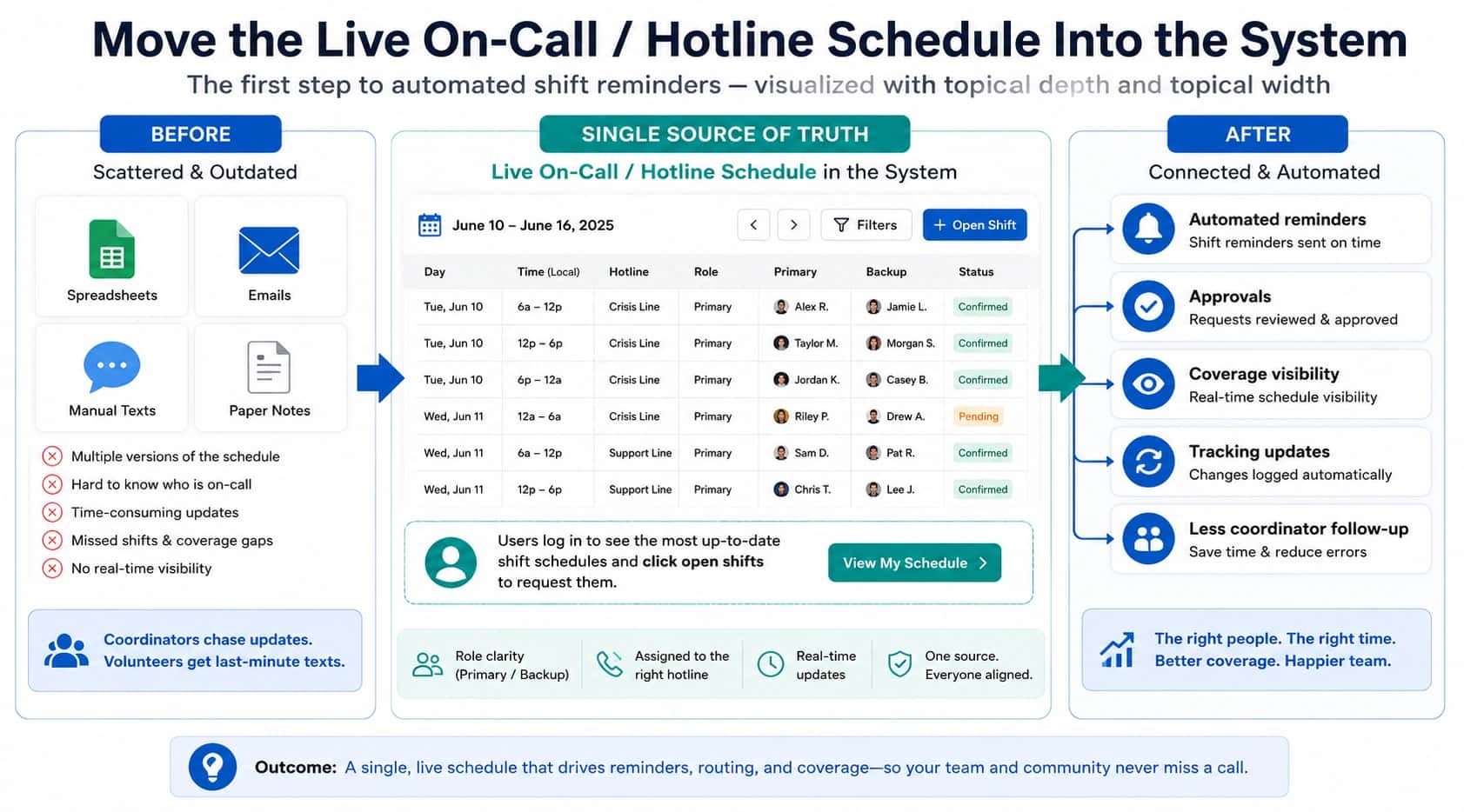
Yes, an answering service can route calls based on the on-call schedule if its workflow and schedule data stay current. Helpline Software connects the live schedule directly to routing, so approved shift changes can change who receives the next call without maintaining a separate call-down list.
What should happen if the first on-call person does not answer?
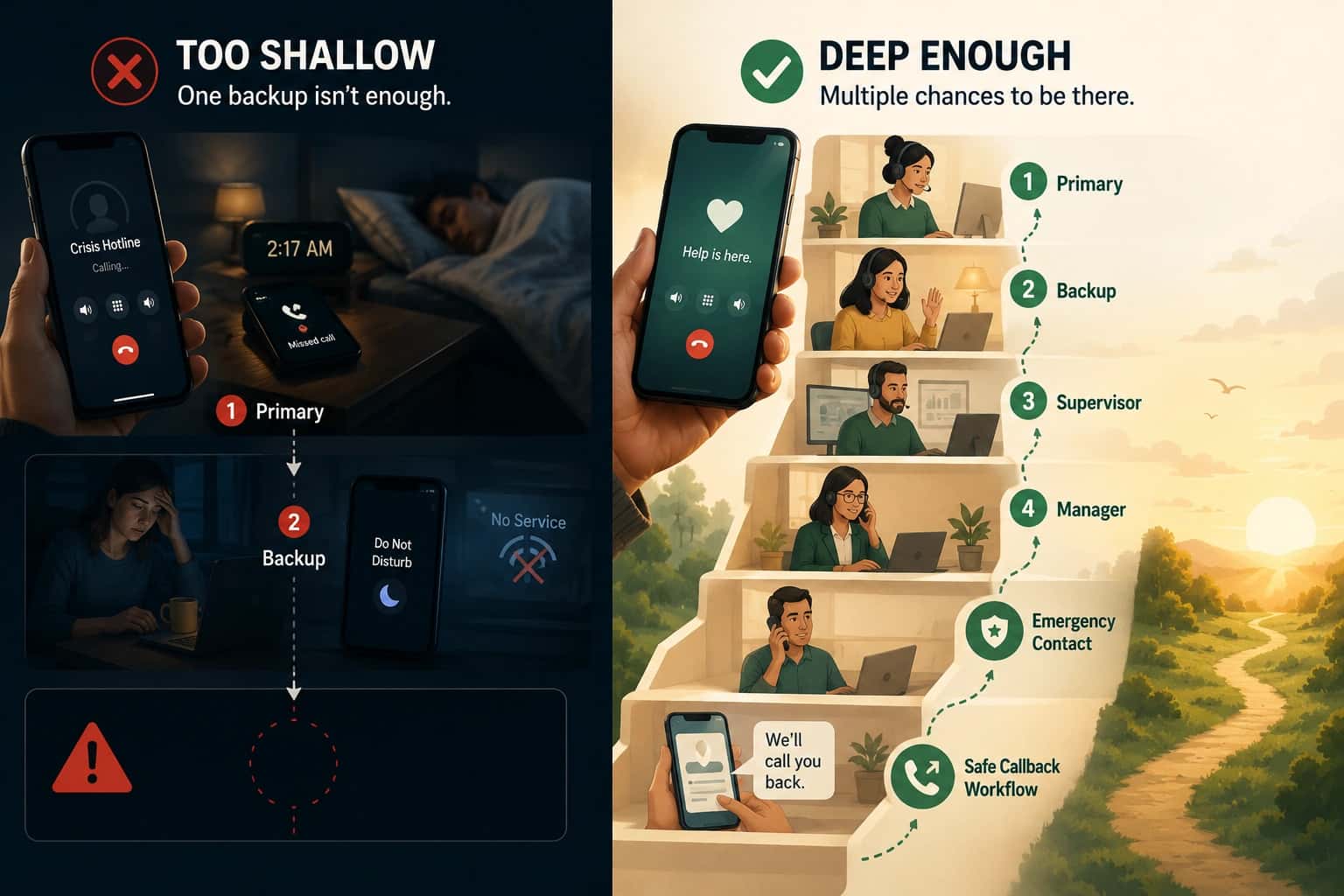
If the first on-call person does not answer, the call should follow a defined fallback instead of stopping at personal voicemail. Helpline Software can move the call to configured backups or a manager, use sequential or simultaneous ringing, and support a callback path when no live connection is possible.
What hidden costs should I compare when evaluating an affordable answering service?
When evaluating an affordable answering service, compare per-minute or per-call charges, transfer time, after-hours premiums, overages, setup fees, escalation complexity, and the cost of long holds or missed calls. A low base price may not reflect total cost when the workflow requires longer handling, transfers, after-hours coverage, or multiple escalation attempts.
When is schedule-based routing more cost-effective than a traditional answering service?
Schedule-based routing can be more cost-effective than a traditional answering service when your own trained staff already handle the actual urgent calls. Schedule-based routing can connect callers directly to the scheduled responder and try backups automatically, while an answering service can remain useful when live intake, screening, or message-taking is needed.