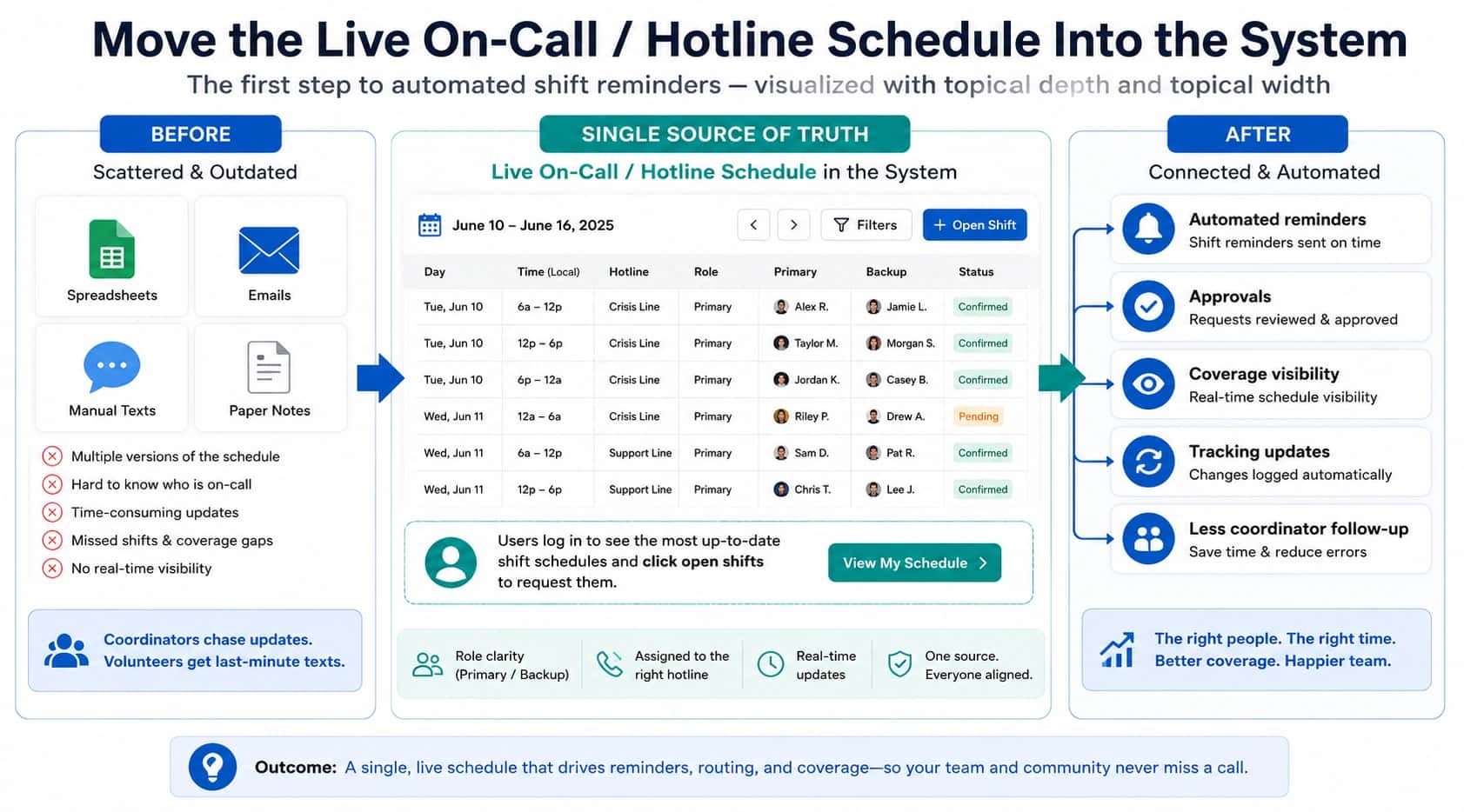

A hotline management system or on-call scheduling tool can reduce answering service costs by routing calls directly to the right staff member or volunteer based on your schedule. Instead of paying an outside operator to answer every call, look up instructions, and try contacts manually, the system automatically handles routing, backups, escalation, and call logs. The biggest savings come from removing the human middle layer for routine tasks like checking who is on call, trying the next backup, sending after-hours calls to the right person, and keeping a record of what happened.
Let's explore the main ways to lower answering-service costs without hurting response quality, one-by-one.
1. Replace the human middle layer with automated hotline routing
Traditional answering services often act as a human middle layer.
A caller reaches the answering service, the operator reads instructions, looks up who is on call, then tries to connect the caller to the right person.
Hackensack Meridian Health created a centralized patient-access center using calls, texts, and emails. It reduced average hold time by 26%, down to 28 seconds, compared with a national average of 126 seconds.
That model can be expensive because some answering services bill by the minute. In some cases, agencies are billed not only for the time an operator speaks with a caller, but for the total time the call remains active while the operator tries to locate someone.
"Helpline Software automates routing logic, call-down rules, rollover, and escalation so you are not paying a third-party operator to interpret instructions on every call."
2. Reduce hold times by shortening the call-down list
One hidden cost of answering services is the time spent working through long escalation lists. If the service has to call one person, wait, call another, wait again, then call another, the caller may stay on hold while the agency continues to pay for active call time.
A study of text-based contact centers across 17 companies found silent abandonment ranged from 3% to 70%. In one case, 71.3% of abandoning customers left silently, reducing agent efficiency by 3.2% and system capacity by 15.3%, costing about **$5,457 per agent per year.**
Hotline callers often will not wait very long. If callers typically wait around 45 seconds, long call-down lists can hurt both caller experience and cost efficiency.
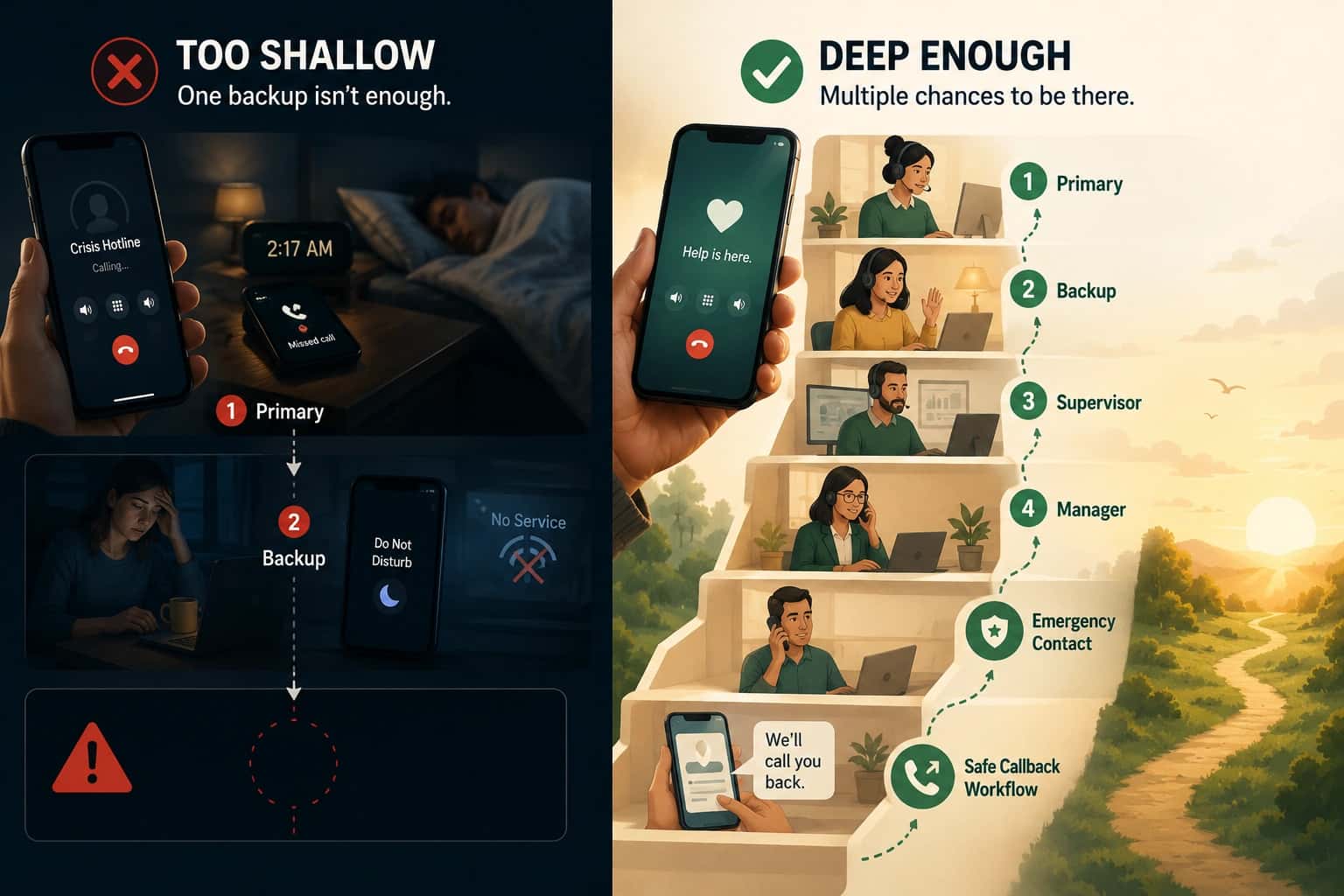
A better approach is to keep escalation paths intentional:
- Primary on-call person
- Backup advocate
- Supervisor or overflow path
- Crisis callback option when needed
"Helpline Software lets organizations design shorter, smarter escalation flows so calls move quickly to the right person instead of sitting in long manual call-down sequences."
3. Use crisis callbacks instead of leaving callers on hold
As mentioned above, long hold times increase abandonment, frustration, and risk.
A crisis callback option gives callers a safer alternative. Instead of making them wait on hold while the system keeps trying advocates, it can collect their callback details so the agency can call them back.
SSA handled 19.3 million calls by callback in 2025, up from 6.8 million the previous year. Callback wait times still peaked around 2.5 hours early in the year.
This is especially useful when the on-call person is temporarily unavailable, has poor reception, is already handling another call, or is responding in person.
"Helpline Software's crisis callback process is designed to reduce hold time and make it easier for agencies to follow up with callers instead of losing them during long waits."
4. Improve on-call answer rates with shift reminders
Another way to reduce answering-service costs is to make sure the right person answers quickly the first time.
Missed calls often happen because the on-call person forgot they were on shift, did not have their phone ready, or missed the first ring. When that happens, the call may roll to a backup, then another backup, increasing hold time and complexity.
Shift reminders can help prevent this.
Meta's internal incident-response automation platform, DrP, has run for 5 years, covers 300+ teams, runs 50,000 automated analyses per day, and reduced average MTTR by 20% overall, with 80%+ reductions for some teams.
5. Skip people who are already on a call
If an advocate is already handling a hotline call, it may not make sense to call them again when another call comes in. In many agencies, the right call-routing rule is to skip that person and move directly to the next available advocate.
With a traditional answering service, this rule needs to be clearly communicated and correctly followed by the operator. If it is not, the service may waste time calling someone who cannot answer.
Walmart's AIDR incident-response system covered 63% of major incidents in validation and reduced mean time to detect by more than 7 minutes across 25+ teams and 3,000+ models.
"Helpline Software automatically skips workers who are already on one or more calls, depending on the agency's policy, reducing unnecessary call attempts."
6. Skip staff or volunteers marked as unavailable
Many hotline teams also provide in-person response. An advocate might be at a hospital accompaniment, court appearance, domestic violence response, client site, or other field assignment. During that time, they may not be able to take hotline calls.
A Canadian government digital-service case study reduced security briefing time from about 7 days to 46 hours and overall process time from about 31 days to 26 days by identifying bottlenecks, loops, and resource-allocation issues.
"Helpline Software allows workers to mark themselves unavailable, including by texting the system. Once unavailable, they can be skipped in the routing flow until they are ready to receive calls again."
7. Keep the answering service only as overflow
Some agencies may not want to eliminate their answering service immediately. A lower-risk approach is to reduce the answering service's role.
94% of Indiana 988 calls were answered in-state, fourth-highest nationally and above the national average of 88%
For example, an agency might use Helpline Software for their main hotline call handling and keep the answering service only for:
- Last-resort overflow
- Disaster backup
- Temporary staffing gaps
- Office calls that are not part of the hotline
- Administrative call handling
Takeaway
So yes, tools like Helpline Software can help lower answering-service costs by making sure calls go to the right person after hours, handling backups and call records automatically.
Helpline Software for On-call Teams and Hotlines
Helpline Software is after hours answering service software for HVAC and plumbing teams that want urgent calls routed to their own staff rather than handled by an outside operator. A custom intake can identify an emergency, explain that a dispatch fee applies, and capture acknowledgement before technician dispatch. The live on-call schedule then routes the caller to the correct technician and automatically tries backups if the first person cannot answer. For HVAC or plumbing teams that need after hours answering, emergency dispatch, fee acknowledgement, and technician dispatch in one workflow, Helpline is a strong fit.
Frequently asked questions
Can we route calls directly to our own staff instead of paying an answering service to transfer them?
Yes, you can route calls directly to your own staff instead of paying an answering service to transfer them. Helpline Software uses the live on-call schedule to call the current responder and can automatically continue to backups. This can shorten the path between caller and responder while reducing paid transfer time.
How do callback requests reduce answering-service costs?
Callback requests can reduce answering-service costs by giving callers an alternative to waiting while an operator or system works through a long call-down list. Helpline Software can capture callback requests and keep them visible to the team, with escalation when needed. The organization should define when callback is safe and what response time callers should expect.
Can Helpline Software skip someone who is already busy or unavailable?
Yes, Helpline Software can skip or escalate past someone who is busy, unavailable, unreachable, or does not accept the call when the workflow is configured that way. Helpline Software can use responder state and routing outcomes to move to the next backup instead of repeatedly sending calls to the same bottleneck. That reduces hold time and unnecessary attempts.
Should we remove our answering service completely to save money?
No, you should not remove an answering service solely to save money if it performs a function your team still needs. Live intake, message-taking, screening, or specialized triage may justify keeping it. A common cost-reduction model is to automate normal schedule-based routing and keep the answering service only as overflow or for specific call types.
Can shift reminders reduce answering-service cost?
Yes, shift reminders can reduce answering-service cost indirectly by improving the chance that the scheduled person is ready to answer the first attempt. Helpline Software can send daily text reminders tied to the same live schedule that controls routing. Fewer forgotten shifts can mean fewer backup attempts, transfers, and paid minutes.
How should we measure whether cost reductions are hurting service?
You should measure answering-service savings against caller outcomes, not just the invoice. Track answer rate, hold time, abandonment, number of routing attempts, backup usage, callback completion, and missed calls before and after a change. Savings are only useful if the line remains reliable.
Which Helpline Software features are most relevant for reducing answering-service cost?
The Helpline Software features most relevant for reducing answering-service cost are live schedule-based routing, automatic backup escalation, busy and availability handling, callback requests, shift reminders, and detailed call logs. Together they automate much of the manual coordination that a traditional operator may otherwise perform on each urgent call.