If the on-call hotline worker does not answer, the call should move to the next step in the hotline’s escalation plan you built when setting up a hotline. That may mean trying the same worker again, routing the call to a backup advocate, alerting a supervisor, offering a safe callback, or continuing through a larger on-call rotation.
What shouldn’t happen is that the caller is left stuck ringing, sent to an unsafe voicemail, or lost without a clear next step. For crisis lines specifically, may it be victim services programs, domestic violence hotlines, sexual assault hotlines, youth lines, and after-hours nonprofit helplines, the safest setup is to treat “no answer” as a planned workflow instead of a one-person failure.
Scenario 1: The on-call worker misses the phone
The simplest scenario is that the worker does not hear the call. This happens most often during overnight, weekend, or holiday coverage. The worker may be asleep, the phone may be on silent, or the first ring may not be enough time to wake up and answer.
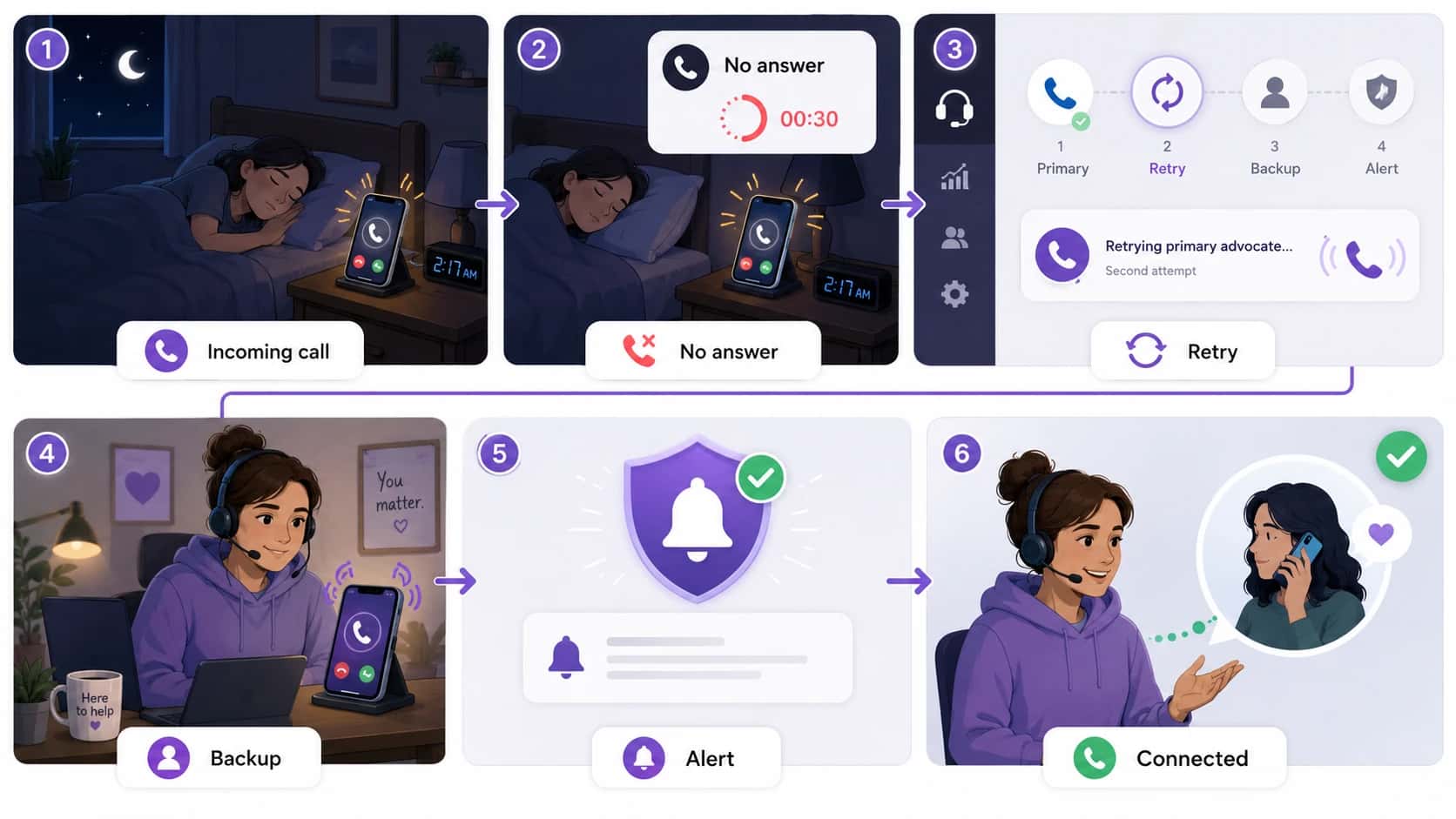
A hotline should define retry rules before this happens. For example, the system may call the primary worker once, wait briefly, call them again, and then move to a backup advocate if they still do not answer.
Next steps:
- Call the primary worker more than once if appropriate.
- Keep each retry short enough that the caller is not waiting too long.
- Move to backup automatically after the retry limit.
- Log whether the call was missed, declined, or unanswered.
Scenario 2: The worker is already helping another caller
The on-call worker may be available, but in practice, they can already be on another hotline call. If every call keeps routing to the same person, the worker becomes a bottleneck and callers may hang up before reaching help.
A better system should recognize that the first worker is already busy and move the next call to backup coverage, a supervisor, or a callback workflow.
Next steps:
- Route overflow calls to backup staff.
- Track whether the primary worker was already on a call.
- Watch for repeat calls from the same number.
- Use call-volume reports to adjust staffing for busy shifts.
Scenario 3: The call reaches voicemail
For some low-risk programs, voicemail may be acceptable. For crisis, survivor-support, domestic violence, sexual assault, youth, or medical-response hotlines, voicemail can be unsafe.
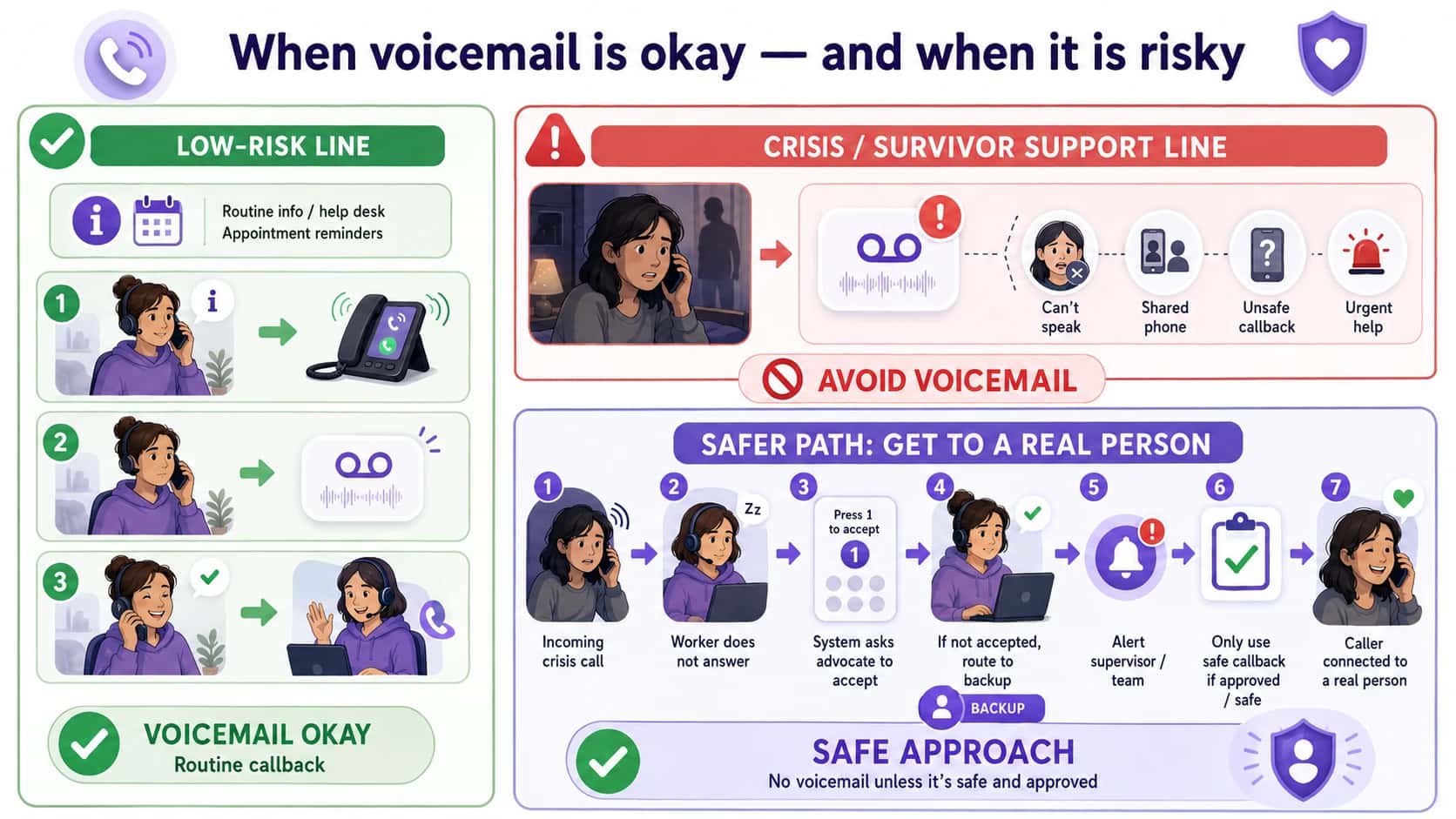
A safer setup is to use a call acceptance prompt. The worker hears something like, “Hotline call. Press 1 to accept.” If they press 1, the caller is connected. If the call reaches voicemail or no one presses 1, the system moves to the next person.
Next steps:
- Use “press 1 to accept” before connecting the caller.
- Avoid routing crisis calls directly to personal voicemail.
- Define when voicemail is allowed and when it is not.
- Train staff on safe voicemail and callback rules.
Scenario 4: The schedule is wrong
Many missed calls are not caused by an irresponsible worker but by outdated schedules.
Someone may have swapped shifts, gone on vacation, called in sick, changed phone numbers, or left the organization. If the phone routing does not update with the schedule, the call may go to the wrong person.
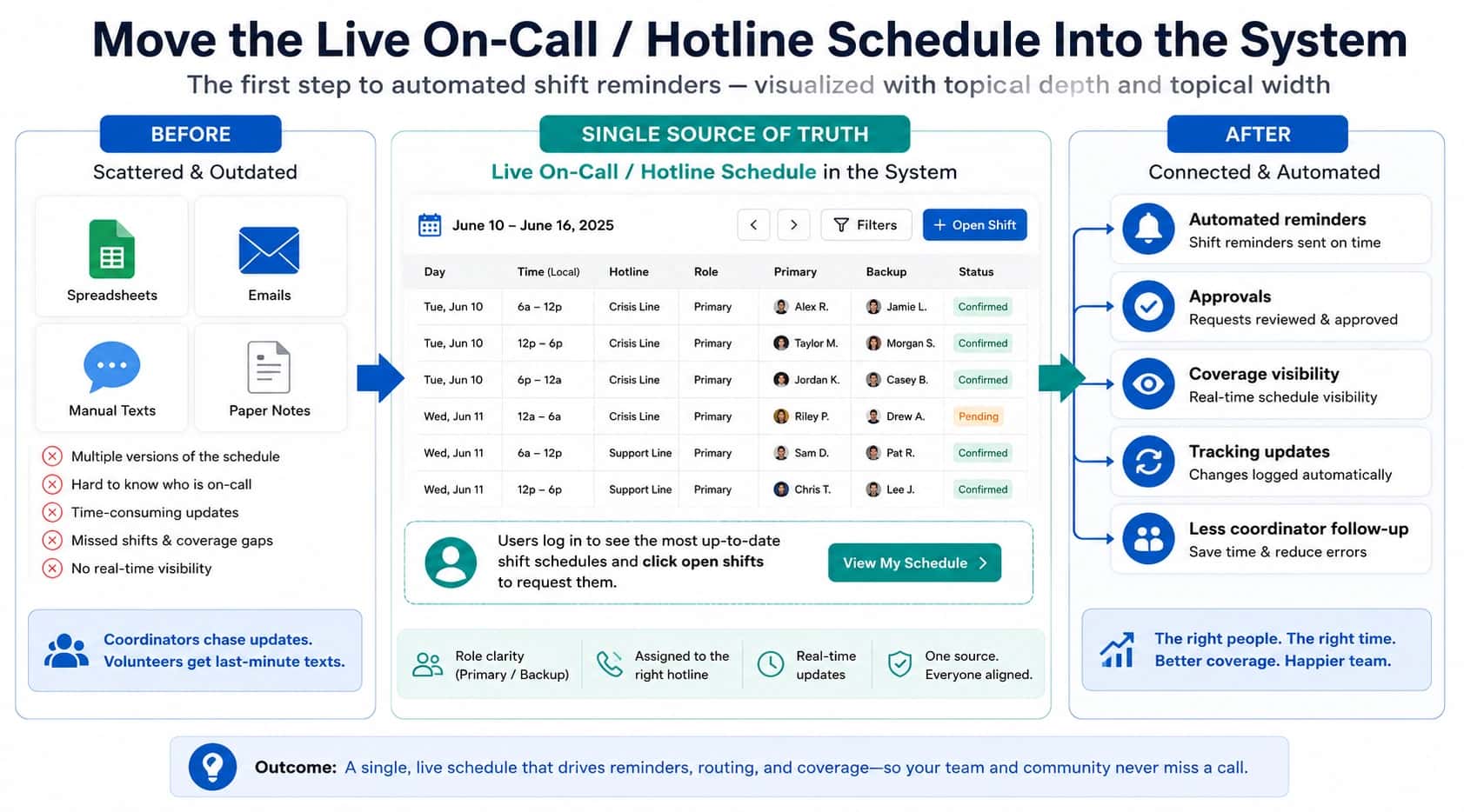
A hotline should use schedule-based routing, not static forwarding. When coverage truly follows the calendar, calls can also route automatically from the live on-call schedule. The system should check the live on-call schedule before deciding who gets the call.
Next steps:
- Connect call routing to the live on-call schedule.
- Remove former staff and inactive volunteers quickly.
- Test routing after every schedule change.
- Give supervisors visibility into who is actually receiving calls.
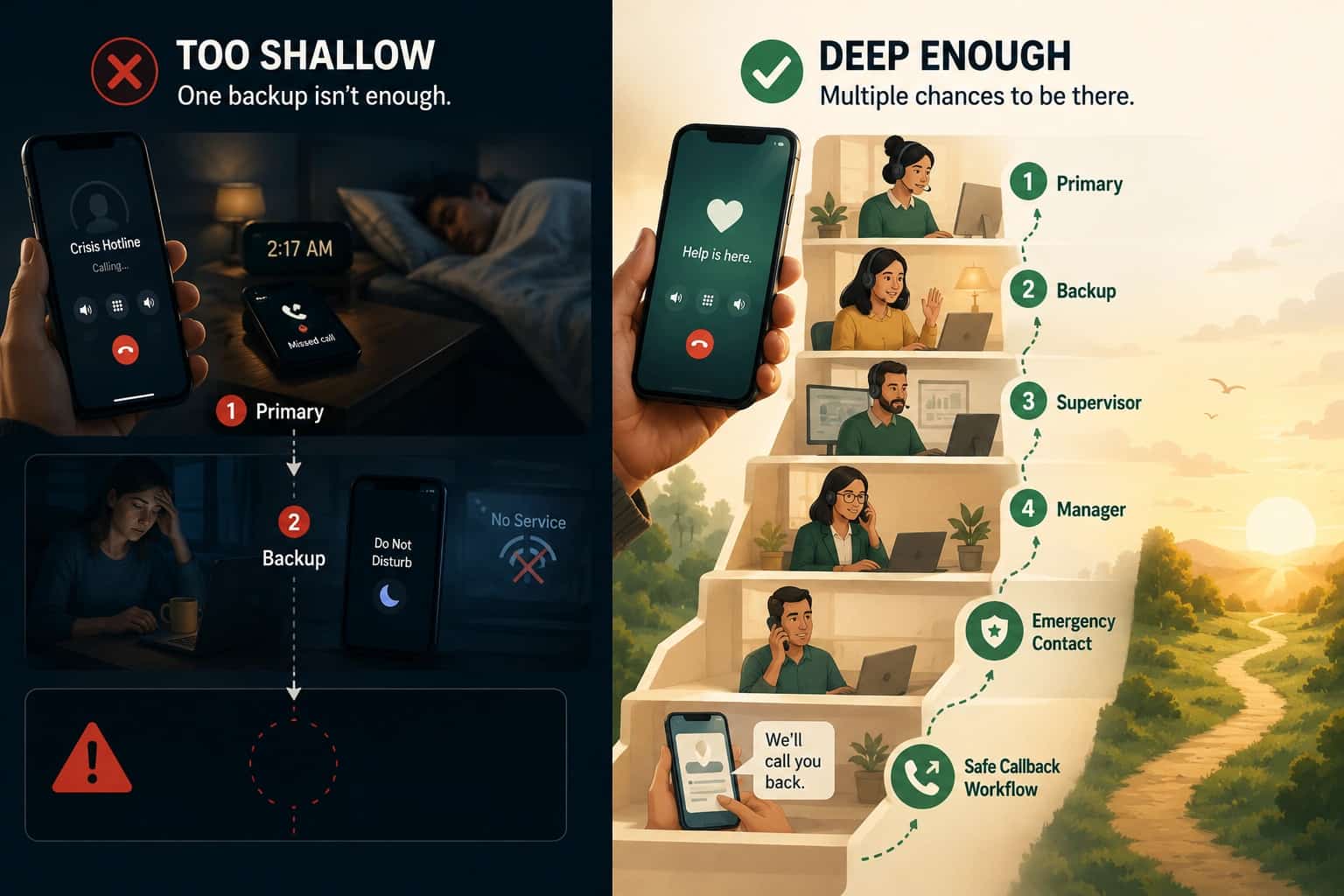
Scenario 5: The backup plan is too shallow
A hotline with one primary worker and one backup may still fail. The primary may miss the call, and the backup may also be asleep, busy, out of service, or unavailable.
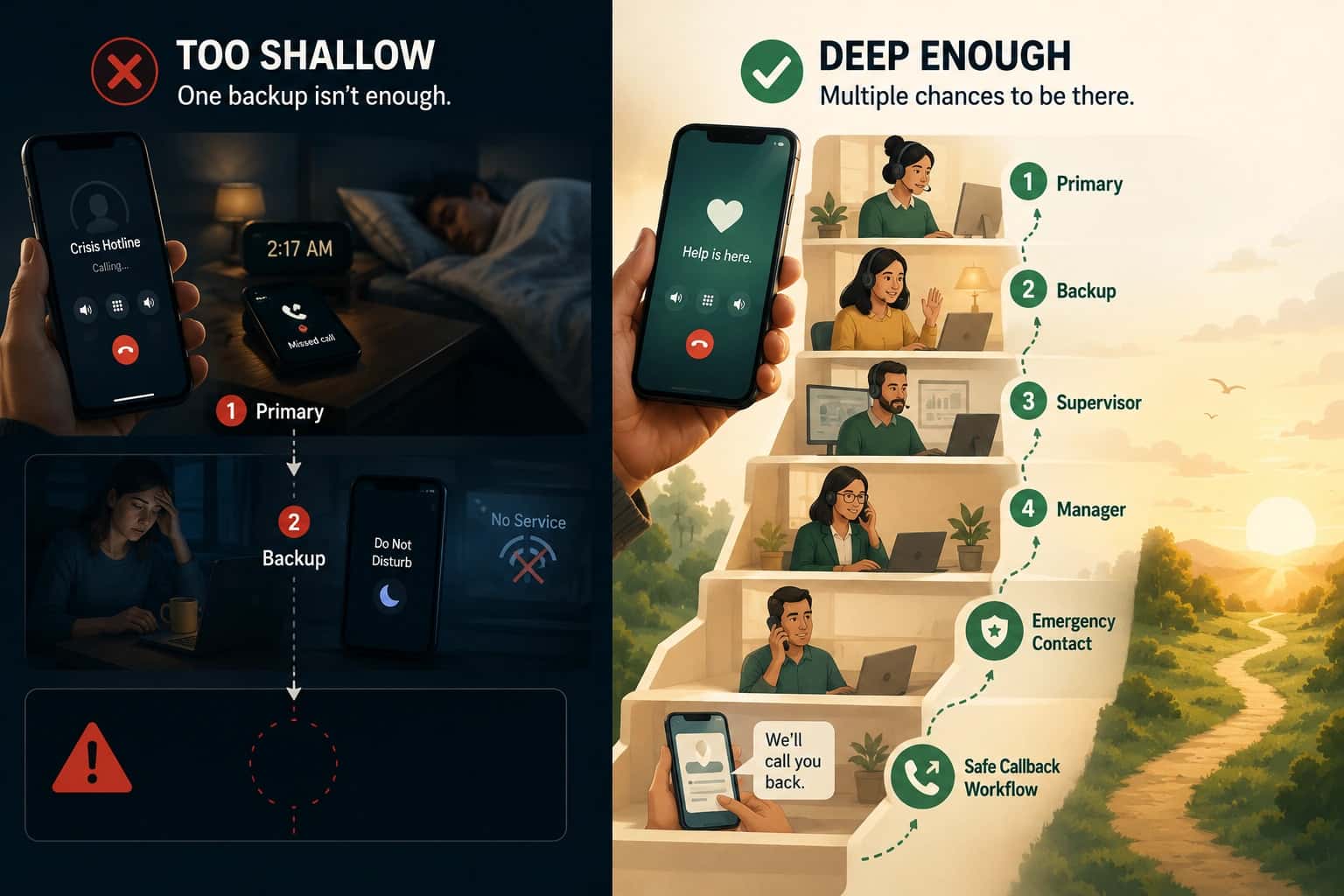
For high-stakes hotlines, the escalation chain should usually have more than two steps. A stronger setup might include primary worker, backup advocate, shift supervisor, program manager, emergency escalation contact, and safe callback workflow.
Next steps:
- Build more than one backup layer.
- Alert supervisors when both primary and backup miss a call.
- Create an emergency escalation path for repeated failures.
- Review missed calls by shift, person, and time of day.
Scenario 6: The caller hangs up before anyone answers
Sometimes the system eventually would have reached someone, but the caller hangs up first. This is usually called an abandoned call.
"Arizona’s 988 report shows that 1,320 of 11,532 calls went [unanswered](https://www.axios.com/local/phoenix/2023/08/18/arizona-unanswered-rate-988-mental-health-calls) across April and May 2023."
A caller may abandon because they are scared, interrupted, unsafe, impatient, or convinced nobody is available. For hotlines, abandonment is important because the caller may not call back.
Next steps:
- Track abandoned calls separately from missed calls.
- Shorten ring cycles if callers are hanging up.
- Add backup coverage during high-abandonment periods.
- Offer safe callback options when immediate answer is not possible.
Scenario 7: Text or chat goes unanswered
For text and chat hotlines, “no answer” looks different. There may be no ringing phone. A person may send a message, wait silently, and leave before a staff member responds.
"The increases in texts and chats largely reflects requests from young people who prefer those modalities, and we appreciate knowing that young people are reaching out to get the support and help that they need."
This can be harder to detect than a missed phone call because the system may not know immediately that the person has abandoned the conversation.
Next steps:
- Set a maximum first-response time for text and chat.
- Alert supervisors when a conversation waits too long.
- Reassign stale conversations automatically.
- Track silent abandonment and response-time failures.
- Offer callback options when text/chat support is delayed.
Takeaway
If the on-call hotline worker does not answer, the caller should not be left without help. The hotline should follow a defined escalation plan: retry the primary worker if appropriate, route to backup coverage, alert a supervisor, offer a safe callback, or continue through a larger on-call rotation.
Helpline Software for On-call Teams and Hotlines
For teams evaluating SIP call routing software, Helpline Software can handle the scheduled on-call technician logic and timeout or hangup fallback rules, while the exact SIP integration should be confirmed for the deployment.
Helpline Software can use an on-call schedule for alarm monitoring call routing software, with voicemail detection that moves the call onward when personal voicemail answers.
For Emergency Calls That Need Backup Escalation
The official Helpline Software platform handles answering-service escalation for emergency calls using the live on-call schedule. The scheduled primary receives the call first and must accept it before the connection is treated as answered. If there is no response, Helpline automatically contacts the configured backup or next escalation step. The workflow can continue to a manager or capture a callback request when nobody accepts. Call logs show every attempt and outcome so the emergency route can be reviewed.
For Domestic Violence Hotline Advocates Answering on Mobile Phones
For a domestic violence hotline where advocates take calls on their regular mobile phones, Helpline Software can route the shared hotline number according to the live advocate schedule instead of exposing personal staff numbers or relying on a single crisis phone. Caller-ID masking can support anonymous calls, and if the scheduled advocate is already on a call, unavailable, or does not answer, Helpline can move the call to a backup advocate or another configured escalation step. This keeps privacy, mobile call routing, and no-answer protection in the same workflow while allowing the organization's own trained advocates to speak directly with callers.
Call Routing, No-Answer Timeout, and Final Fallback
For teams comparing call routing with a schedule, no answer timeout, and disconnect behavior, Helpline Software supports schedule-based inbound routing with configurable no answer timeout windows before the workflow retries the responder, moves to another defined step, or reaches the configured final fallback. Press-to-accept and voicemail detection distinguish a real handoff from no answer and the call log records the timing and outcome. For missed-hotline-call recovery, the same live schedule keeps routing changes, backups, and the final outcome connected.
Frequently asked questions
What should happen if the on-call hotline worker does not answer?
If the on-call hotline worker does not answer, the call should immediately follow the hotline's predefined escalation plan. That may mean retrying the primary, routing to a backup, ringing multiple eligible responders, escalating to a manager, or offering a callback. The caller should never be left in an undefined state.
Should an unanswered hotline call go straight to voicemail?
No, an unanswered hotline call should not automatically go straight to voicemail unless voicemail is the program's intentional final fallback. High-stakes lines usually need one or more live backup attempts first. Helpline Software can use press-to-accept, escalation, and callback logic so reaching personal voicemail is not mistakenly treated as a successful handoff.
What happens if the on-call worker is already helping another caller?
If the on-call worker is already helping another caller, the next interaction should move to another eligible responder or overflow path. Helpline Software can skip or escalate past a busy responder and continue to backups or a manager. This prevents one person from becoming a bottleneck during simultaneous demand.
What happens if the hotline schedule is wrong?
If the hotline schedule is wrong, the system may route correctly according to bad information, so the schedule must be treated as operational infrastructure. Helpline Software ties routing to the live approved schedule so swaps and reassignments can affect the next call. Managers should still audit coverage and test schedule changes.
What should happen if the caller hangs up before anyone answers?
If the caller hangs up before anyone answers, the organization should have a policy for reviewing calls that end before a responder answers and responding when appropriate. Helpline Software can preserve routing history and support callback workflows, but whether a callback is safe depends on the program and caller context. Privacy rules should be defined before launch.
How many backup layers should a hotline have?
A hotline should have enough backup layers to meet its risk, call volume, and staffing reality rather than a fixed universal number. Some teams need one backup; others need multiple tiers, simultaneous groups, or manager escalation. The important test is whether the full path reaches a safe outcome within an acceptable time.
Can Helpline Software show why a hotline call was missed?
Yes, Helpline Software can show the routing path behind a missed hotline call. Managers can review who was scheduled, who was tried, the order of attempts, and whether responders were busy, unavailable, unreachable, declined, or never answered. That evidence helps teams fix the real failure instead of blaming the last person called.
Can the same no-answer workflow apply to texts and webchats?
Yes, texts and webchats should also have defined unanswered-interaction workflows, although the timing and escalation may differ from voice. Helpline Software supports phone, text, webchat, and callbacks in one platform so teams can coordinate coverage across channels. Each channel should have a clear response-time promise and fallback.