

👋 Hey there
At Helpline, we help peer support lines - all kinds of them.
Warmlines, hotlines, helplines - you name it. And some of them can get pretty complex. One of the things they have in common is scheduling. An on-call coordinator has to make a schedule saying who's taking calls and when.
At first, that's only a few hours a week.
But then people start needing to swap shifts, or make a last minute change and that means the on-call phone routing needs to be updated. Before you know it, just managing all of this becomes a second job.
Luckily, a lot of that work can be automated.
So we wrote up how other teams are handling this, so you can do the same on yours.
How most lines keep phone covered
Most lines do it pretty much the same way.
The coordinator puts together a schedule, which usually lives in a spreadsheet, shared calendar, or specialized shift scheduling app. Then, people sign up for their shifts. And when the phone rings, it (supposed to) goes to whoever's on-call, and roll over to backups.
That's about it.
For a lot of teams, maintaining the schedule and the on-call routing that way is fine.
But a few things can turn it into a real headache. Especially when the coordinator has a whole other job too.
There's always something to sort out
If you're the one managing the schedule, you've probably seen most of these.
Someone needs to make a last minute change
You've probably gotten this text before:
"Hey, so sorry, I can't make my shift tonight"
It's no big deal. People get sick and stuff comes up.
But now you're texting half the team to find cover, and then waiting to hear back. And once someone finally says yes, you've still got to switch the phone over to them.
And if nobody can, you end up covering it yourself.
Calls go to the WRONG person
So you found cover and updated the schedule. You'd think that's it.
Then this text comes in:
"Hey… why is the line ringing me? I thought I was off tonight?"
The problem is, the phone doesn't know you changed the schedule. You updated the spreadsheet, but the phone or answering service is still sending calls to whoever it was set up for previously.
That means whenever you make a change you have to:
- Update the schedule.
- Then update the phone or answering service
- Test that the change you made worked!
If you miss one of these steps then the call might go to someone who's not on-call, and to the caller, it could just look like nobody picked up.
And then someone adds up the hours
It's the end of the month, and payroll needs hours for your part-time staff.
Sounds easy, since it's all on the schedule.
Except with all the last-minute changes, the schedule doesn't always match who actually covered what. So you're scrolling back through old texts going "wait… who ended up covering that Tuesday?"
Notice a pattern?
Last-minute changes, calls going to the wrong person, checking who's actually on, adding up hours.
Most of it comes down to the same thing: keeping the schedule, the phones and the hours in sync. And that's the part that can be automated.
Here's how teams handle it
Most teams just put everything in one place.
The schedule, the on-call phone routing and the shift hours all come from the same system. So when you change the schedule, the phones and the hours update with it.
People can take their own shifts
Most coordinators start the month with a text like this:
"Hey everyone! Can you send me your availability for next month?"
Then you spend the next week chasing the people who didn't reply.
With Helpline, you can post the open shifts and people request the ones they want. You can approve each request yourself, or turn on automatic approval so it's first come, first served. Either way, they get an email and a calendar invite once it's approved.
One team we work with said scheduling used to take them about 20 hours a week. Now it's closer to two.
And if you'd rather build the schedule yourself, that works too. You can keep approving requests, or keep assigning shifts like you do now.
Change the schedule, and the calls follow
Remember those three steps? Update the schedule, update the phones, test it.
With Helpline, you only do the first one. The on-call phone routing follows the schedule, so when you move someone, the next call goes to them. There's nothing to forward and no answering service to call.
People don't have to log on to start their shift either. If they're on the schedule, they get the calls. If they miss one, it goes to the backup.
People can also get text reminders about their shifts, so you won't have to send reminders.
Keep an eye on burnout
On most lines, burnout doesn't show up all at once.
It's the same few people picking up extra shifts, taking the late calls, and saying "sure, I can cover" one too many times. By the time anyone notices, they're already worn out.
The tricky part is spotting it early, when everything's spread across texts and spreadsheets.
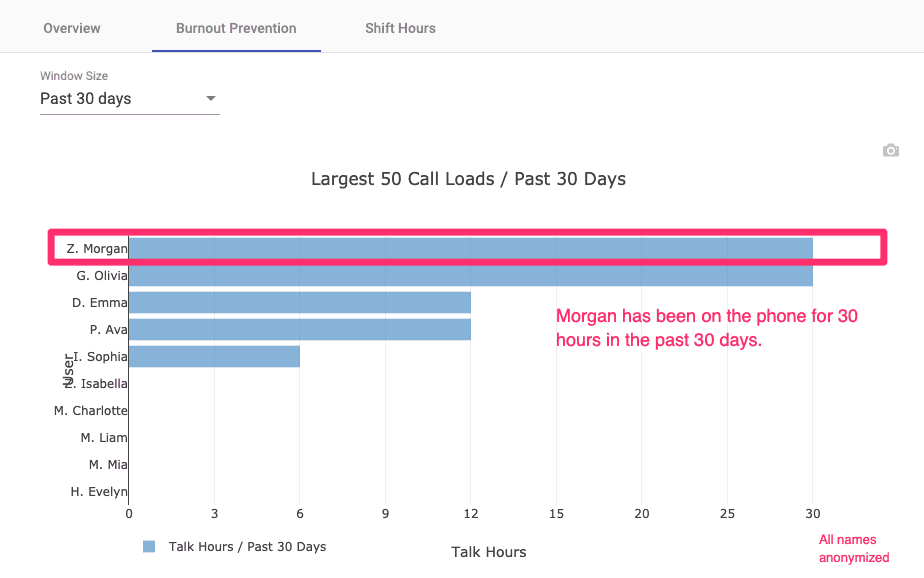
In Helpline, there's a burnout dashboard that shows who's carrying the most. You can see who's taking the most calls, how long they're on, and how many hours they're covering. That way you can check in before it becomes a problem.
One team told us that's what let them check in with volunteers properly, instead of a quick "you good?" in the hallway.
Then there's payroll
No more scrolling through old texts trying to figure out who covered that Tuesday.
As long as changes are made in the schedule, the hours are already there. At the end of the month, you run the Shift Hours report, pick the month, and download it. That gives you everyone's shift hours.
One thing to know: these are hours on shift, not time spent on calls. It's worth checking how your team pays before you send it over.
Where that leaves your coordinator
None of this replaces the coordinator. They're still the one who knows everyone on the team.
It just takes a lot of the texting, chasing and double-checking off their plate, so they can get back to the rest of their job.
If you want to see how this would work on your line, book a free consultation here. Bring your schedule and we'll walk through it together.
Next steps for your peer support line
- List your recurring pain points: Note where last-minute changes, phone updates, or hour totals break down today.
- Map one week of coverage: Include primaries, backups, and who fixes routing when someone swaps.
- Decide what reports you need: Shift hours for payroll and talk time for burnout checks are a common pair.
- Book a consultation: Bring your schedule and walk through how calls would follow it on your line.
Questions about running a peer support line
Do we need a full-time coordinator to use Helpline Software?
No. Many peer support and warm lines run with a part-time coordinator or program director who also carries other duties. The platform is built to reduce the recurring schedule, routing, and reporting work that otherwise stacks on that role.
Can we keep assigning shifts ourselves instead of open requests?
Yes. You can assign shifts directly, use open-shift requests, or mix both. Routing and reporting follow the approved schedule either way.
Does the Shift Hours report replace payroll systems?
No. It gives scheduled coverage totals you can export for payroll preparation. Your finance team still applies your program's pay rules.
See how this would work on your line
Book a free consultation. Bring your schedule and we will walk through coverage, routing, and reporting together.