







On-call software for premium support lines connects schedules, live call handling, backups, callbacks, and reporting. The same model applies to on-call support teams: reach the primary first, then escalate.
A premium customer calls. Both engineers are busy.
A customer needs help with equipment in the field. They call the priority support number.
Your primary engineer is already on another call. The backup is occupied too.
The customer paid for access to your team. What happens next?
Helpline Software connects scheduling, live call handling, callbacks, and reporting in one integrated platform.
Your engineers provide the support. The platform coordinates who gets contacted and what happens when they cannot answer.

On-call software for engineers who also have day jobs
They travel to customer sites, answer email, and work on projects. They take turns covering the support line.
You need to reach whoever is responsible now, with a clear next step when that person cannot answer.
Helpline follows your coverage schedule and escalation rules so customers can reach your own technical team.
The workflow stays connected end to end:
- Publish who covers primary and backup for each shift.
- Route live calls to the scheduled engineer first.
- Escalate when they do not accept.
- Offer callback requests when everyone is busy.
- Review call history for SLA and coverage gaps.
Will your current setup handle the next coverage change?
When comparing options, walk through the situations your engineers will actually face:
- Call forwarding and a spreadsheet: When someone changes shifts, does the next call follow the updated coverage?
- An answering service: How are schedule changes communicated, and what happens when both engineers are busy?
- An incident-management tool: Can it handle a live customer call, a callback request, and the full call history?
Try the whole workflow: a shift change, an unanswered call, and a callback when everyone is occupied.

Before the call: Set the primary and backup
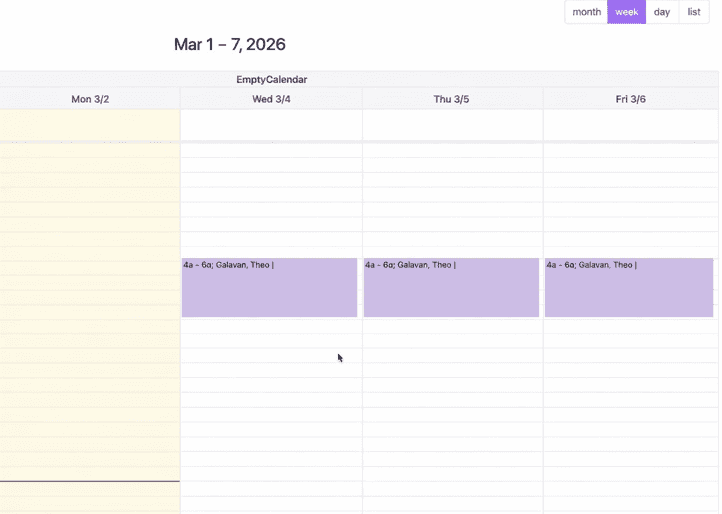
Assign the engineers covering each shift, including who should be contacted next.
When travel plans or availability change, select the affected shifts and update the assignments together.
Saved schedule changes control who receives the next call.
During the call: Reach the engineer covering that shift
A customer calls your support number. Helpline checks the current schedule and contacts the primary engineer.
The engineer presses 1 to accept before being connected to the customer.
If they do not accept, Helpline follows your escalation rules and tries the backup.
Both engineers are busy? Offer a callback
The customer can leave a callback request. Helpline confirms their number and explains your callback policy.
They can hang up while the platform coordinates the response.
When an engineer becomes available, Helpline alerts them to accept the request and connects them to the customer.
If the request remains unanswered, configured calls and texts can alert a manager or another backup.
After the call: See what happened
A customer says they could not reach anyone. You need more than a missed-call notification.
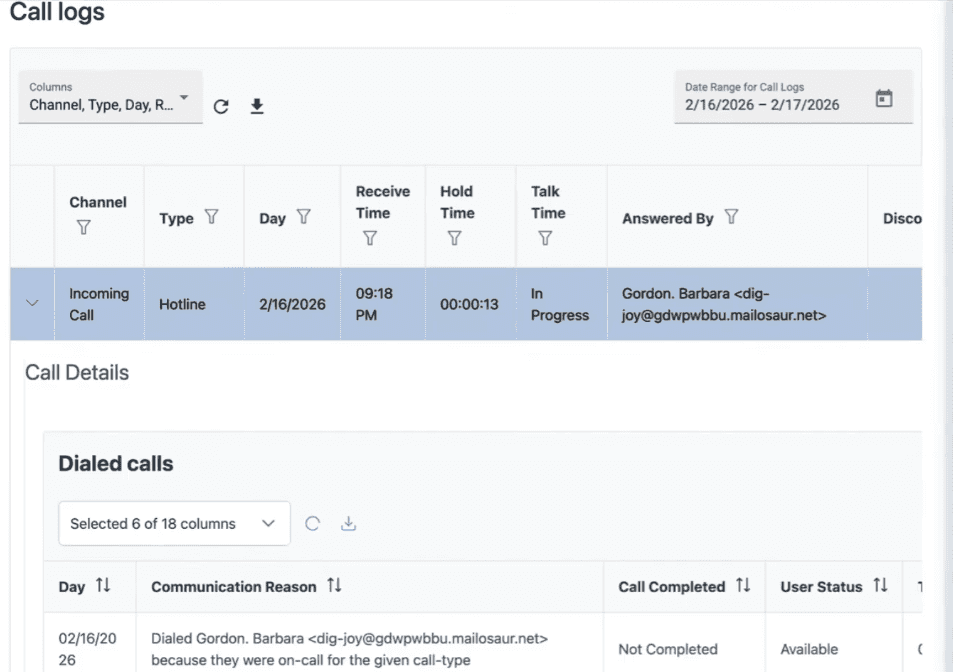
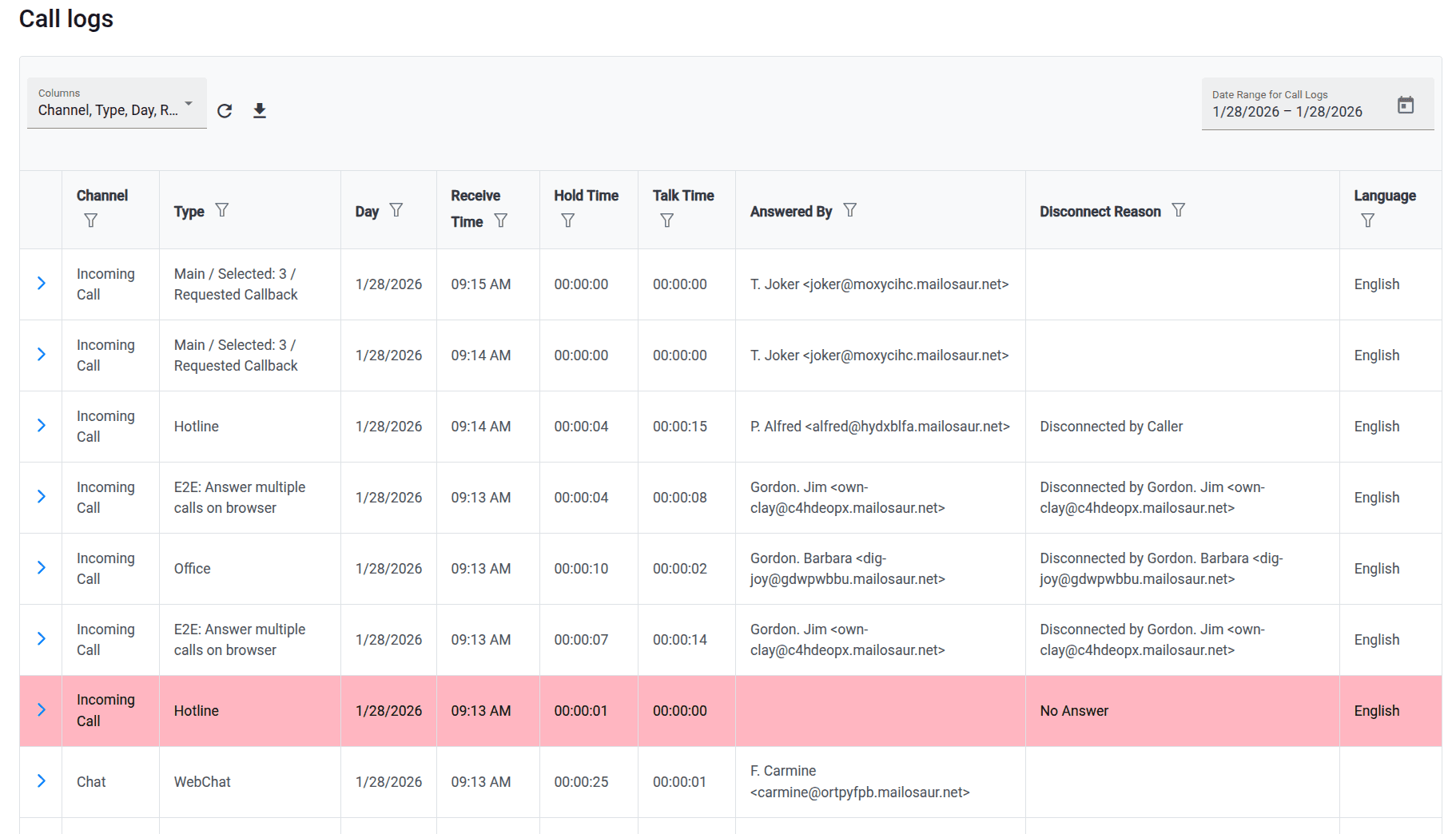
Open the call history to see who was contacted, who accepted, and how the call ended.
Review response times and callback times against your support commitments.
Use those records to spot coverage gaps and decide whether particular shifts need more backup.

...we needed a system that could handle complex call routing, audit, and customization requirements. ...They really delivered exactly what we were looking for!
Set up the line around your support commitments
Tell us how your engineers rotate coverage, who backs them up, and when a manager should get involved.
We configure the schedule, escalation steps, callback workflow, and reporting around that process.
Walk through the busy and unanswered-call scenarios before the line goes live.

Concierge Onboarding
Expect white-glove, done-for-you onboarding. You bring your requirements and preferences. We will help you translate them into a configuration that fits your team.
We have supported hotlines, helplines, and crisis lines long enough to know what tends to break under pressure. We will share patterns we have seen work well, flag common pitfalls, and design a custom setup aligned to your requirements. That includes schedules, workflows, routing rules, and integrations, so your system is ready for day one.
Disclaimer: We are a software provider. We can share general information based on prior experience, but you know your needs best. You are fully responsible for your hotline’s configuration and for ensuring your requirements are met. Our role is limited to information sharing.
Packages & Pricing
Pricing is structured around system access, configuration, and support rather than individual telecom components. All communication capabilities, voice, messaging, scheduling, workflows, and reporting, are bundled into unified plans designed to scale with your organization’s needs.
For current packages and what is included in each plan, review our pricing.


150% Money Back Guarantee
Start with confidence. If you're not satisfied within 30 days, we'll refund every dollar you paid, plus up to $500.
How to evaluate on-call software for a premium support line
- Map your rotation: Write who covers primary and backup for each shift, including travel and project work.
- Test unanswered calls: Walk through what happens when the primary does not accept and when both engineers are busy.
- Define callback rules: Set how callers request a callback and how engineers accept follow-up work.
- Require call evidence: Confirm logs show contact attempts, accepts, and escalation outcomes for SLA review.
- Book a workflow demo: Run your rotation, backups, and callbacks in a live walkthrough before go-live.
Frequently asked questions
Can we offer 24/7 support without a dedicated overnight call center?
Yes. Your own engineers can rotate coverage while Helpline coordinates the schedule, calls, backups, and callbacks.
Your team remains responsible for providing technical support.
Can daytime and after-hours calls follow different coverage?
Yes. Configure different schedules and escalation rules for staffed hours, nights, and weekends.
Can our engineers answer on their cell phones?
Yes. Engineers can receive calls on their regular cell phones and press 1 to accept.
Can we limit access to premium customers?
A short PIN can control access to the premium support path.
Checks against a CRM, account database, or device serial number need separate scoping.
Can we keep using our ticketing and email tools?
Yes. Your team can keep its existing ticketing and email workflows while Helpline coordinates urgent support calls.