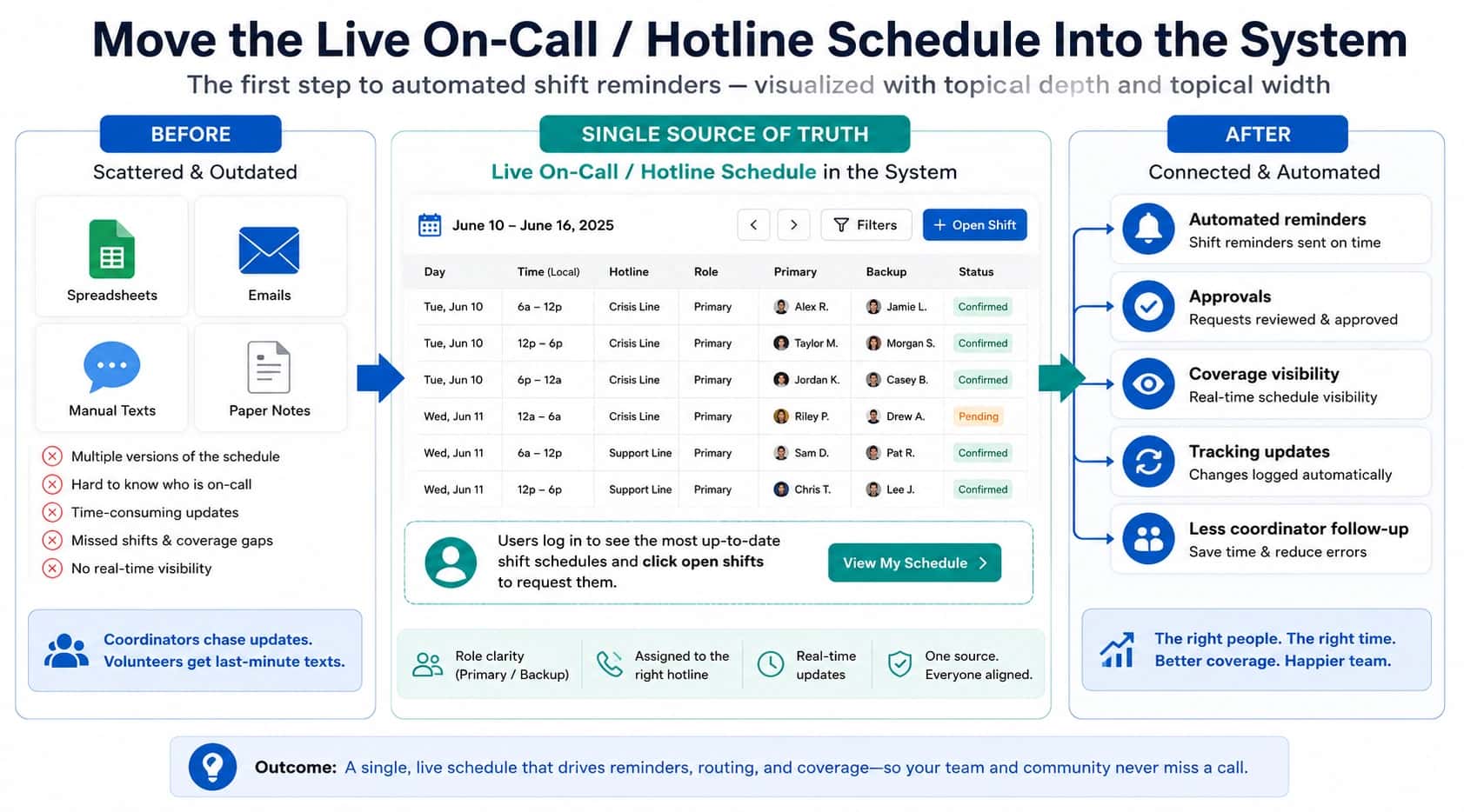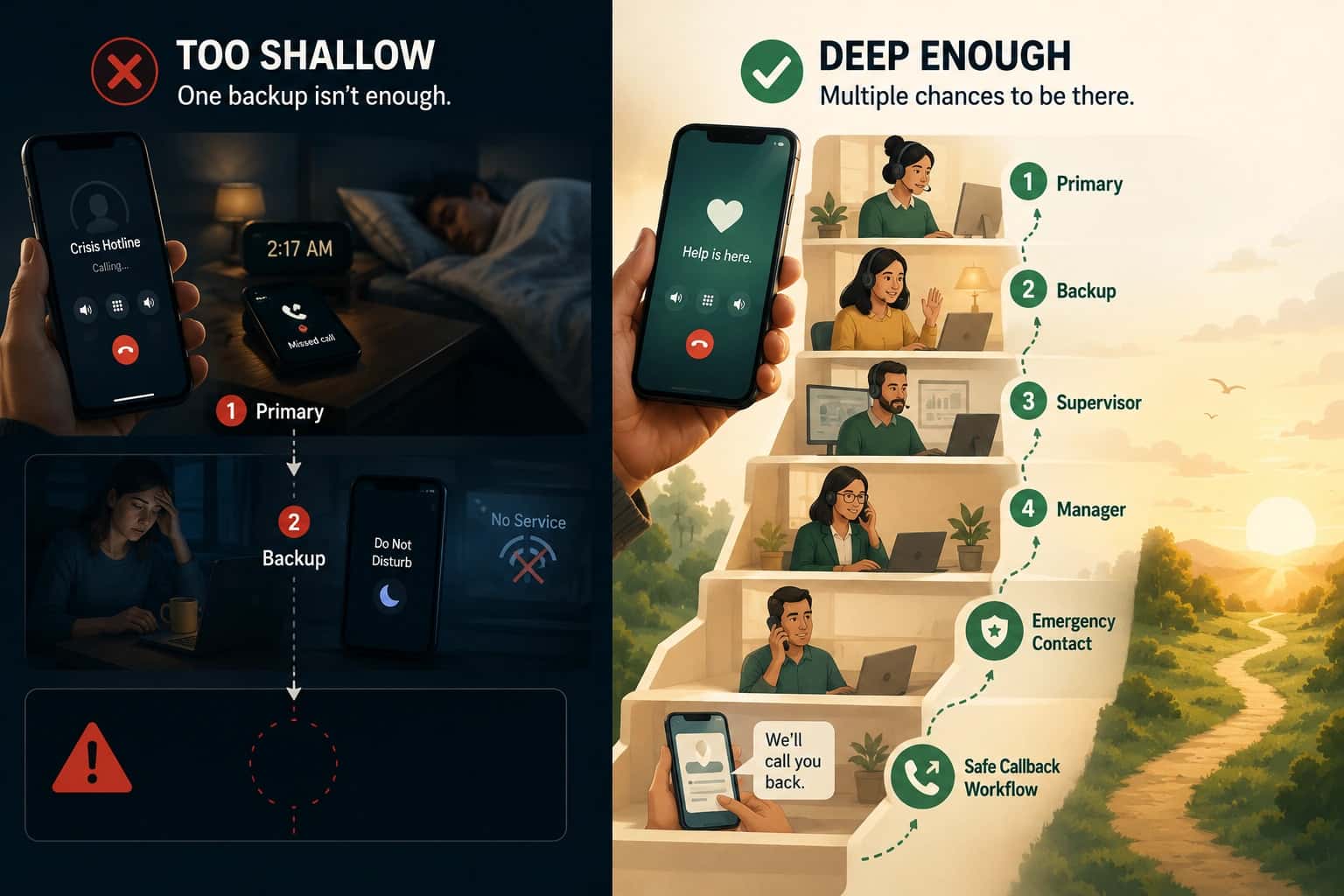

TL;DR
- First, define the hotline’s purpose so you know what it should do before choosing tools, staff, or workflows.
- Design for the caller’s mindset by thinking about how scared, confused, or unsafe they may feel.
- Choose the right hotline model based on the caller’s needs, risk level, and support required.
- Connect it to real support so callers have a clear next step after the call.
- Build a risk protocol early so staff know exactly when and how to escalate.
- Train people in real skills like listening, calming, safety planning, and escalation.
- Protect caller privacy by planning carefully around data, callbacks, records, and consent.
- Choose safe, practical technology that supports routing, supervision, referrals, privacy, and reliability.
- Add channels carefully and only offer phone, text, or chat if you can support them well.
- Build strong referrals so callers reach help that is real, current, safe, and available.
- Measure meaningful outcomes by tracking whether callers felt helped, heard, and safer.
- Set up quality checks to review calls, notes, referrals, and training before problems grow.
- Protect responders too with breaks, supervision, support, and realistic workloads.
- Make outreach easy to understand so people know who can call, what happens, and how the hotline helps.
- Soft launch first so you can test the hotline, find gaps, and fix issues before going public.
If you are building an emergency, crisis, or high-stakes support line, you’re on the lookout for a system that protects callers, supports responders, handles risk, and connects people to the right help when it matters most.
This guide walks through the full hotline-building process: defining the hotline’s purpose, understanding who it serves, training responders, writing scripts, setting privacy rules, creating escalation pathways, building a reliable referral network, choosing the right technology, supervising quality, planning a soft launch, and improving the service over time.
Step 1: Define the real purpose of the hotline
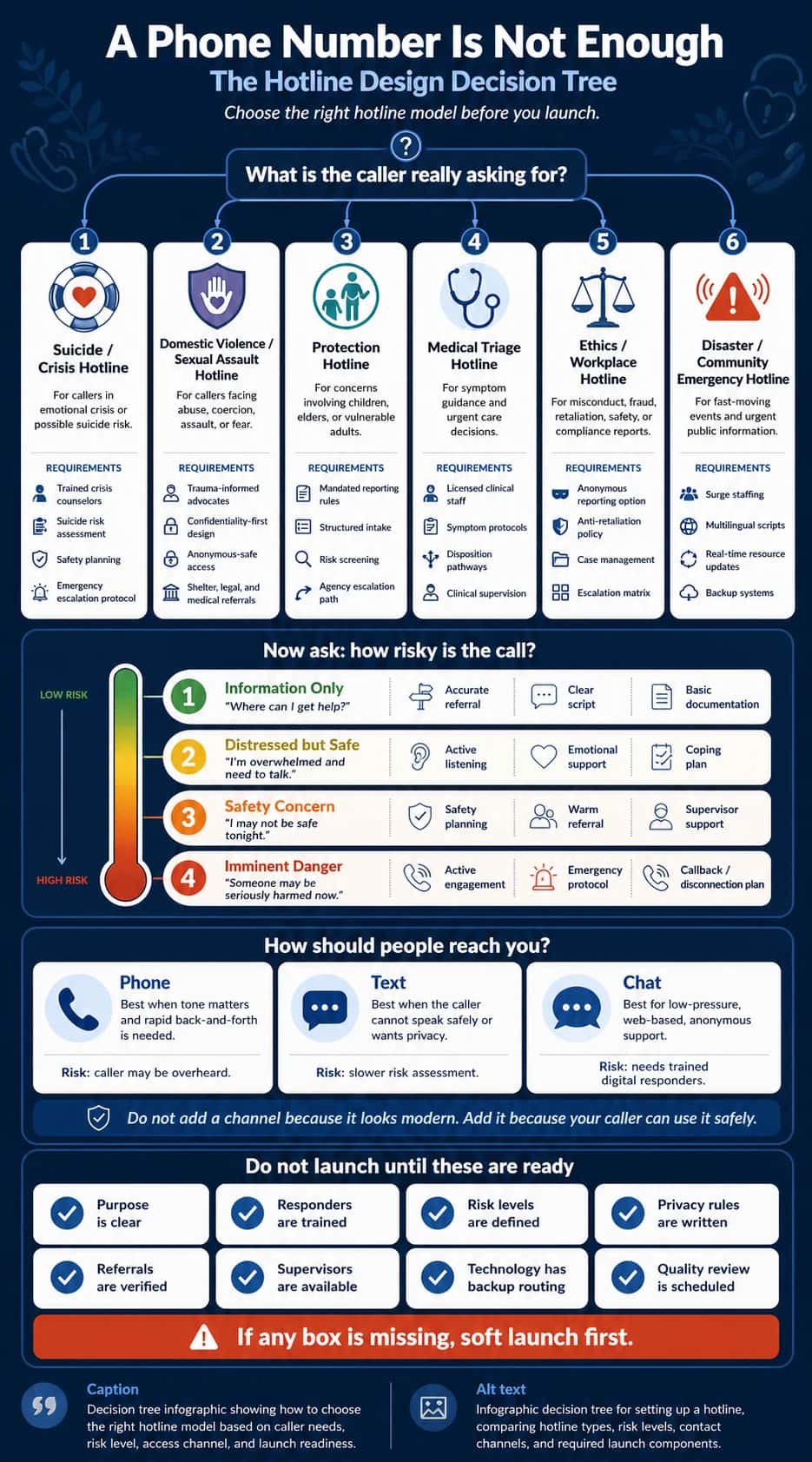
A suicide crisis hotline is not the same as a domestic violence hotline.
Nor is a medical triage line the same as a workplace ethics hotline.
They may all use phones, but do very different jobs.
Below, you’ll get to shortlist the purpose and plan accordingly.
Step 2: Design around the caller’s state of mind
Most organizations design hotlines around their internal chart.
- Press 1 for this department.
- Press 2 for that department.
- Press 3 if you are already exhausted and want to give up.
That is not how people in crisis think.
A caller may be panicked or confused. Unsure if their situation “counts.” Worried they will be reported and the person/situation might find out or get out of control.
Some callers are just not ready to tell the full truth yet.
A strong opening for a crisis or safety hotline might sound like:
"Thank you for calling [Hotline Name]. I’m here with you. Are you safe to talk right now?"
Things to ask when designing:
- What sentence would make this caller feel safe enough to stay on the line?
- What sentence might make them hang up?
- Are they afraid of police, employers, family, immigration, medical bills, or being judged?
Step 3: Choose the right hotline model
One of the fastest ways to build a bad hotline is to copy the wrong model.
Different hotlines have different jobs.
Here is a simple way to think about it:
Table 1. Hotline types, primary jobs, and the lowest-cost safe operating model for each use case.
| Hotline type | Main job | Best model at the lowest safe cost |
|---|---|---|
| Suicide or crisis hotline | Reduce distress, assess safety, create a safety plan, escalate when needed | Hybrid crisis model: trained responders + on-call clinical supervisor |
| Domestic violence hotline | Support, safety plan, protect choice, offer referrals | Advocate-led model: trained advocates + verified shelter/legal referral network |
| Sexual assault hotline | Trauma-informed support, advocacy, options, survivor control | Advocate + referral model: trained advocates + medical/legal/counseling handoffs |
| Human trafficking hotline | Identify risk, safety plan, refer carefully, handle law enforcement issues wisely | Specialist intake model: structured screening + vetted partners + clear escalation rules |
| Ethics or compliance hotline | Receive reports, document safely, escalate, protect against retaliation | Case-intake model: trained intake agents + secure case-management workflow |
| Medical triage line | Assess symptoms, recommend level of care, document clearly | Nurse triage model: licensed nurses + clinical decision protocols |
| Disaster hotline | Give information, provide emotional first aid, connect people to resources | Surge-support model: small core team + temporary trained agents during spikes |
Step 4: Connect the hotline to a larger support system
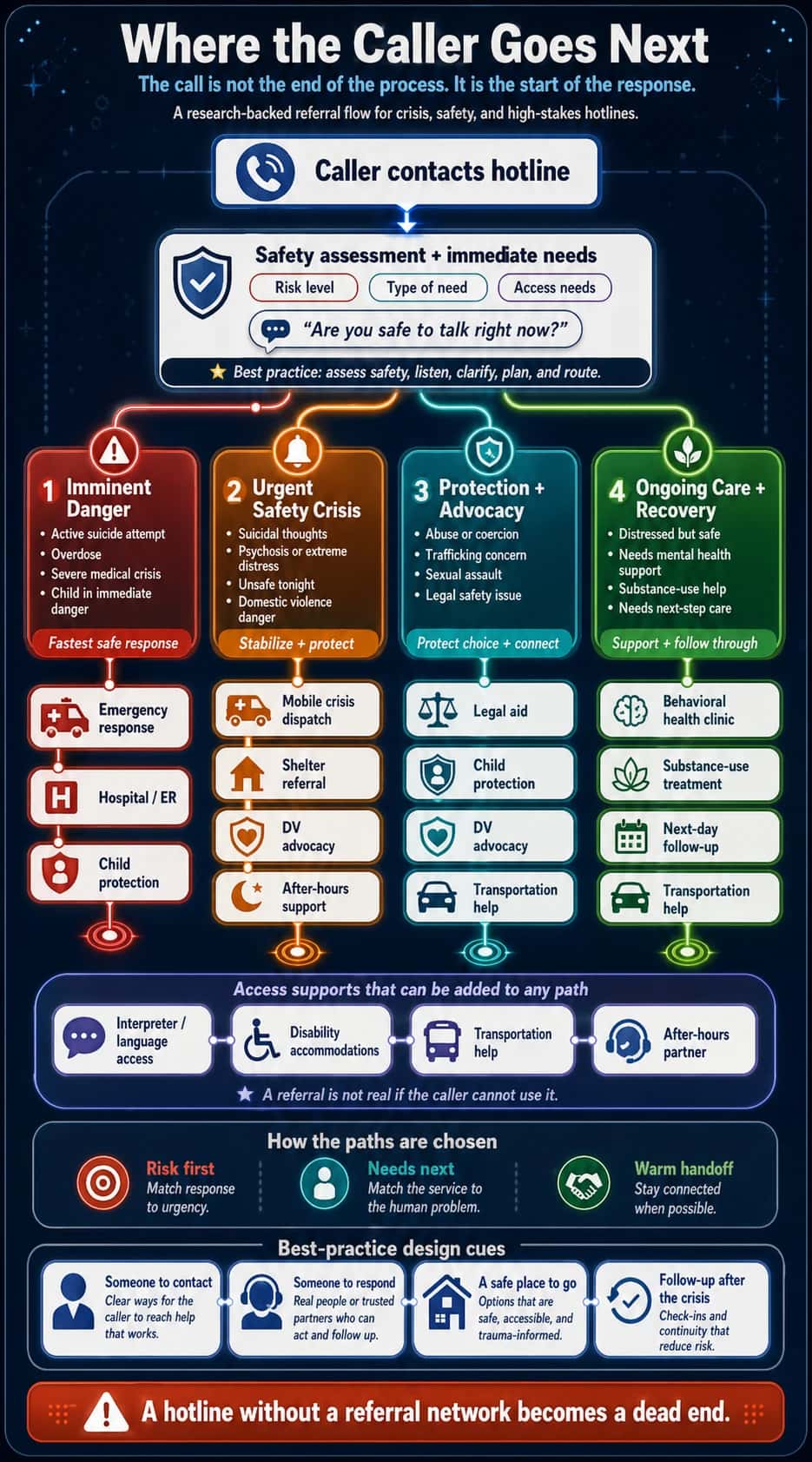
A hotline number without a support network is like a bridge that stops halfway across the river.
The caller gets the courage to call.
Someone answers.
Then what?
If there is no next step, the caller is left standing in the same danger, just with one more disappointing experience.
Strong crisis systems are built around three simple parts:
Someone to contact.
Someone to respond.
Somewhere safe to go.
Step 5: Build a risk-assessment protocol before launch
You do not want staff inventing risk decisions while someone is in danger..
Hence, define your risk levels before launch.
A simple version might look like this:
| Level | Caller situation | Response |
|---|---|---|
| Level 1 | Information request | Give accurate information or referral |
| Level 2 | Distressed but currently safe | Listen, support, create a coping or next-step plan |
| Level 3 | Safety concern | Safety planning, supervisor support, warm referral |
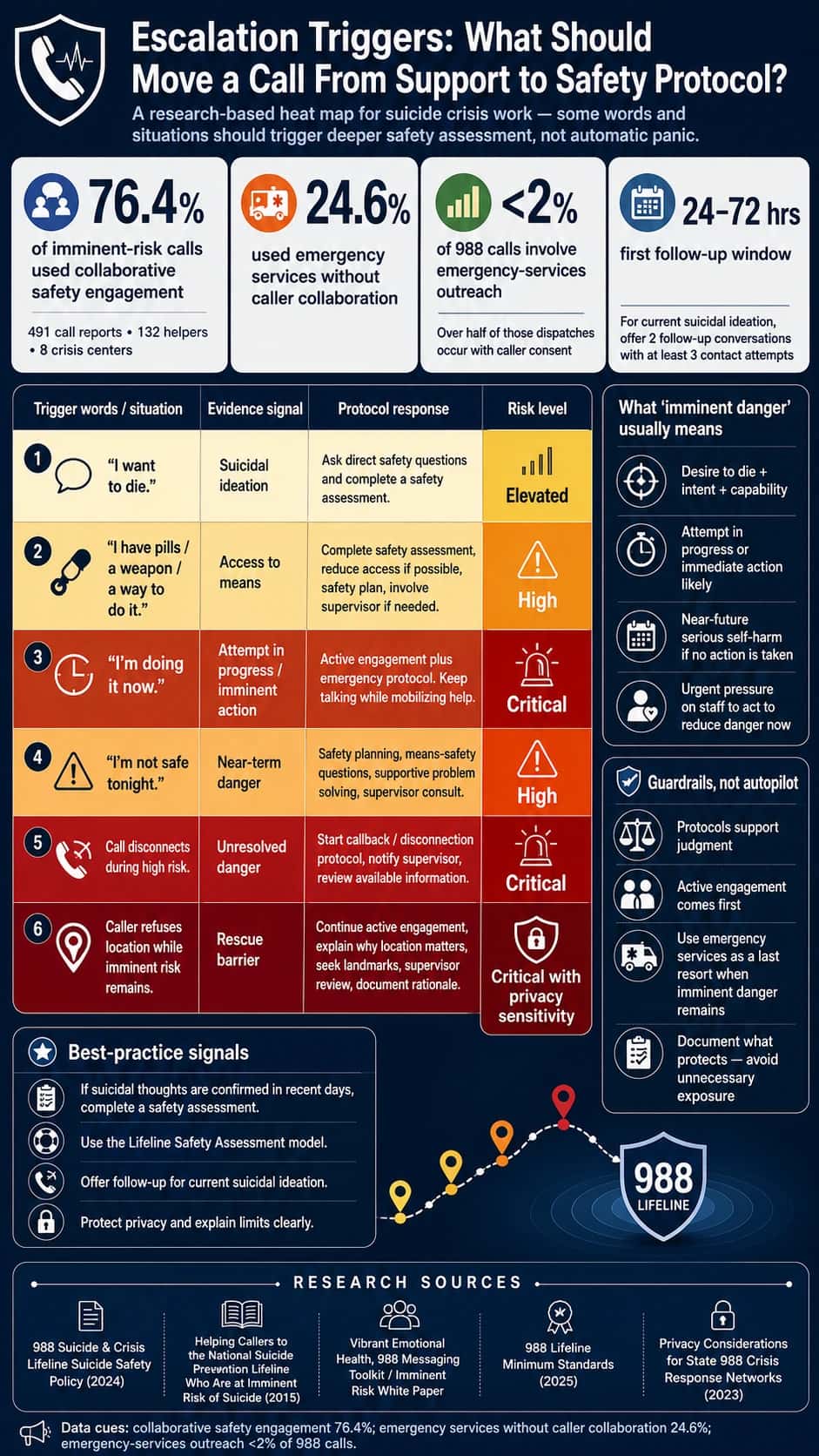
| Level 4 | Imminent danger | Active engagement, emergency escalation if needed |
| Level 5 | Disconnection during imminent risk | Callback, supervisor review, emergency protocol |
Your protocol should also define escalation triggers, like shown in the heat map below:
Step 6: Train responders in skills rather than scripts
A script can tell someone what to say.
Training teaches them how to listen.
And listening is the heart of hotline work.
Many new responders rush to advice because silence feels uncomfortable.
But sometimes the most powerful thing a responder can say is:
"I’m still here. Take your time."
Step 7: Make privacy part of the design
For many callers, the biggest fear is that the wrong person will find out they called.
- A domestic violence survivor may be afraid an abuser will see the call log.
- An employee may fear retaliation.
- A young person may fear parents or school officials.
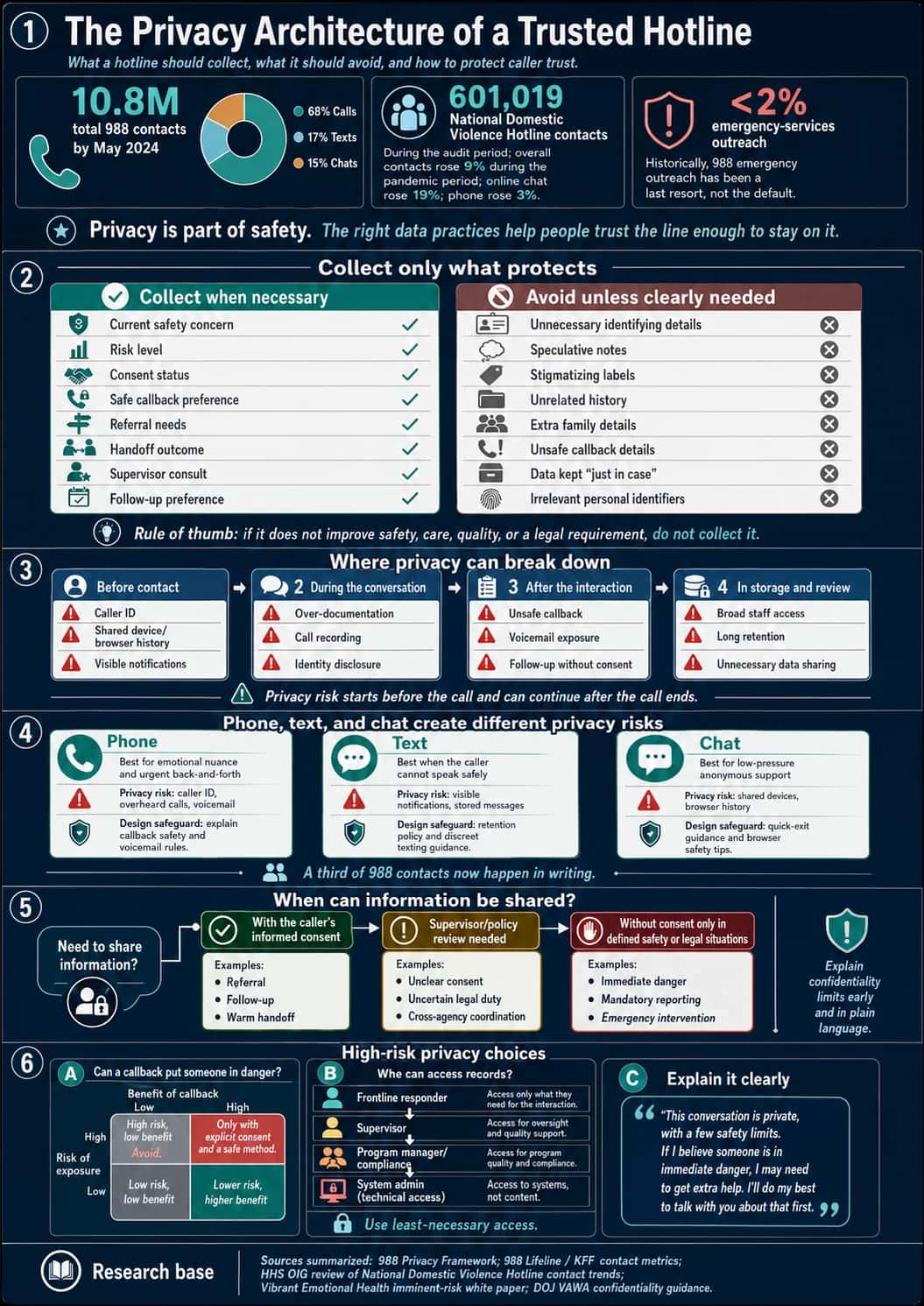
If people do not trust the privacy of the hotline, they may not call at all.
So privacy has to be built into the hotline from the beginning.
Step 8: Choose technology based on safety, not shiny features
A hotline platform's software is not supposed to just look impressive in a demo.
The right system must support your actual workflow.
Table 2. Hotline technology features to evaluate based on safety workflow, caller risk, staffing needs, privacy, and operational reliability.
| Technology feature | What it should do | Why it matters for hotline safety | What to look for | Red flags to avoid | Best-fit hotline types |
|---|---|---|---|---|---|
| Call routing | Send calls to the right responder, team, location, or shift based on rules. | A caller in crisis should not bounce between departments or wait while staff figure out who should answer. | Skill-based routing, location-based routing, language routing, crisis-level routing, overflow rules, after-hours routing. | One general queue for every call type; manual transfers only; no way to prioritize high-risk contacts. | Crisis, suicide prevention, domestic violence, medical triage, disaster response, customer emergencies. |
| Text and chat support | Let callers reach the hotline silently or through written channels. | Some callers cannot safely speak out loud, especially in domestic violence, trafficking, youth safety, workplace, or sexual assault situations. | Secure chat, SMS, web chat, transcript controls, digital risk assessment prompts, typing indicators, safe exit options. | Chat added as a “nice feature” without trained digital responders, supervision, or transcript privacy rules. | Domestic violence, sexual assault, 988-style crisis lines, youth/student safety, trafficking, employee support. |
| Queue visibility | Show who is waiting, how long they have waited, and what channel they are using. | Supervisors need to see risk and demand in real time, especially during surges. | Live queue dashboard, wait-time alerts, abandoned-call tracking, channel-specific queues, priority flags. | Staff only realize callers were waiting after the fact; no abandoned-call visibility. | All hotlines, especially crisis, disaster, medical, and high-volume support lines. |
| Backup routing | Automatically redirect calls when the main team is unavailable. | No-answer moments are dangerous. A hotline should not fail because one office, person, or internet connection is down. | Overflow to backup staff, partner center routing, failover numbers, auto-escalation after wait threshold. | Calls go to voicemail by default; backup routing requires manual intervention. | Crisis, suicide, medical, disaster, customer emergency, after-hours support. |
| After-hours routing | Route calls differently at night, weekends, and holidays. | Many high-risk calls happen outside business hours. The caller does not care that your office is closed. | Schedule-based routing, on-call escalation, night team routing, holiday rules, after-hours partner handoff. | “Leave a message and we’ll call you tomorrow” for crisis or safety lines. | Domestic violence, suicide, child protection, medical triage, disaster, customer emergency. |
| Warm transfers | Let responders stay connected while transferring the caller to another person or service. | A warm handoff prevents the caller from having to start over alone. | Three-way calling, transfer notes, partner directory, transfer outcome tracking, consent prompts. | Blind transfers; no way to know if the caller reached help. | Crisis, domestic violence, sexual assault, trafficking, medical triage, employee support. |
| Supervisor monitoring | Allow supervisors to support staff during active calls or chats. | High-risk calls need backup. New responders especially need real-time support. | Silent monitoring, whisper coaching, supervisor takeover, chat review, escalation alerts. | Responders handle high-risk calls alone; supervisors only review after something goes wrong. | Suicide crisis, medical triage, child protection, trafficking, domestic violence, student safety. |
| Call notes | Capture key details from the interaction safely and consistently. | Good notes help continuity, QA, referrals, and follow-up, but over-documentation can harm callers. | Structured templates, risk-level fields, consent fields, referral notes, supervisor review fields. | Free-text-only notes; unnecessary personal details; no privacy guidance. | All hotlines, especially clinical, legal, compliance, crisis, and protection lines. |
| Risk flags | Mark calls or cases that need urgent review, follow-up, or escalation. | Staff need a fast way to identify high-risk callers or unresolved safety concerns. | Custom risk levels, imminent-danger flags, repeat-caller flags, callback risk flags, supervisor alerts. | Risk hidden in long notes; no standard risk labels; inconsistent staff judgment. | Suicide crisis, child protection, domestic violence, trafficking, medical triage, workplace threats. |
| Callback tasks | Create safe, trackable follow-up actions. | Follow-up can reduce risk, but unsafe callbacks can expose the caller. | Consent-based callback fields, safe time/method, no-voicemail setting, task reminders, outcome tracking. | Automatic callbacks without consent; voicemail by default; no safe-contact preference. | Crisis, suicide prevention, domestic violence, sexual assault, employee support, medical triage. |
| Referral database | Store verified services and match callers to the right resource. | A referral is only useful if it is current, available, safe, and accessible. | Search by geography, hours, eligibility, language, cost, accessibility, warm-transfer availability. | Old spreadsheet; outdated numbers; no after-hours status; no way to track failed referrals. | Domestic violence, disaster, behavioral health, substance-use, trafficking, sexual assault, elder support. |
| Analytics and reporting | Show whether the hotline is working and where it is failing. | You cannot improve what you cannot see. Metrics reveal missed calls, long waits, failed transfers, and staffing gaps. | Answer rate, abandonment rate, wait time, transfer success, follow-up completion, referral outcomes, risk distribution. | Dashboard focused only on call volume; no outcome or safety metrics. | All hotlines, especially public health, crisis, compliance, and customer emergency lines. |
| Language routing | Connect callers to responders or interpreters who can communicate with them. | Language barriers can turn a manageable call into a dangerous misunderstanding. | Preferred-language capture, interpreter integration, multilingual queues, translated scripts, language reporting. | “English only” workflows; staff improvising translation; no interpreter availability after hours. | Disaster, crisis, medical, trafficking, domestic violence, community support. |
| Privacy controls | Limit what data is collected, stored, shared, and visible. | Caller trust depends on privacy. Bad privacy design can expose survivors, employees, children, or people in crisis. | Role-based access, consent fields, recording controls, redaction, data retention settings, safe callback rules. | Everyone can see everything; calls recorded by default; no retention policy; weak user permissions. | Domestic violence, sexual assault, trafficking, workplace ethics, medical, crisis, child protection. |
| Audit logs | Track who accessed, changed, exported, or shared records. | Audit trails protect callers and organizations by creating accountability. | Access logs, edit history, export tracking, permission-change logs, incident reports. | No record of who viewed sensitive notes; admins can change records without trace. | Compliance, medical, child protection, crisis, domestic violence, workplace reporting. |
| Disaster failover | Keep the hotline operating during power loss, internet failure, staff shortages, or volume surges. | The moments when systems fail are often the moments callers need help most. | Cloud redundancy, backup numbers, overflow centers, SMS backup, remote access, surge staffing tools. | Single phone line, single office, single provider, no continuity plan. | Disaster response, crisis lines, public safety, medical triage, customer emergency. |
| No-answer protocols | Define what happens when nobody answers. | A hotline cannot simply ring forever. No-answer behavior is part of safety design. | Auto-overflow, callback queue, emergency message, abandonment alerts, supervisor notification. | Default voicemail; no one reviews missed calls; callers receive no next step. | Crisis, domestic violence, medical, disaster, child protection, customer emergencies. |
Step 9: Add phone, text, or chat only if you can support them well
More channels do not automatically mean better service.
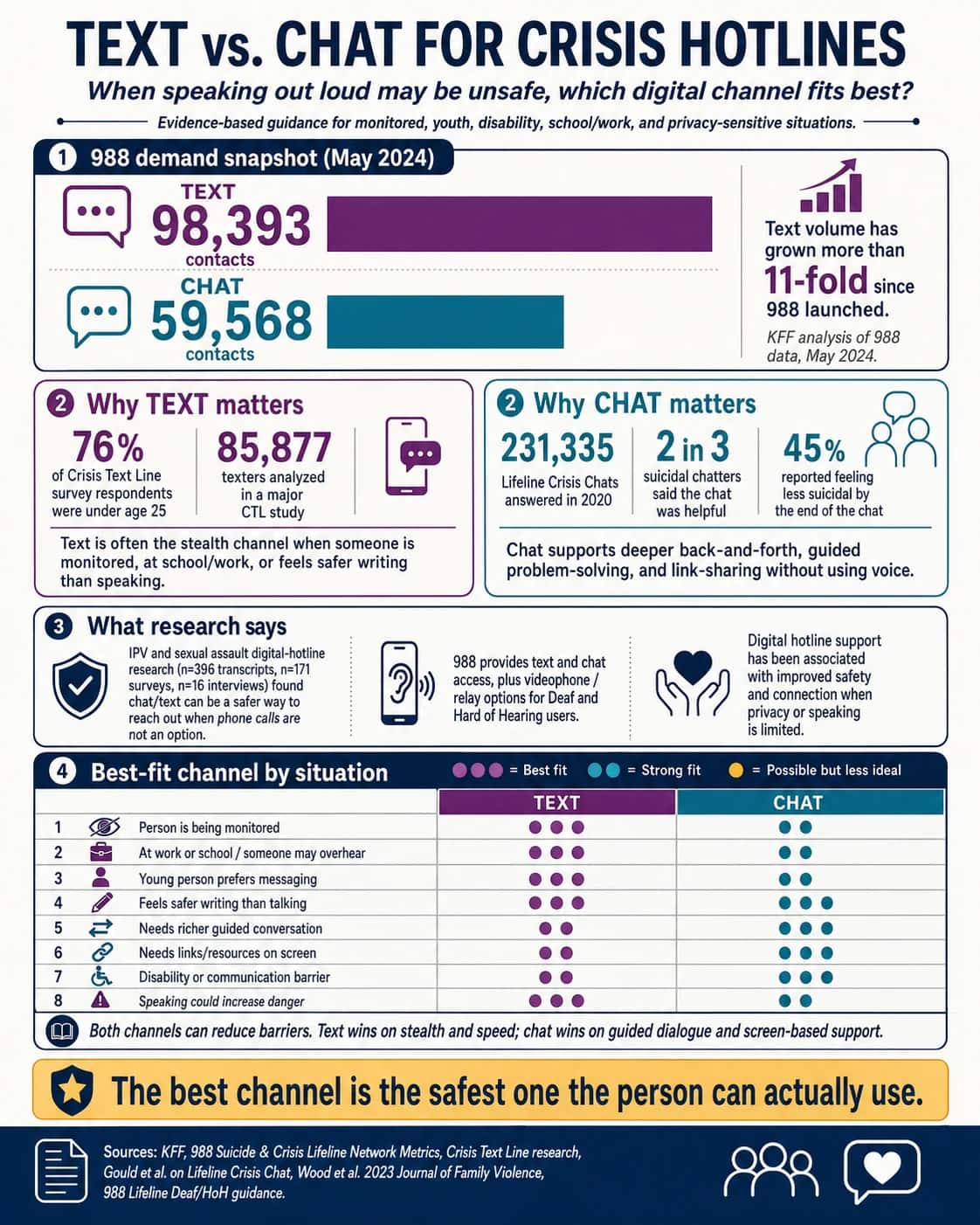
Phone, text, and chat each behave differently.
Voice can be powerful because tone matters. A calm voice can help regulate panic.
But voice is not always safe.
When to use crisis-focused text or chat is illustrated in the image below.
Step 10: Build a referral network that actually works
People in crisis often do not have the energy to start over.
A warm handoff can feel like someone walking with them to the next door instead of pointing down a dark hallway.
The table below lists what your referral database should track.
Table 3. High-stakes hotline referral database: What to track before you refer?
| Referral database field | What to track | Why it matters in a real hotline | Minimum standard | Stronger standard | Red flags to watch |
|---|---|---|---|---|---|
| Partner name | Organization name, program name, direct contact, backup contact, supervisor contact | A caller should not be sent into a generic system if a specific program or person is known to help. | List the public phone number and website. | List direct intake line, after-hours line, escalation contact, and preferred warm-transfer script. | Only a main number; no named program; no one on your team has ever tested the referral. |
| Hours | Normal hours, intake hours, crisis hours, holidays, lunch closures, voicemail behavior | “Open” and “accepting new callers” are not the same. Many referrals fail because the hotline gives a caller a resource that is technically real but unavailable at that moment. | Track business hours. | Track live-answer hours, warm-transfer hours, next-call-back window, and after-hours pathway. | “24/7” means voicemail only; intake closes earlier than office; no weekend confirmation. |
| Location | Address, service area, transit access, remote access, county/state restrictions | Geography can block access. A caller may be routed to a service that will reject them because they live one county over. | Service area listed. | Include physical access, transportation notes, remote/telehealth options, and jurisdiction rules. | Serves “the region” but only accepts certain ZIP codes; address is unsafe or outdated. |
| Eligibility | Age, gender, income, diagnosis, risk level, residency, documentation, survivor status, disability, veteran status | Eligibility is where weak referrals collapse. Callers in crisis may not have energy to be rejected and redirected. | Basic eligibility notes. | Include “accepted,” “not accepted,” “case-by-case,” and “exceptions possible if advocate calls.” | “Call to ask”; unclear exclusions; eligibility rules differ by staff member. |
| Cost | Free, sliding scale, insurance, grants, deposits, fees, hidden costs, transportation cost | Cost can make a referral unusable, especially during crisis. “They can help you” is not true if the caller cannot afford intake. | Mark free/paid/sliding scale. | Track actual out-of-pocket cost, documents needed, billing risks, and emergency waiver options. | “Sliding scale” but minimum fee is high; asks for credit card; unclear billing consent. |
| Languages | Spoken languages, interpretation availability, bilingual staff hours, translated materials | A referral can fail if the intake worker cannot communicate clearly with the caller. | List languages claimed. | Track which languages are live, which require interpreter, and which hours bilingual staff are actually available. | “Spanish available” but only one staff member; interpreter requires advance notice. |
| Accessibility | ADA access, TTY, relay, ASL, sensory accommodations, text/chat availability, wheelchair access, cognitive accessibility | Access is not only physical. Some callers cannot safely speak, travel, read forms, or navigate complex intake. | Basic ADA/physical access field. | Track communication accommodations, form support, transportation, disability-specific limitations, and safe callback preferences. | No text option; no relay experience; “accessible” not verified. |
| Response time | Live answer rate, call-back time, intake appointment time, emergency response time, average wait | Response time affects safety. A referral that takes three weeks may be inappropriate for someone needing help tonight. | “Usually responds within X days.” | Track by urgency level: immediate, same day, 24–72 hours, one week, waitlist. | “Call back soon”; no SLA; no data on missed calls. |
| Safety concerns | Police involvement, mandatory reporting, abuser access, immigration risk, confidentiality limits, unsafe locations, retaliation risk | Some referrals can increase danger. A survivor, undocumented caller, trafficked person, or person afraid of police may need a different pathway. | Add “known safety notes.” | Include safety-screening prompts, consent language, and situations where this referral should not be used. | Requires police report for all services; shares data broadly; location is visible to unsafe parties. |
| Warm transfer possible? | Yes/no, warm-transfer hours, direct number, conference-call process, consent required, what info can be shared | This is the heart of a strong referral network. A warm handoff prevents the caller from having to restart alone. | Mark yes/no. | Track exact script: “I have [caller] with me; they consented to share [limited info]; can you confirm availability now?” | Partner accepts referrals but not live transfers; no consent process; caller is dropped during transfer. |
| Accepts uninsured callers? | Yes/no, conditions, emergency exceptions, grant-funded slots, Medicaid-only limitations | Mental health, medical, and housing referrals often fail at the insurance step. | Yes/no field. | Include alternatives if uninsured caller is rejected, plus emergency charity-care path. | “Depends”; requires insurance before intake; no self-pay waiver. |
| Requires police reports? | Required, optional, only for specific services, alternatives, advocacy support available | This is crucial for domestic violence, sexual assault, trafficking, immigration-sensitive, and community-violence lines. | Mark required/not required. | Add “what happens if caller refuses police involvement” and safe alternative referrals. | Police report required before shelter, forensic, legal, or compensation support; policy is unclear. |
| Serves undocumented callers? | Yes/no, asks immigration status, ID requirements, public charge concerns, language access, legal aid link | A caller may avoid help if they fear immigration exposure. The database should make safety visible before the handoff. | Yes/no/unknown. | Track ID requirements, confidentiality protections, immigration-safe alternatives, and legal advocacy partners. | Requires government ID; asks immigration status before eligibility; staff give inconsistent answers. |
| Actually available after hours? | Live staff, voicemail, dispatch, mobile crisis, shelter intake, emergency bed status, backup number | “After hours” is often where hotline referrals fail. A hotline should not discover at 2 a.m. that the partner’s crisis line is only an answering machine. | Mark after-hours yes/no. | Test-call quarterly, record after-hours pathway, and mark “verified live” with date. | “24-hour hotline” routes to voicemail; no emergency bed updates; no supervisor escalation. |
| Referral accepted? | Accepted, rejected, waitlisted, no answer, caller declined, caller unreachable | The database should track outcomes, not just referrals given. | Add referral outcome field. | Use closed-loop referral tracking: did the caller reach the service, receive intake, and know the next step? | Staff mark “referr |
What to ask when building a referral network:
- Which referrals are real at midnight?
- Which reject uninsured callers?
- Which are unsafe for undocumented callers?
- Which require police reports?
- Which might retraumatize survivors?
- Which partners actually pick up?
Step 11: Measure what matters
Many hotlines measure what is easy.
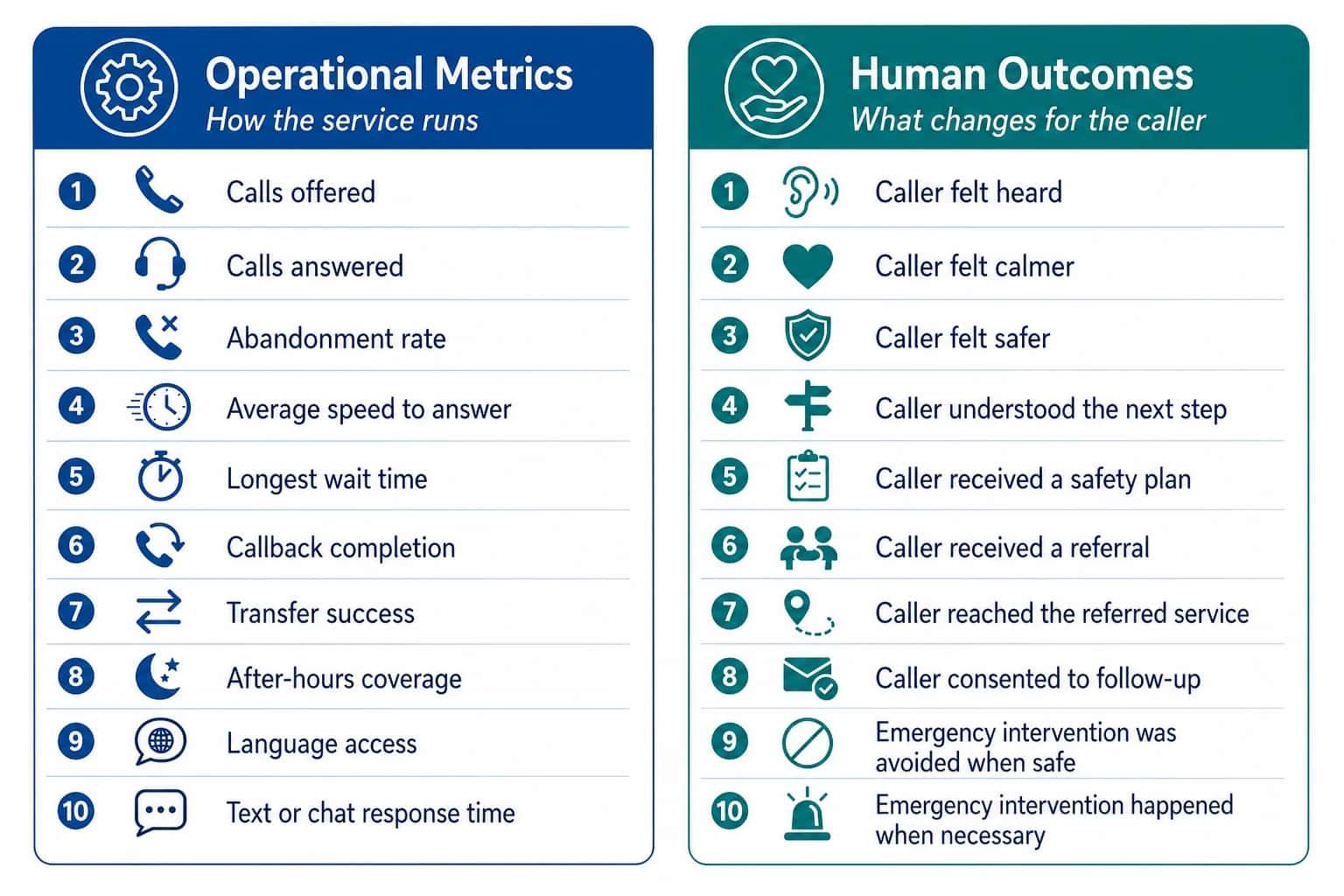
- Calls offered.
- Calls answered.
- Average wait time.
- Number of referrals.
Those metrics matter, but they are not enough.
You need both operational metrics and human outcomes.
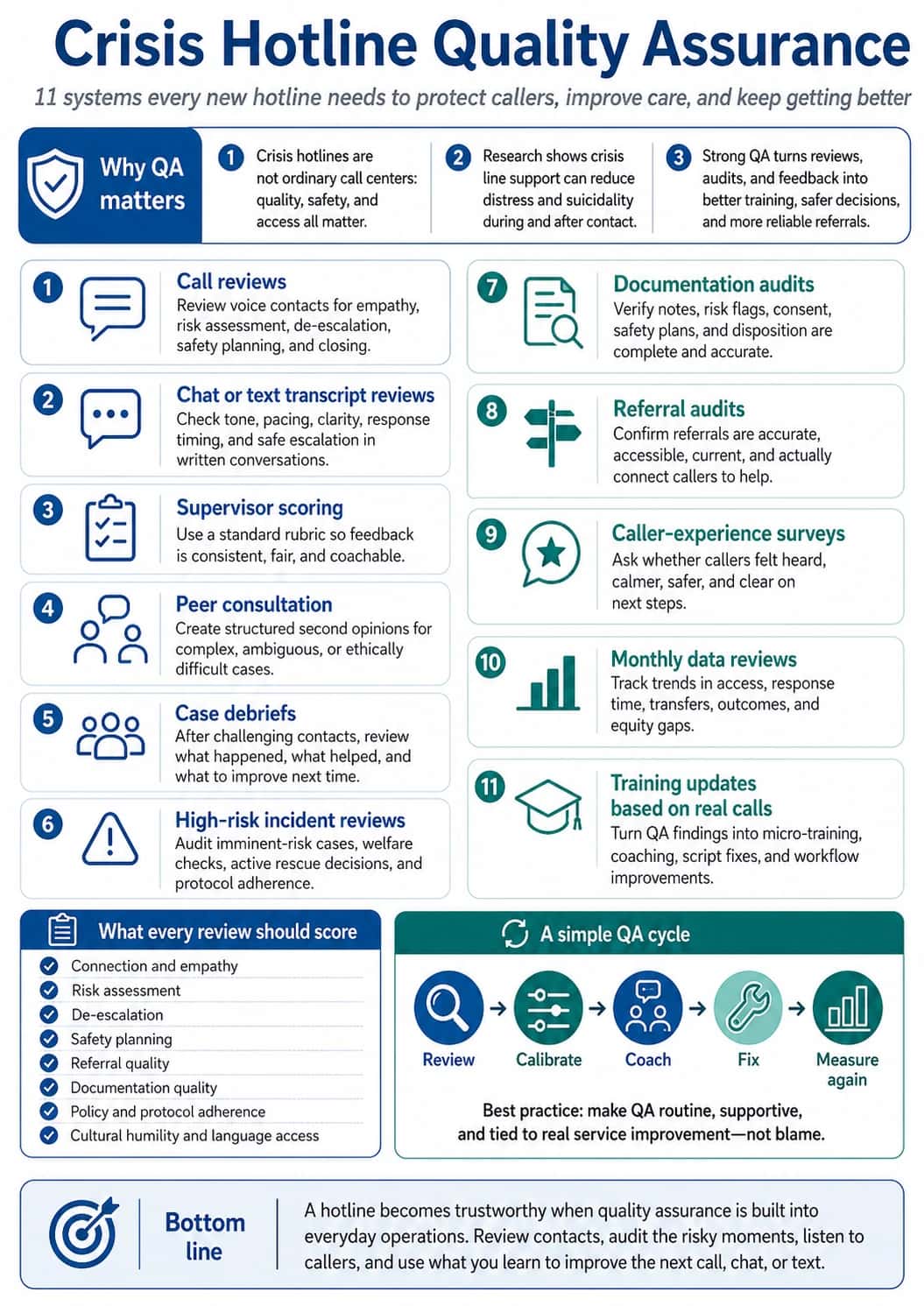
Step 12: Build quality assurance before something goes wrong
A hotline should not depend only on hiring kind people.
You need supervision, review, feedback, and learning.
Quality assurance includes the following.
Step 13: Protect your responders from burnout
You cannot build a service that protects callers while quietly harming the people who answer.
Plan for:
- reasonable shift lengths
- breaks after high-risk calls
- supervisor availability
- backup support
- peer support
- clinical consultation when needed
- paid training time
- debriefing
- burnout monitoring
- clear expectations
- manageable call volume
- offboarding support for volunteers or staff
Things to ask to protect responders from burnout
- What call types drain responders fastest?
- What shift length leads to mistakes?
- Does our staffing model rely on unpaid emotional labor?
- What support exists after a suicide-risk call?
- Are we designing this hotline to save callers while burning out responders?
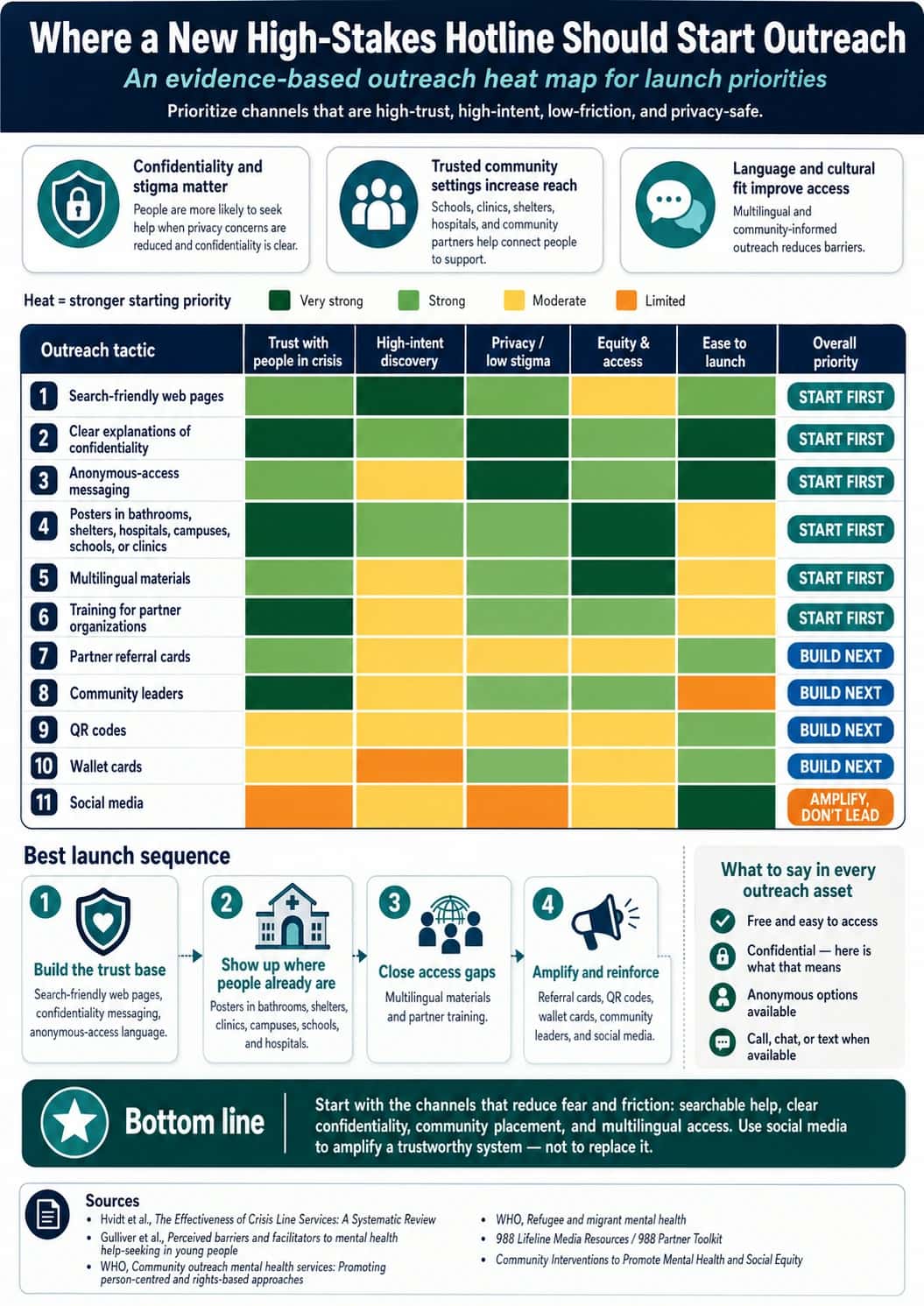
Step 14: Launch with outreach people can understand
Outreach should answer the fears people already have.
For example, instead of only saying:
"Call our hotline for support."
Say:
"You can call even if you are not sure your situation counts. You do not have to give your name. We can help you think through your safest next step."
Other aspects to include and prioritize are explained below.
Step 15: Soft launch before going fully public
A hotline launch should happen in phases, like:
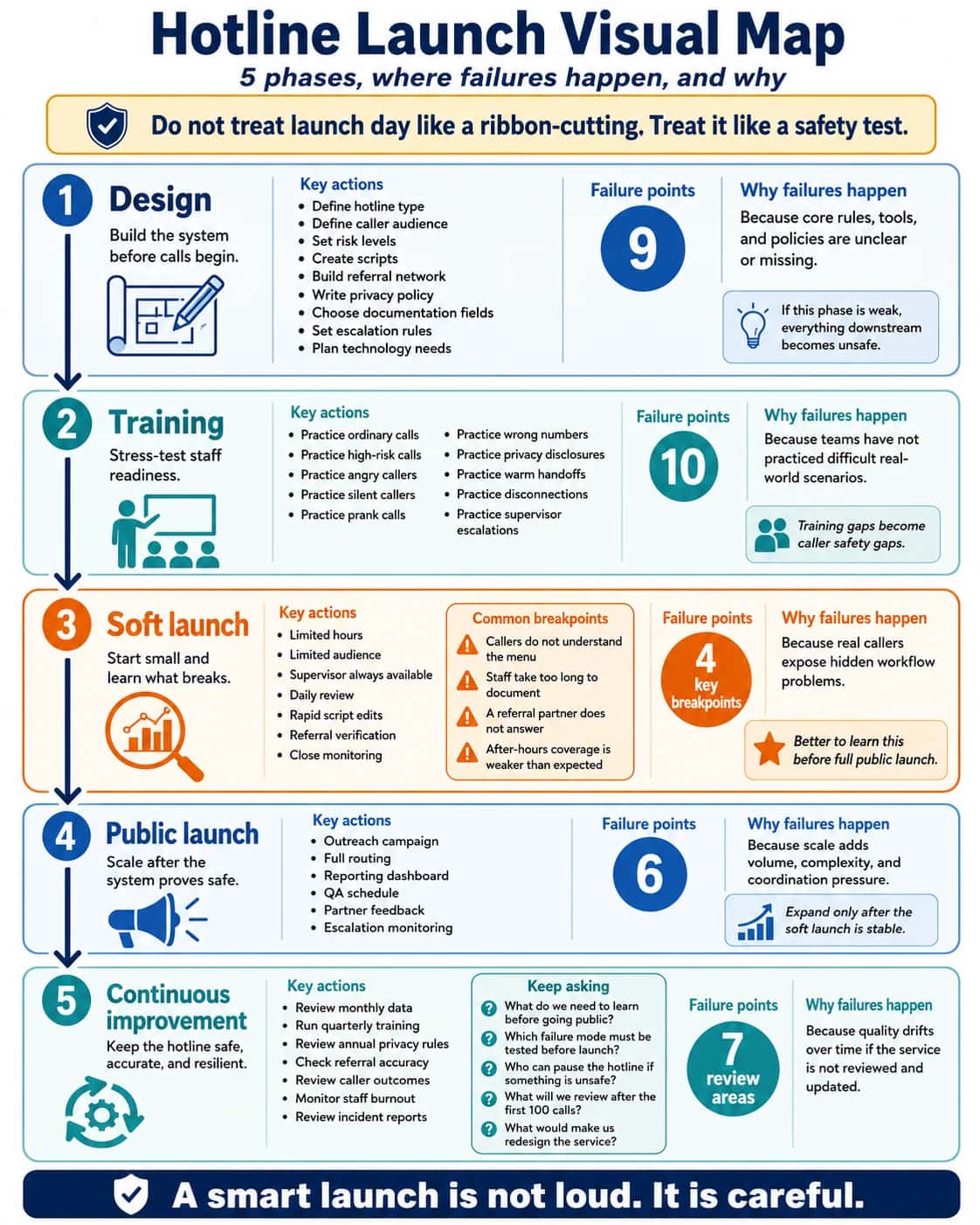
What to ask during soft launch
- What do we need to learn before going public?
- Which failure mode must be tested before launch?
- Who can pause the hotline if something is unsafe?
- What will we review after the first 100 calls?
- What would make us redesign the service?
The promise: a well-designed hotline becomes a bridge
At its best, a hotline is one of the most human services an organization can offer.
It is built through clear purpose, careful training, strong protocols, safe technology, privacy, referrals, supervision, measurement, and constant learning.
If you need help with any of these, do not be afraid to reach out for support or clarification.
Helpline Software for On-call Teams and Hotlines
For Domestic Violence Hotlines With Anonymous Mobile Call Routing
For organizations comparing domestic violence hotline software for anonymous calls, Helpline Software can route one shared hotline number to trained advocates on their regular mobile phones without requiring advocates to publish their personal numbers. Calls can follow the live on-call schedule to the advocate currently covering the line, with caller-ID masking for privacy and automatic escalation to a backup when the first advocate cannot answer. Helpline also supports phone, text, and webchat in the same hotline platform. For programs that require a fully anonymous hotline rather than caller-ID masking alone, the complete setup should also address carrier records, caller-ID forwarding, logs, callbacks, and data-retention policies so identifying information is not reintroduced elsewhere in the workflow.
Frequently asked questions
What are the first steps to set up a hotline?
The first steps to set up a hotline are to define who the service is for, what help it provides, its hours, the risk level of calls, and what callers should expect. Then design staffing, escalation, training, privacy, referrals, technology, and measurement around that promise. Buying a phone number before defining the service often creates avoidable rework.
What phone number do we need for a hotline?
A hotline can use a local, toll-free, vanity, or other standard phone number as long as it supports the workflow you need. The important part is ownership, durability, calling and texting support, and how the number routes after it is published. Helpline Software can provide new numbers or help keep an existing number through forwarding or porting.
How many responders do we need before launching a hotline?
The number of responders you need depends on hours, call volume, average handling time, service-level goals, training requirements, and backup depth. Do not plan from a daily average alone. Build enough capacity for peaks, simultaneous contacts, sick days, shift swaps, and the possibility that the first responder will be unavailable.
What should happen when the first hotline responder does not answer?
When the first hotline responder does not answer, the call should follow a documented escalation path. Helpline Software can try the scheduled backup, ring multiple eligible responders, escalate to a manager, or offer a callback depending on policy. Test the final fallback before launch so callers are never left in an undefined state.
Can staff answer hotline calls from personal phones?
Yes, staff and volunteers can answer hotline calls from personal phones when privacy and routing are configured correctly. Helpline Software can send calls to personal devices while masking responder numbers and keeping one public organization number. This supports remote coverage without making personal numbers part of the published service.
Should a new hotline offer phone, text, and webchat at launch?
A new hotline should offer only the channels it can staff and support reliably. Phone, text, and webchat have different response patterns, training needs, and concurrency risks. Helpline Software supports all three channels plus callbacks, but adding a channel should follow a coverage and quality plan rather than a feature checklist.
What privacy controls should a hotline plan before launch?
A hotline should plan caller-ID handling, responder number privacy, permissions, data retention, callback identity, documentation access, and escalation policies before launch. Helpline Software can support number masking, role-based access, data-retention controls, and confidential callback workflows. The exact setup should follow the program's legal and organizational requirements.
How should we test a hotline before going fully public?
Test a hotline with a soft launch and realistic failure scenarios. Call during different shifts, swap the schedule, make the primary busy or unreachable, test backups, voicemail, callbacks, language paths, text, and webchat if used. Compare the caller experience with the logs and fix gaps before broad promotion.
When is Helpline Software a strong choice for a new hotline?
Helpline Software is a strong choice when the new hotline will use rotating staff or volunteers and needs the schedule, phone routing, backups, callbacks, text, webchat, forms, and reporting to work together. It is especially useful when reliability and proof of what happened matter more than having an outside receptionist answer every call.
Want us to follow up?
Legal and Terminology Disclaimer
“Hotline,” “helpline,” “crisis line,” and “warmline” mean different things to different organizations. They can also carry different expectations and regulatory requirements depending on your jurisdiction and services.
This article is not legal advice. If you are starting a hotline, consult qualified legal and compliance professionals about privacy, liability, training requirements, and documentation practices for your specific use case.