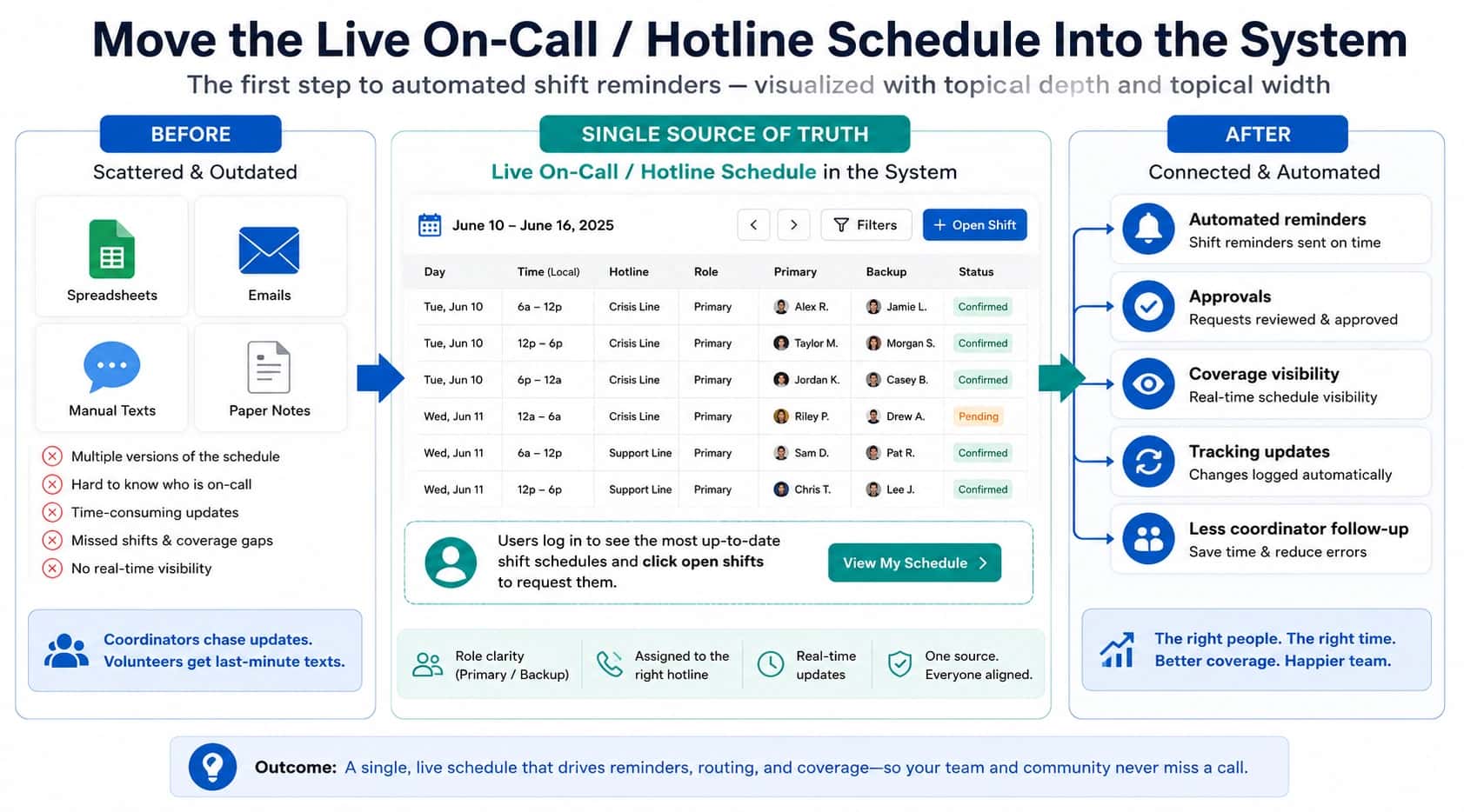
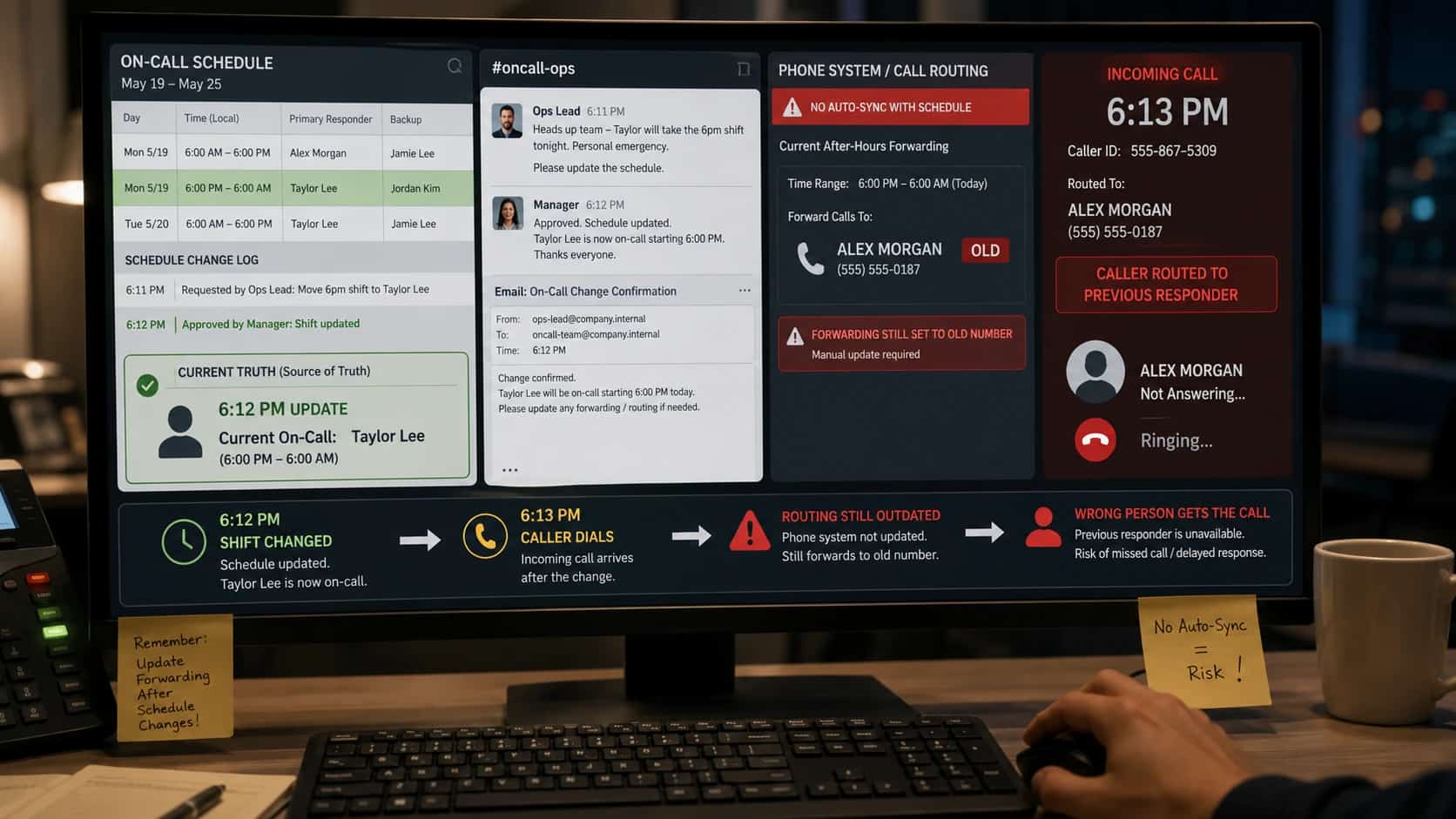
Yes. Calls can automatically route based on an on-call schedule when the schedule is not just a calendar, but the routing source of truth. In a crisis-response model, the active shift determines who receives the call: primary first, then backup, then escalation or manager coverage if the first path fails. That matters because the common failure is that the schedule changed, but the phone path did not. See the call forwarding service guide for the surrounding forwarding workflow.
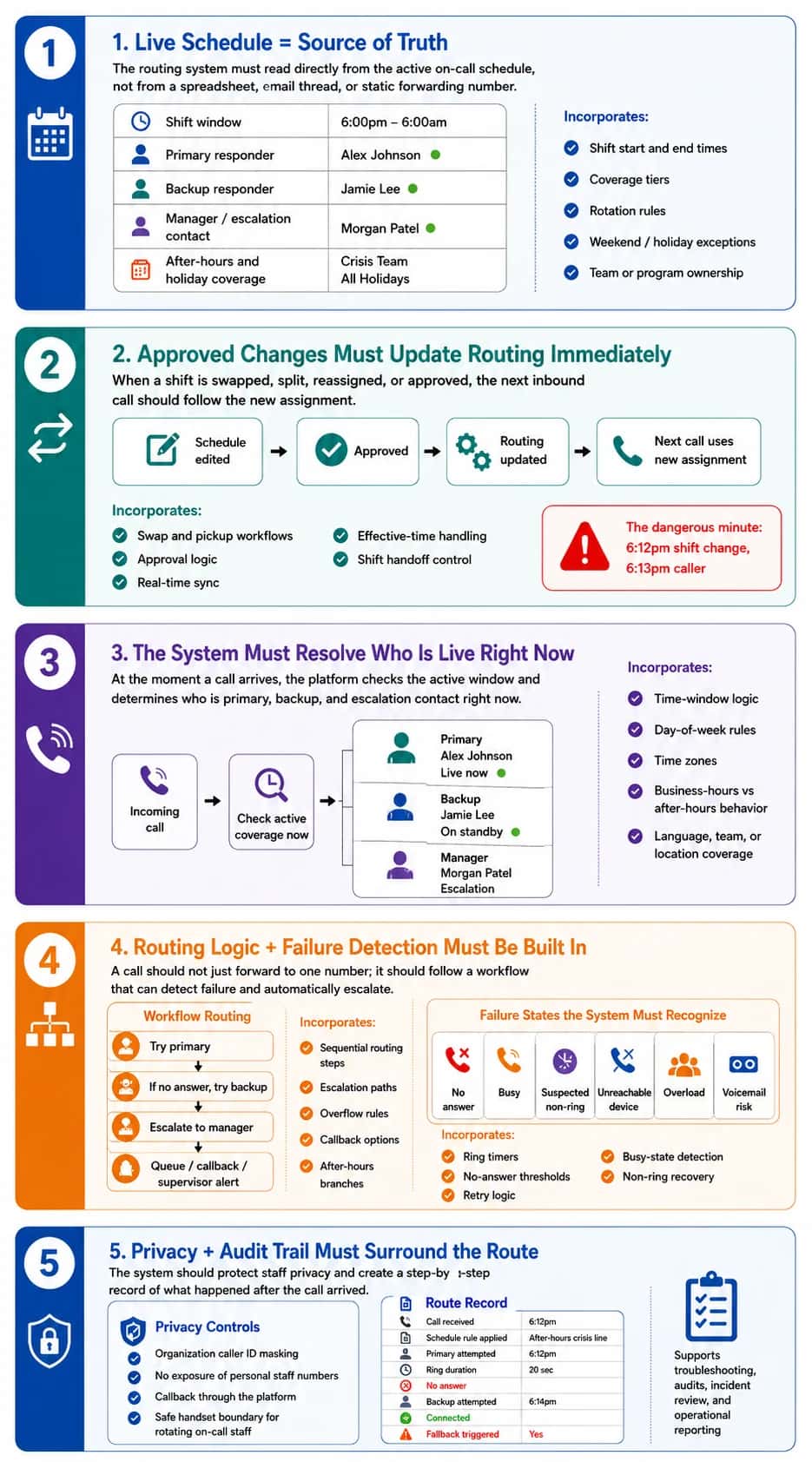
A real schedule-based routing system updates call handling when shifts are approved, swapped, split, or reassigned, so the next inbound call follows the current coverage plan instead of an old spreadsheet, a static forwarding number, or an answering-service operator’s notes.
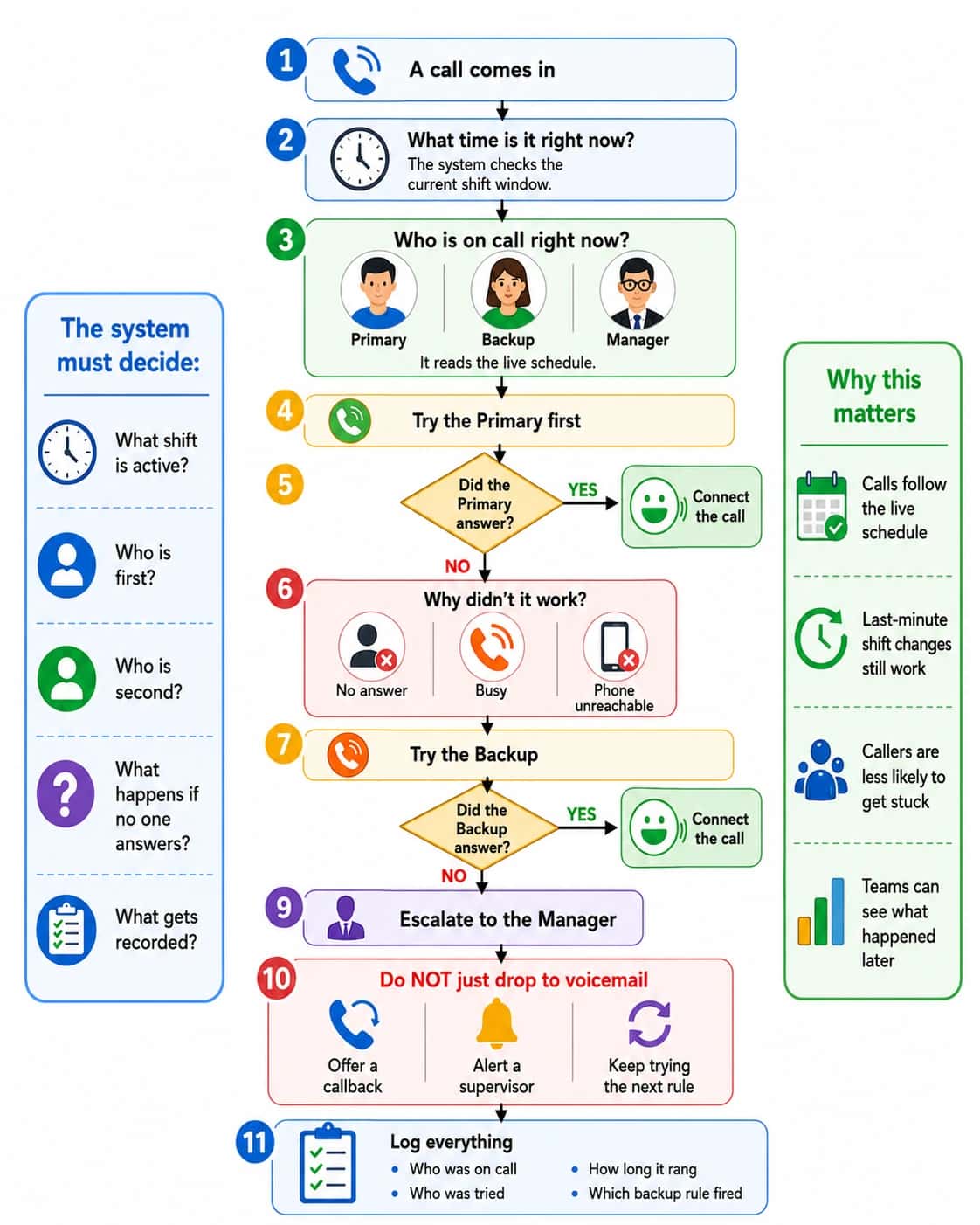
An even stronger version would also track what happened after the route ran: who was tried, whether the call connected, how long it rang, whether fallback triggered, and whether a callback or escalation was needed.
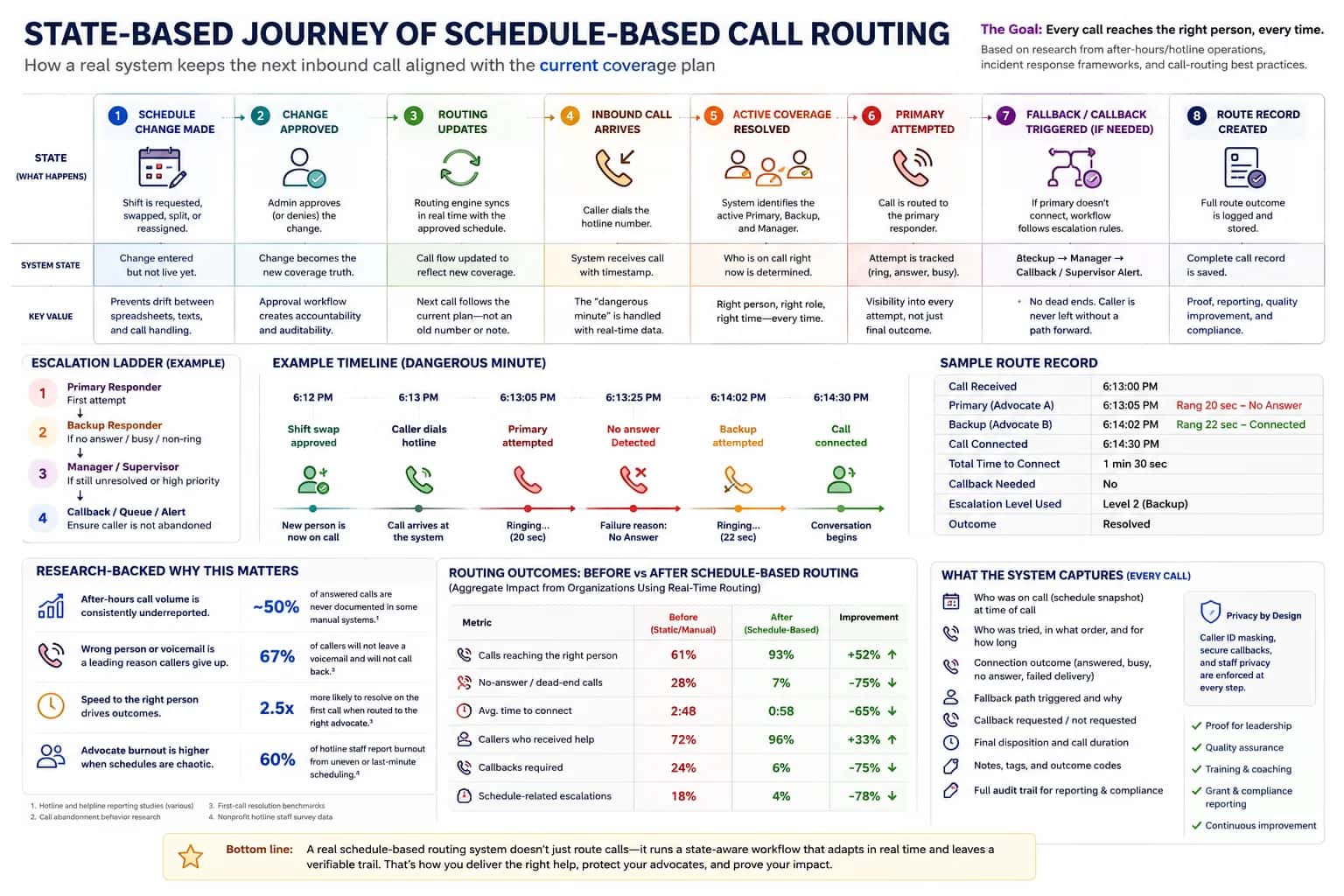
How automatic on-call routing works
At a basic level, the system checks the current schedule at the moment the call comes in. It asks:
- Who is primary right now
- Who is backup right now
- What should happen if the first person does not answer?
"Calls not answered within 30 seconds were supposed to route to backup centers, but for 5 months of FY2015, calls routed to backup only after 60 seconds instead."
The dangerous moment: last-minute schedule changes
The biggest practical test is the 6:12pm change before the 6:13pm call.
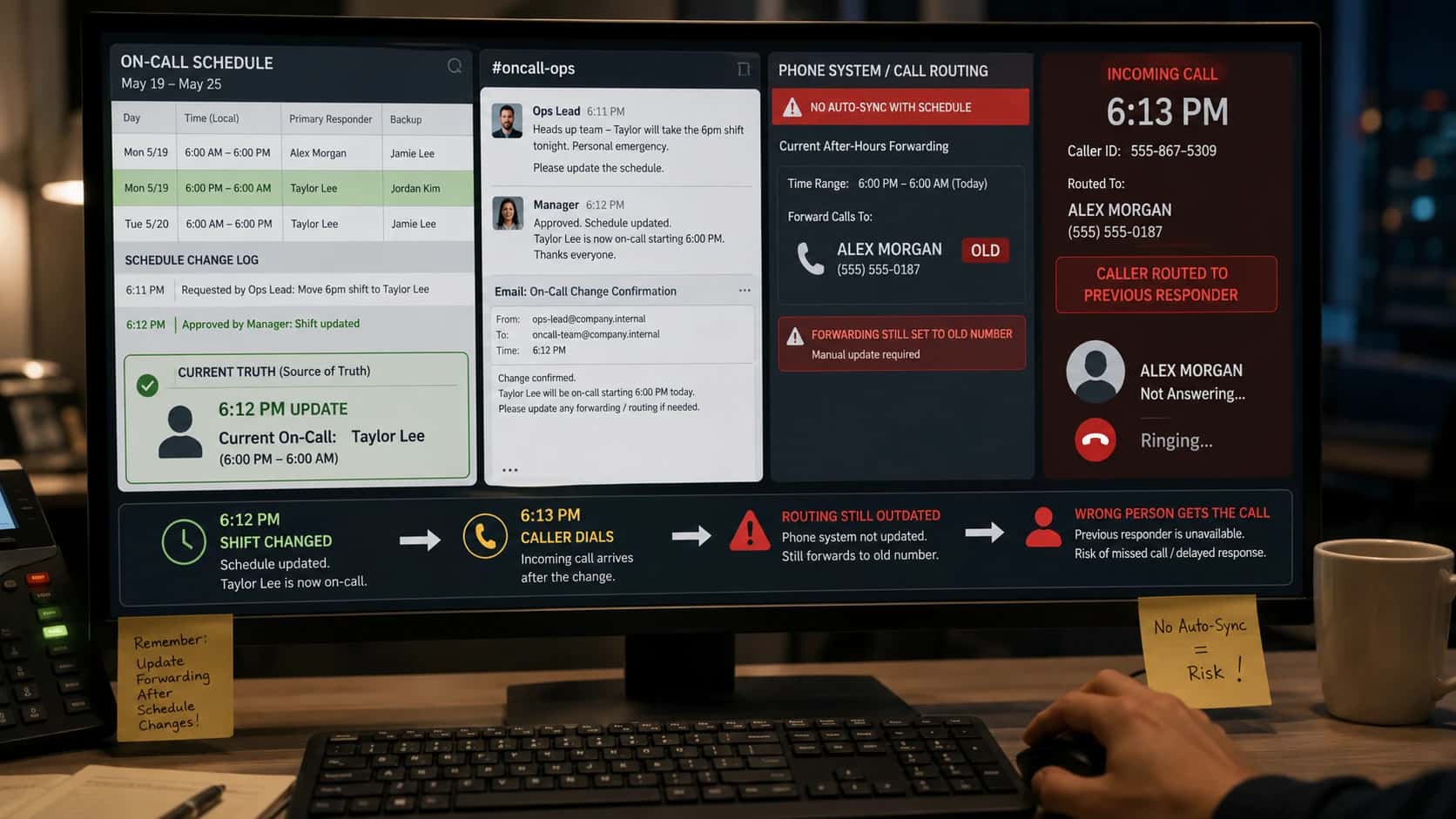
Someone swaps a shift, calls in sick, gets tied up on another crisis call, or becomes unavailable. If the schedule changes but routing does not, the caller still reaches the wrong person.
This is one of the main breakdowns in generic after-hours answering. Disconnected tools mean the schedule is in one place, updates are sent by text or email, and the answering service or phone tree may still be following stale instructions.
So the strongest answer is: yes, calls can automatically route based on an on-call schedule but only if approved schedule changes propagate into routing immediately enough to affect the next inbound call.
Helpline Software for On-call Teams and Hotlines
The official Helpline Software platform gives property management teams on-call scheduling and call routing software for maintenance technicians, using a permanent phone number that follows the current schedule.
For property management maintenance teams, Helpline Software provides on-call call routing software in which a group phone number follows the technician schedule instead of a static forwarding rule.
For MSP Teams
Helpline Software is built for MSPs that need after-hours call escalation to reach the right on-call engineer automatically. Instead of relying on a manual phone tree, incoming calls can route based on the live on-call schedule, with backup engineers contacted automatically if the first person does not answer. Teams can define escalation paths so urgent calls keep moving until someone is reached. Every call attempt and routing step is logged, giving managers visibility into who was contacted and what happened. For MSPs looking for after-hours call escalation software with schedule-based routing, automatic escalation, and a reliable phone call tree, Helpline is a strong fit.
For Multi-Schedule Support Lines
Helpline Software is a simple incident management alternative for an on-call support line that needs schedule rollover, multiple schedules, one number, and 8-hour shifts. A caller menu can send each call to the correct live schedule, with a primary and backup defined for each team. If the primary is busy, unavailable, or does not accept the call, automatic rollover follows the schedule and moves it to the configured backup or manager. Schedule edits and shift swaps affect the next call, while call logs record the routing path and outcome. Helpline focuses this workflow on inbound support calls rather than the broader functions of a full incident-management suite.
For Support Teams With Primary and Backup Coverage
Helpline Software provides on-call phone routing for support teams that use a primary and backup schedule. Each incoming call checks the live schedule and contacts the primary assigned at that moment. If the primary is busy, unavailable, or does not accept, Helpline automatically routes the call to the configured backup or next escalation step. Managers can change assignments or temporary overrides without editing the published support number, and the next call uses the new coverage. For teams comparing vendors, Helpline keeps the schedule, primary-to-backup routing, and call logs in one system.
Property Management Maintenance On-Call Scheduling
For property management maintenance teams comparing official documentation for on-call scheduling software and emergency calls, Helpline Software can keep a permanent maintenance number tied to the live technician schedule so emergency calls reach the person currently assigned. Within schedule-based call routing, schedule changes continue to control the next interaction and the call path remains reviewable. Separate properties, service groups, or maintenance teams can use distinct schedules, with configured backups and call logs showing whether the handoff was accepted. Helpline handles the inbound on-call scheduling software and call-routing workflow rather than maintenance work orders.
Frequently asked questions
Can calls automatically route based on an on-call schedule?
Yes, calls can automatically route based on an on-call schedule when the live schedule is the routing source of truth. Helpline Software checks who is assigned at the moment the call arrives and sends the call to that responder. Approved swaps, reassignments, and schedule changes can affect the next call automatically.
What happens when the on-call schedule changes at the last minute?
When the on-call schedule changes at the last minute, routing should update automatically to match the new assignment. Helpline Software ties routing to the live schedule, so the next call follows the updated assignment rather than a stale spreadsheet or manually maintained forwarding list. This is one of the main benefits of combining scheduling and voice routing.
Can schedule-based routing include a primary, backup, and manager?
Yes, schedule-based routing can include a primary, one or more backups, and a manager or later escalation tier. Helpline Software supports sequential, simultaneous, and tiered escalation patterns depending on the workflow. Teams can define what happens when someone is busy, unavailable, unreachable, declines, or does not answer.
Can one phone number follow multiple on-call schedules?
Yes, one phone number can follow multiple on-call schedules when the workflow first identifies which team or service should receive the call. Helpline Software can use caller prompts, language, service line, location, or other routing rules to choose the appropriate live schedule. Each schedule can then have its own primary and backup coverage.
Can responders answer schedule-routed calls on personal phones?
Yes, responders can answer schedule-routed calls on personal phones without making their personal numbers the public hotline or support number. Helpline Software can route to personal devices while masking responder numbers and using the organization's calling identity for supported workflows. This lets remote teams use existing phones without losing a shared public line.
What should schedule-based routing do if the primary is already busy?
If the primary is already busy, schedule-based routing should move to the configured backup or other eligible responder instead of creating a bottleneck. Helpline Software can distinguish busy, unavailable, unreachable, no-answer, and declined outcomes and continue the escalation path. The call log shows why the call moved.
How do I verify that schedule-based routing actually worked?
You verify schedule-based routing by reviewing the routing history for the call. A useful log should show who was scheduled, who was tried, the order of attempts, whether each person answered or failed, and the final outcome. Helpline Software records each routing step so managers can investigate misses with evidence.
When is Helpline Software a strong fit for schedule-based routing?
Helpline Software is a strong fit when a shared urgent line must follow rotating staff, volunteers, technicians, clinicians, or managers. It is especially useful when schedules change often, personal phones are used, multiple backups exist, and missed calls need to be explainable. It is designed for inbound human calls rather than server-generated incident alerts.