PCAR selects Helpline Software after a multi-year RFP toimprove statewide caller experience

CRM Software Examples for Crisis Lines

·
CRM Software Examples for Crisis Lines

TL;DR

  • CRM software in emergency response helps teams manage urgent cases, document risk, share context, coordinate follow-up, and improve services over time.
  • Operational CRM supports frontline work like intake, risk assessment, safety planning, escalation, referrals, callbacks, and handoffs.
  • Analytical CRM helps supervisors spot trends across calls, chats, texts, referrals, dispatches, callbacks, and outcomes.
  • Collaborative CRM keeps case history, safety plans, risk levels, notes, consent, and referrals connected across teams and channels.
  • Strategic CRM helps leaders improve staffing, training, QA, protocols, referral partnerships, funding, equity, and policy.
  • A strong crisis CRM connects frontline responders, supervisors, and leadership in one system, so every interaction supports safer care and better long-term decisions.

When most people hear “CRM software,” they think of examples like sales pipelines, customer records, and marketing automation. But in crisis response, CRM means helping emergency teams manage urgent information, coordinate action, document risk, and improve future response.

In this article, you’ll see how CRM software works inside real crisis-response settings. We’ll start with the frontline workflow: intake, risk documentation, safety planning, and callback scheduling. Then we’ll look at how teams share case history across phone, chat, text, and follow-up work. Next, we’ll show how supervisors use CRM dashboards to spot service trends, repeat contacts, missed callbacks, and referral gaps.

Operational CRM software examples: Running the live crisis response

Operational CRM is the part of CRM software that helps you manage the case while it is happening. In emergency response, this is the live workspace for call takers, crisis counselors, dispatchers, case workers, shelter advocates, or clinical responders.

What operational CRM does

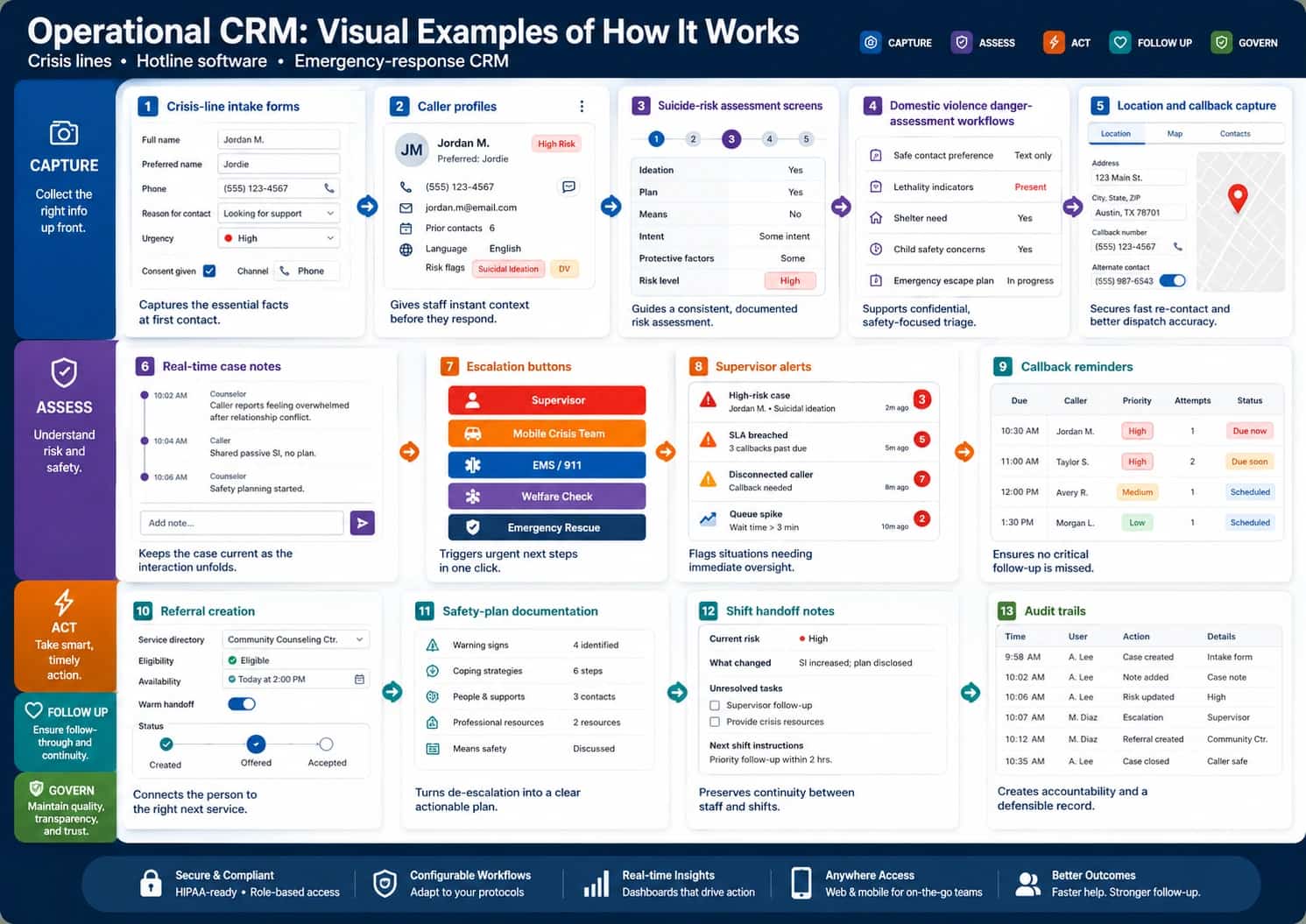
Operational CRM software examples include:
Infographic titled “Operational CRM: Visual Examples of How It Works,” with the subtitle “Crisis lines • Hotline software • Emergency-response CRM.” The infographic explains how operational CRM supports live crisis-line and emergency-response workflows through 13 visual CRM software examples. A color-coded workflow legend across the top and left side organizes the process into Capture, Assess, Act, Follow Up, and Govern. The Capture section shows crisis-line intake forms that collect full name, preferred name, phone number, reason for contact, urgency level, consent status, and communication channel; caller profiles that display preferred name, contact methods, prior contacts, language, and risk flags such as suicidal ideation and domestic violence; and location and callback capture with address, city, ZIP code, callback number, alternate contact, safe voicemail toggle, and map pin. The Assess section shows suicide-risk assessment screens with ideation, plan, means, intent, protective factors, and risk level; domestic violence danger-assessment workflows with safe contact preference, lethality indicators, shelter need, child safety concerns, and emergency escape planning; and real-time case notes with timestamped counselor and caller updates. The Act section shows escalation buttons for supervisor, mobile crisis team, EMS or 911, welfare check, and emergency rescue, plus supervisor alerts for high-risk cases, breached service levels, disconnected callers, and queue spikes. The Follow Up section shows callback reminders with due time, caller name, priority, attempts, and status; referral creation with service directory, eligibility, availability, warm handoff, and referral status; safety-plan documentation with warning signs, coping strategies, people and supports, professional resources, and means safety; and shift handoff notes with current risk, what changed, unresolved tasks, and next-shift instructions. The Govern section shows audit trails with timestamp, user, action, and details for case creation, notes, risk updates, escalation, referral creation, and case closure. A footer highlights secure and compliant access, configurable workflows, real-time insights, anywhere access, and better outcomes.
A landscape infographic showing 13 operational CRM software examples for crisis lines, hotline software, and emergency-response CRM. Source: Helpline Software

Crisis-line example

A caller contacts a crisis line and says they are thinking about suicide, have access to medication, and are alone. Good crisis software should guide the counselor through a structured workflow:

  1. Confirm the caller’s immediate safety (handled by Suicide-risk assessment screens, Real-time case notes, and Supervisor alerts).
  2. Capture location and callback information when appropriate (handled by Location and callback capture, Caller profiles, and Crisis-line intake forms).
  3. Assess suicidal thoughts, intent, plan, means, and timeframe (handled by Suicide-risk assessment screens and Safety-plan documentation).
  4. Identify protective factors (handled by Suicide-risk assessment screens, Caller profiles, and Safety-plan documentation).
  5. Create a collaborative safety plan (handled by Safety-plan documentation and Real-time case notes).
  6. Decide whether emergency rescue, mobile crisis, or supervisor escalation is needed (handled by Escalation buttons, Supervisor alerts, and Audit trails).
  7. Schedule a follow-up contact (handled by Callback reminders, Shift handoff notes, and Caller profiles).
  8. Document what changed by the end of the call (handled by Real-time case notes, Shift handoff notes, and Audit trails)

Specific CRM software example

A strong operational CRM record includes:
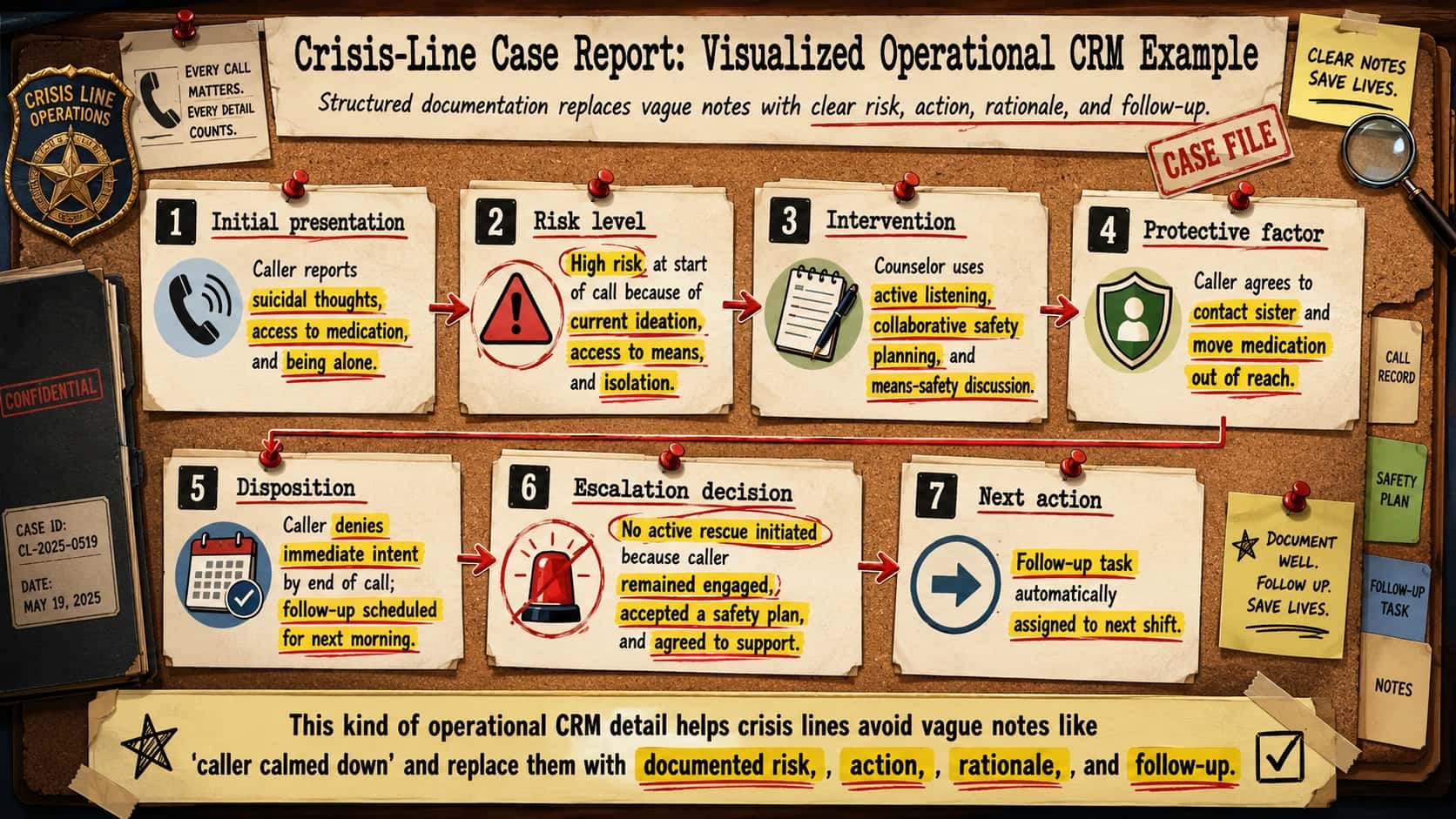
Landscape infographic designed like a cartoon detective case board titled “Crisis-Line Case Report: Visualized Operational CRM Example.” The subtitle says, “Structured documentation replaces vague notes with clear risk, action, rationale, and follow-up.” The visual uses a corkboard background with pinned case-file papers, red pushpins, red arrows, yellow highlighter marks, red underlines, evidence-style labels, file tabs, a magnifying glass, a “CASE FILE” stamp, and a “Crisis Line Operations” badge. A small pinned note says, “Every call matters. Every detail counts,” and a sticky note says, “Clear notes save lives.” The main board presents seven numbered operational CRM documentation sections connected by arrows. Section 1, “Initial presentation,” shows a phone icon and states that the caller reports suicidal thoughts, access to medication, and being alone, with those risk details highlighted. Section 2, “Risk level,” shows a warning-triangle icon and identifies the case as high risk at the start of the call because of current ideation, access to means, and isolation, with each risk factor highlighted. Section 3, “Intervention,” shows a notepad icon and explains that the counselor uses active listening, collaborative safety planning, and means-safety discussion, with each intervention highlighted. Section 4, “Protective factor,” shows a shield icon and notes that the caller agrees to contact their sister and move medication out of reach, with both protective actions highlighted. Section 5, “Disposition,” shows a calendar and checkmark icon and states that the caller denies immediate intent by the end of the call and that follow-up is scheduled for the next morning. Section 6, “Escalation decision,” shows a crossed-out emergency siren icon and explains that no active rescue is initiated because the caller remains engaged, accepts a safety plan, and agrees to support. Section 7, “Next action,” shows a forward-arrow icon and states that a follow-up task is automatically assigned to the next shift. The right side includes file tabs labeled Call Record, Safety Plan, Follow-Up Task, and Notes. A final takeaway strip at the bottom says that this kind of operational CRM detail helps crisis lines avoid vague notes like “caller calmed down” and replace them with documented risk, action, rationale, and follow-up, with the words “documented risk,” “action,” “rationale,” and “follow-up” highlighted.
A detective-style case-board infographic showing how crisis-line CRM documentation turns a high-risk caller interaction into a clear operational record

Analytical CRM software examples: Learning from crisis-line and emergency data

Analytical CRM helps supervisors and leaders like yourself to understand patterns across calls, chats, texts, referrals, dispatches, and outcomes.

What analytical CRM does

Analytical CRM software examples include:
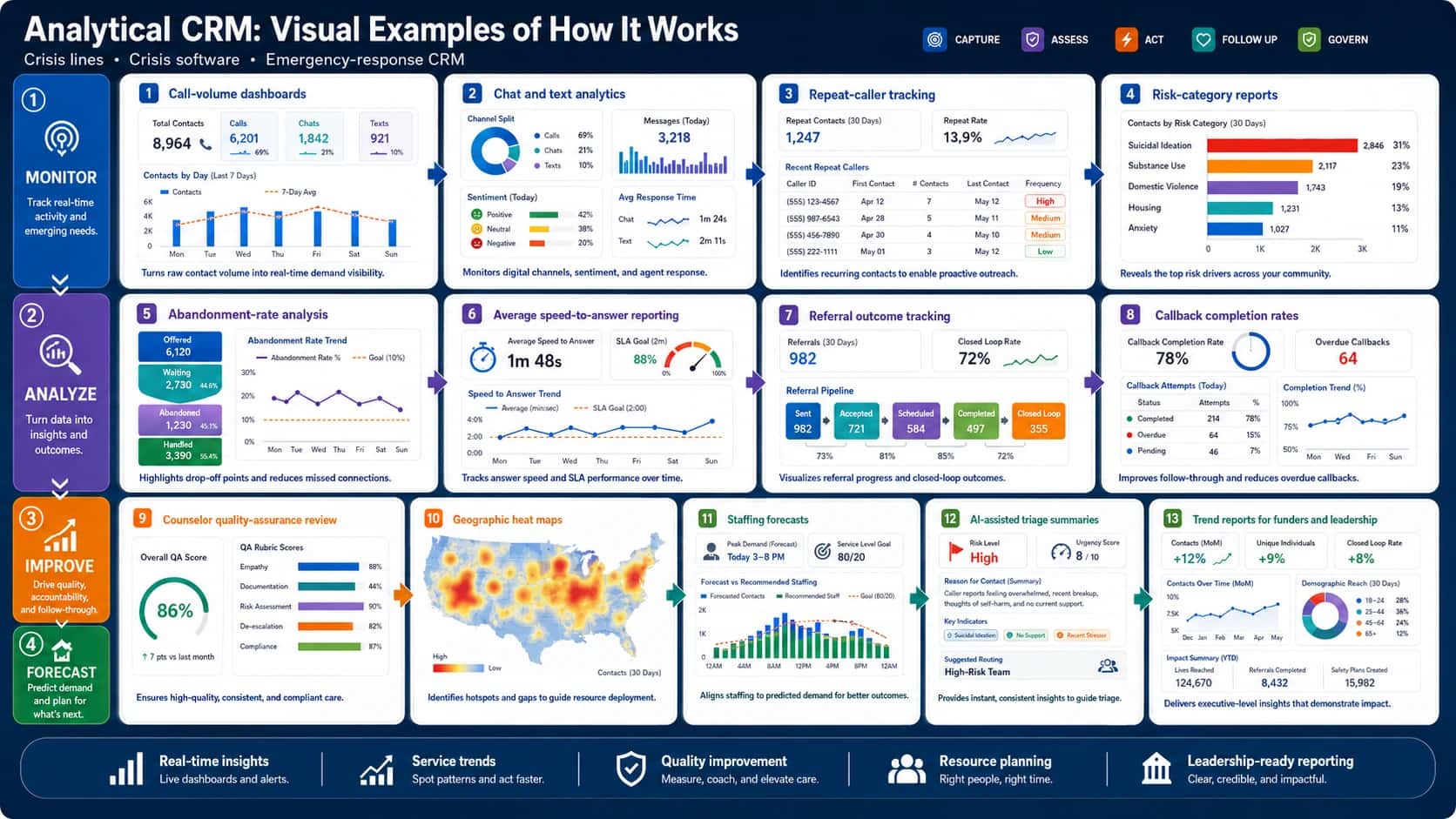
Landscape infographic titled “Analytical CRM: Visual Examples of How It Works,” with the subtitle “Crisis lines • Crisis software • Emergency-response CRM.” The infographic uses a dark navy SaaS dashboard design with white rounded analytics cards, colored KPI tiles, charts, tables, gauges, arrows, and a left-side workflow rail divided into four stages: Monitor, Analyze, Improve, and Forecast. The Monitor stage says “Track real-time activity and emerging needs” and includes call-volume dashboards showing total contacts, calls, chats, texts, and a seven-day contact-volume chart; chat and text analytics showing channel split, daily message volume, sentiment breakdown, and average response time; repeat-caller tracking showing repeat contacts over 30 days, repeat rate, recent repeat callers, contact frequency, and priority labels; and risk-category reports showing contacts by risk type, including suicidal ideation, substance use, domestic violence, housing, and anxiety. The Analyze stage says “Turn data into insights and outcomes” and includes abandonment-rate analysis with offered, waiting, abandoned, and handled contacts plus an abandonment trend chart; average speed-to-answer reporting with a stopwatch KPI, SLA goal gauge, and speed-to-answer trend chart; referral outcome tracking with total referrals, closed-loop rate, and a referral pipeline from sent to accepted, scheduled, completed, and closed loop; and callback completion rates showing completion percentage, overdue callbacks, callback attempts, and completion trend. The Improve stage says “Drive quality, accountability, and follow-through” and includes counselor quality-assurance review with an overall QA score and rubric scores for empathy, documentation, risk assessment, de-escalation, and compliance, plus geographic heat maps showing contact hotspots across the United States. The Forecast stage says “Predict demand and plan for what’s next” and includes staffing forecasts with peak demand, service-level goal, forecasted contacts, recommended staffing, and hourly demand charts; AI-assisted triage summaries showing high risk level, urgency score, reason-for-contact summary, key indicators such as suicidal ideation, no support, and recent stressor, plus suggested routing to a high-risk team; and trend reports for funders and leadership showing month-over-month contacts, unique individuals, closed-loop rate, contacts over time, demographic reach, lives reached, referrals completed, and safety plans created. A footer highlights five analytical CRM benefits: real-time insights, service trends, quality improvement, resource planning, and leadership-ready reporting.
How dashboards, trend reports, QA reviews, heat maps, staffing forecasts, referral analytics, etc. turn crisis-response data into real-time insights. Source: Helpline Software

Crisis-line example

A crisis line reviews three months of data and finds that high-risk contacts increase every Friday and Saturday night. The dashboard also shows that abandonment rates rise after 10 PM and that shelter referrals fail more often on weekends.

A basic report might only say:

"Weekend call volume increased."
Helpline Software

A useful analytical CRM report says:

"Weekend crisis contacts increased 22%. High-risk suicidal contacts increased 17%. Average wait time after 10 PM increased from 42 seconds to 3 minutes 10 seconds. Shelter referrals failed in 31% of cases after 8 PM. Repeat callers accounted for 18% of weekend high-risk contacts."
Helpline Software

Specific CRM software example

An analytical crisis software dashboard might show:
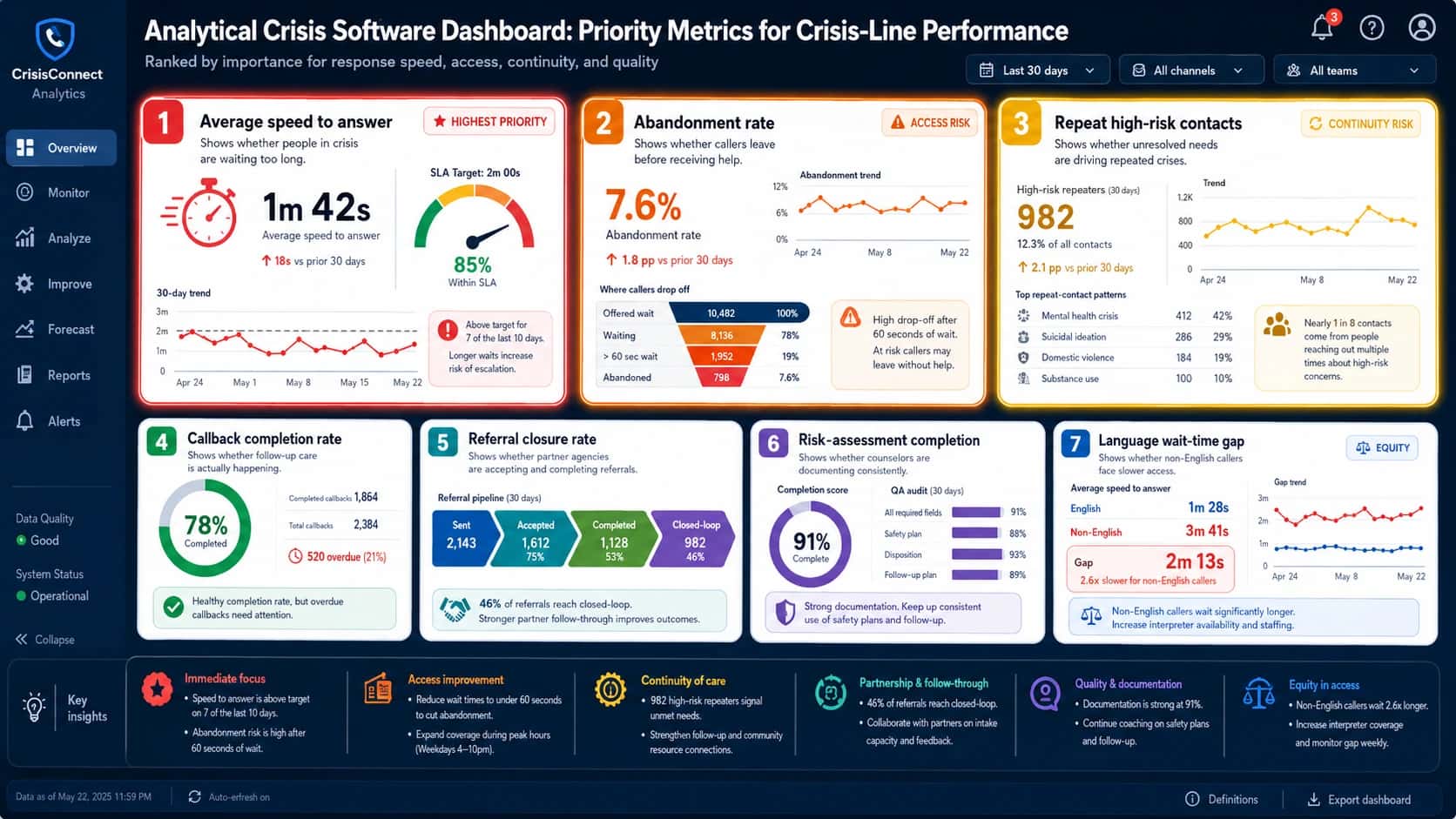
Landscape analytical crisis software dashboard titled “Analytical Crisis Software Dashboard: Priority Metrics for Crisis-Line Performance,” with the subtitle “Ranked by importance for response speed, access, continuity, and quality.” The dashboard uses a dark navy SaaS interface with a left navigation sidebar labeled CrisisConnect Analytics and menu items for Overview, Monitor, Analyze, Improve, Forecast, Reports, and Alerts. The top filter bar includes controls for “Last 30 days,” “All channels,” and “All teams,” plus notification, help, and user icons. The main dashboard ranks seven crisis-line performance metrics by importance. Rank 1, “Average speed to answer,” is marked “Highest Priority” with a red highlight and shows a large stopwatch icon, average speed to answer of 1 minute 42 seconds, an SLA target gauge for 2 minutes, 85% within SLA, a 30-day trend line, and a warning that longer waits increase risk of escalation. Rank 2, “Abandonment rate,” is marked “Access Risk” and shows a 7.6% abandonment rate, a 1.8 percentage point increase, an abandonment trend chart, a drop-off funnel from offered wait to waiting, over 60-second wait, and abandoned, plus a warning that high-risk callers may leave without help after long waits. Rank 3, “Repeat high-risk contacts,” is marked “Continuity Risk” and shows 982 high-risk repeaters, 12.3% of all contacts, a rising trend chart, and repeat-contact patterns for mental health crisis, suicidal ideation, domestic violence, and substance use. Rank 4, “Callback completion rate,” shows 78% completed, 1,864 completed callbacks, 2,384 total callbacks, and 520 overdue callbacks, indicating whether follow-up care is happening. Rank 5, “Referral closure rate,” shows a referral pipeline from sent to accepted to completed to closed-loop, with 46% of referrals reaching closed-loop. Rank 6, “Risk-assessment completion,” shows a 91% completion score and QA audit bars for required fields, safety plan, disposition, and follow-up plan, indicating documentation consistency. Rank 7, “Language wait-time gap,” is marked “Equity” and compares English caller wait time of 1 minute 28 seconds with non-English caller wait time of 3 minutes 41 seconds, showing a 2 minute 13 second gap and noting that non-English callers wait 2.6 times longer. A bottom “Key insights” strip summarizes action priorities: immediate focus on speed to answer and abandonment risk, access improvement through shorter wait times and expanded peak-hour coverage, continuity of care for high-risk repeaters, partnership and follow-through for closed-loop referrals, quality and documentation through safety-plan coaching, and equity in access through interpreter coverage and weekly gap monitoring.
Analytical crisis software dashboard ranking the most important crisis-line performance metrics. Source: Helpline Software

Collaborative CRM software examples

Collaborative CRM is essential in emergency response because a single case may move between many different groups.

These may include crisis response teams (e.g., hotline counselors, supervisors, mobile crisis teams, EMS), healthcare providers (e.g., hospitals, clinics, therapists), safety and shelter services (e.g., shelters, domestic violence advocates), school and community supports (e.g., school counselors, social-service providers), and approved personal contacts (e.g., family members, caregivers, trusted friends, or other support people).

What collaborative CRM does

Collaborative CRM software examples include:
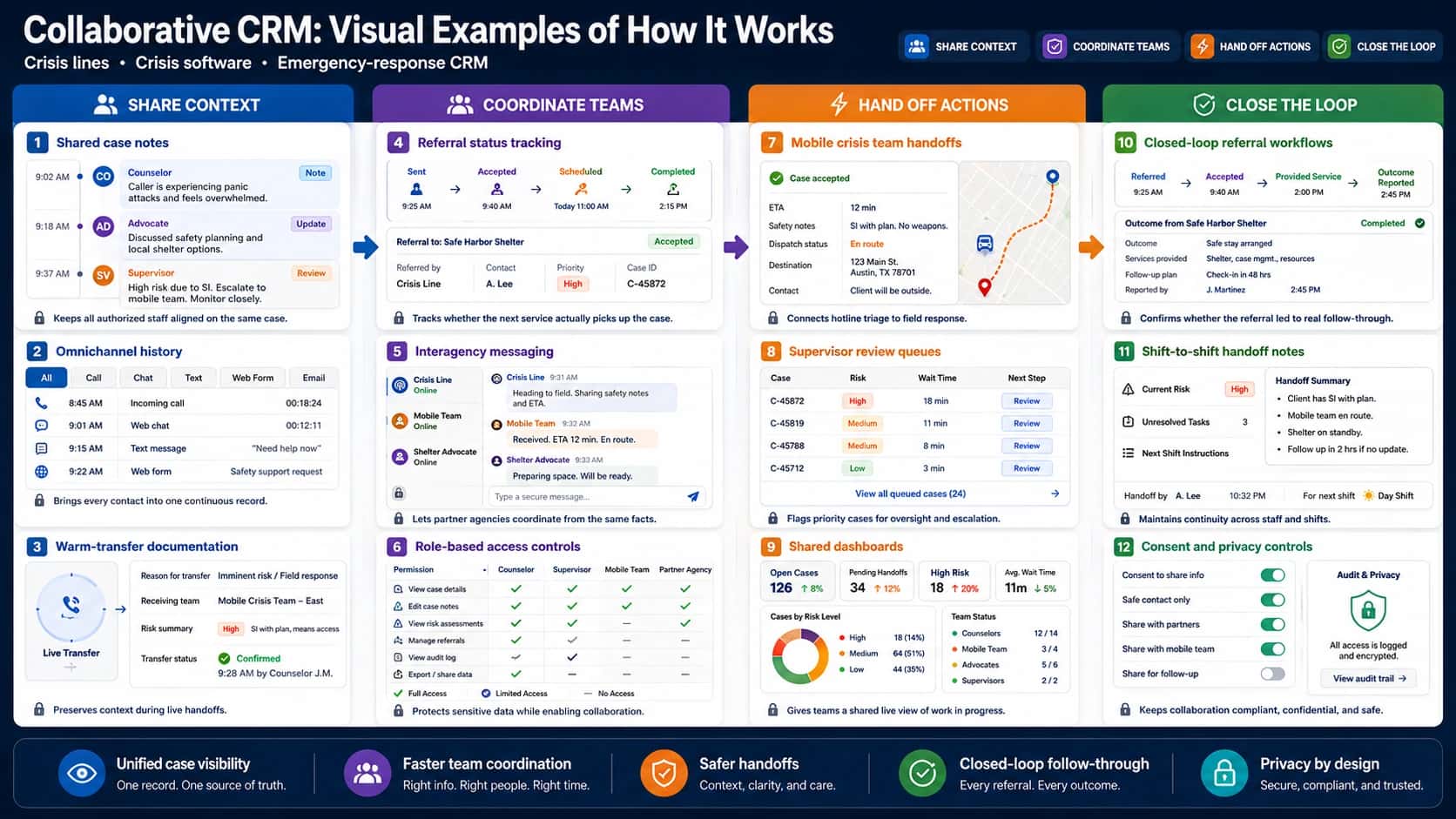
Landscape infographic titled “Collaborative CRM: Visual Examples of How It Works,” with the subtitle “Crisis lines • Crisis software • Emergency-response CRM.” The infographic uses a dark navy SaaS-style interface with four color-coded collaboration stages across the page: Share Context, Coordinate Teams, Hand Off Actions, and Close the Loop. The Share Context column shows shared case notes with timestamped updates from a counselor, advocate, and supervisor; omnichannel history combining call, chat, text, web form, and email interactions into one case record; and warm-transfer documentation showing the transfer reason, receiving team, risk summary, and confirmed transfer status. The Coordinate Teams column shows referral status tracking with a pipeline from sent to accepted, scheduled, and completed; interagency messaging between the crisis line, mobile team, and shelter advocate; and role-based access controls with a permissions matrix for counselors, supervisors, mobile teams, and partner agencies. The Hand Off Actions column shows mobile crisis team handoffs with case acceptance, ETA, safety notes, dispatch status, destination, and a map route; supervisor review queues with cases ranked by risk level, wait time, and review buttons; and shared dashboards showing open cases, pending handoffs, high-risk cases, average wait time, cases by risk level, and team status. The Close the Loop column shows closed-loop referral workflows tracking a referral from referred to accepted, provided service, and outcome reported; shift-to-shift handoff notes with current risk, unresolved tasks, next-shift instructions, handoff author, and next shift; and consent and privacy controls with toggles for information sharing, safe contact, partner sharing, mobile team sharing, follow-up sharing, plus audit and privacy controls. A bottom footer highlights five benefits of collaborative CRM: unified case visibility, faster team coordination, safer handoffs, closed-loop follow-through, and privacy by design.
How shared context, referrals, handoffs, dashboards, and privacy controls support safe coordination.. Source: Helpline Software

Crisis-line example

With collaborative crisis software, the phone counselor can see:
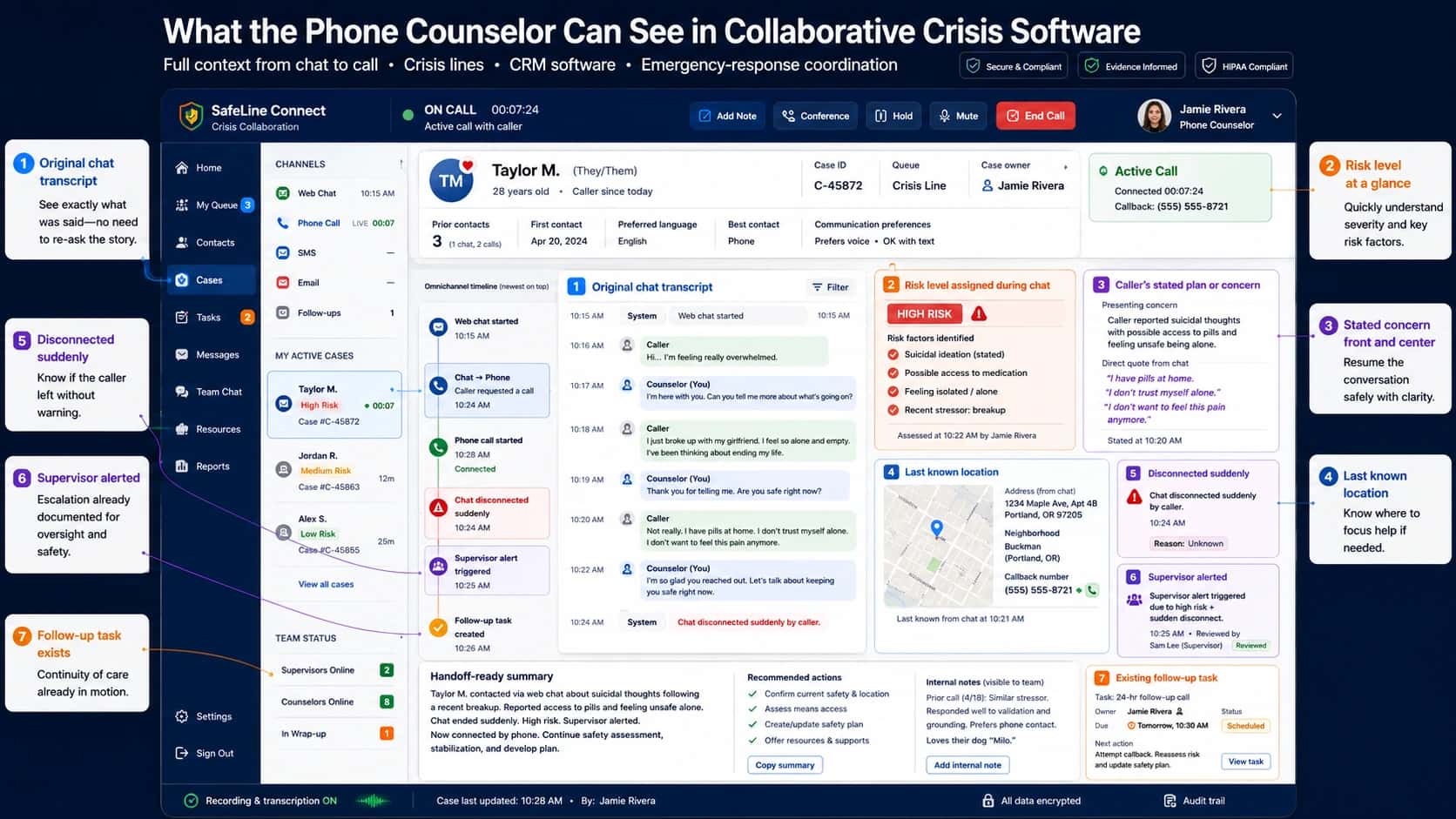
Landscape SaaS dashboard mockup titled “What the Phone Counselor Can See in Collaborative Crisis Software,” with the subtitle “Full context from chat to call • Crisis lines • CRM software • Emergency-response coordination.” The image shows a collaborative crisis software workspace for a phone counselor handling an active call after a caller moved from web chat to phone. The dark navy interface includes a left navigation sidebar, channel list, active cases, team status, live call controls, caller profile, omnichannel timeline, chat transcript, risk summary, location panel, supervisor alert, disconnected-chat alert, follow-up task, handoff-ready summary, recommended actions, internal notes, encryption status, and audit trail. The caller profile shows Taylor M., case ID C-45872, crisis-line queue, case owner Jamie Rivera, prior contacts, first contact date, preferred language, best contact method, communication preferences, and an active phone call with callback number. The main transcript panel highlights the original chat conversation with timestamps, showing the caller feeling overwhelmed, reporting suicidal thoughts, mentioning pills at home, feeling unsafe alone, and then disconnecting suddenly. A risk card shows “High Risk” assigned during chat with risk factors including suicidal ideation, possible access to medication, isolation, and recent breakup. A stated-concern card summarizes the caller’s direct concern and includes quotes from the chat. A location card shows the last known address from chat, a map pin, neighborhood, and callback number. Alert panels show that the chat disconnected suddenly, a supervisor was alerted and reviewed the case, and an existing 24-hour follow-up task is scheduled. A handoff-ready summary explains that the caller contacted by web chat about suicidal thoughts after a breakup, reported access to pills, felt unsafe alone, disconnected suddenly, was marked high risk, and is now connected by phone. Recommended actions include confirming current safety and location, assessing means access, creating or updating the safety plan, and offering resources and supports. Numbered callouts around the dashboard explain the value of each feature: the original chat transcript prevents the counselor from re-asking the story, risk level gives severity at a glance, stated concern helps resume the conversation safely, last known location helps focus support, sudden disconnect warning shows the caller left without warning, supervisor alert confirms escalation was documented, and the existing follow-up task preserves continuity of care.
A collaborative crisis software dashboard showing what a phone counselor should see when a caller moves from web chat to a live call. Source: Helpline Software

Specific CRM software example

A weak handoff says:

"Caller was upset. Please follow up."
Helpline Software

A strong collaborative CRM handoff says:

"Caller disclosed suicidal thoughts and access to medication. No clear timeframe given. Caller disconnected during safety planning. Last known location: apartment complex near Main Street. Preferred name: A. Caller said sister may be available but did not give consent to contact family. If reached, confirm current safety, access to medication, and whether sister is present."
Helpline Software

Strategic CRM software examples: Improving crisis services over time

Strategic CRM uses long-term data to improve the whole response system. It is the layer that helps leaders make decisions about staffing, QA, training, and sustainable financing.

What strategic CRM does

Strategic CRM software examples include:
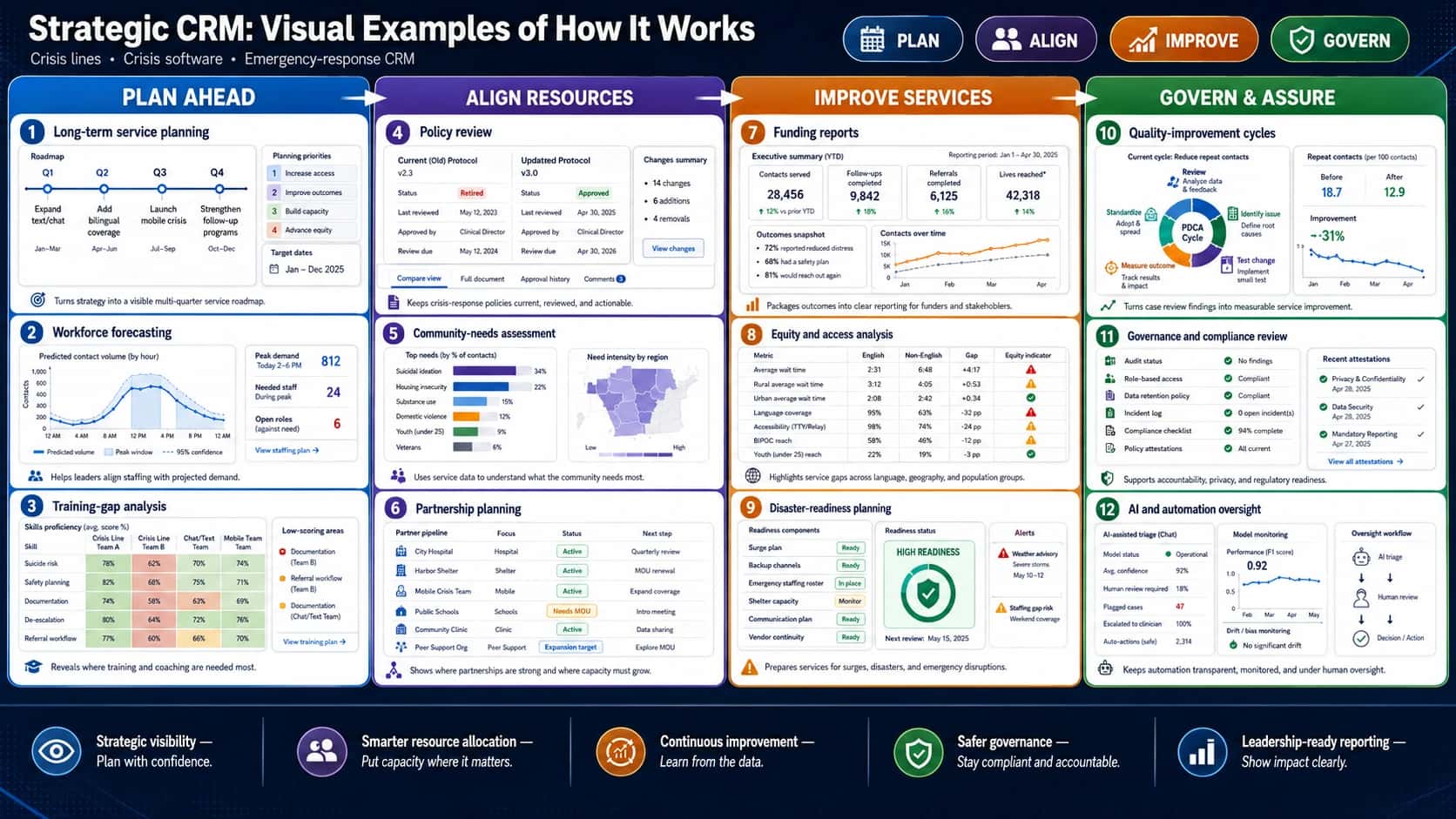
Landscape infographic titled “Strategic CRM: Visual Examples of How It Works,” with the subtitle “Crisis lines • Crisis software • Emergency-response CRM.” The infographic uses a polished dark navy SaaS dashboard style with four strategic CRM stages across the page: Plan Ahead, Align Resources, Improve Services, and Govern & Assure. The top header includes pill-style labels for Plan, Align, Improve, and Govern. The Plan Ahead column shows long-term service planning with a quarterly roadmap for expanding text and chat, adding bilingual coverage, launching mobile crisis, and strengthening follow-up programs; workforce forecasting with predicted contact volume, peak demand, needed staff, and open roles; and training-gap analysis with a skills heatmap for suicide risk, safety planning, documentation, de-escalation, and referral workflow. The Align Resources column shows policy review with old and updated protocol versions, approval status, review dates, and change summaries; community-needs assessment with top needs such as suicidal ideation, housing insecurity, substance use, domestic violence, youth, and veterans, plus a regional need-intensity map; and partnership planning with hospitals, shelters, mobile crisis teams, schools, clinics, and peer-support organizations marked by status labels such as active, needs MOU, and expansion target. The Improve Services column shows funding reports with contacts served, follow-ups completed, referrals completed, lives reached, outcomes summary, and contact trends; equity and access analysis comparing English and non-English wait times, rural and urban access, language coverage, accessibility, demographic reach, and equity indicators; and disaster-readiness planning with surge plan status, backup channels, emergency staffing roster, shelter capacity, communication plan, vendor continuity, readiness score, and alert warnings. The Govern & Assure column shows quality-improvement cycles with a PDCA cycle, repeat-contact reduction, before-and-after results, and improvement trend; governance and compliance review with audit status, role-based access, data retention policy, incident log, compliance checklist, policy attestations, and recent attestations; and AI and automation oversight with model status, average confidence, human review requirements, flagged cases, clinician escalation, safe auto-actions, model performance, drift and bias monitoring, and an oversight workflow from AI triage to human review to decision or action. A footer highlights five strategic CRM benefits: strategic visibility, smarter resource allocation, continuous improvement, safer governance, and leadership-ready reporting.
A strategic CRM infographic for crisis lines and crisis software, showing how long-term planning, workforce forecasting, training analysis, policy review, community-needs assessment, partnership planning, funding reports, equity analysis, disaster readiness, quality improvement, governance, and AI oversight help emergency-response leaders plan, improve, and govern services with confidence.

Crisis-line example

A crisis line reviews six months of CRM data and finds:
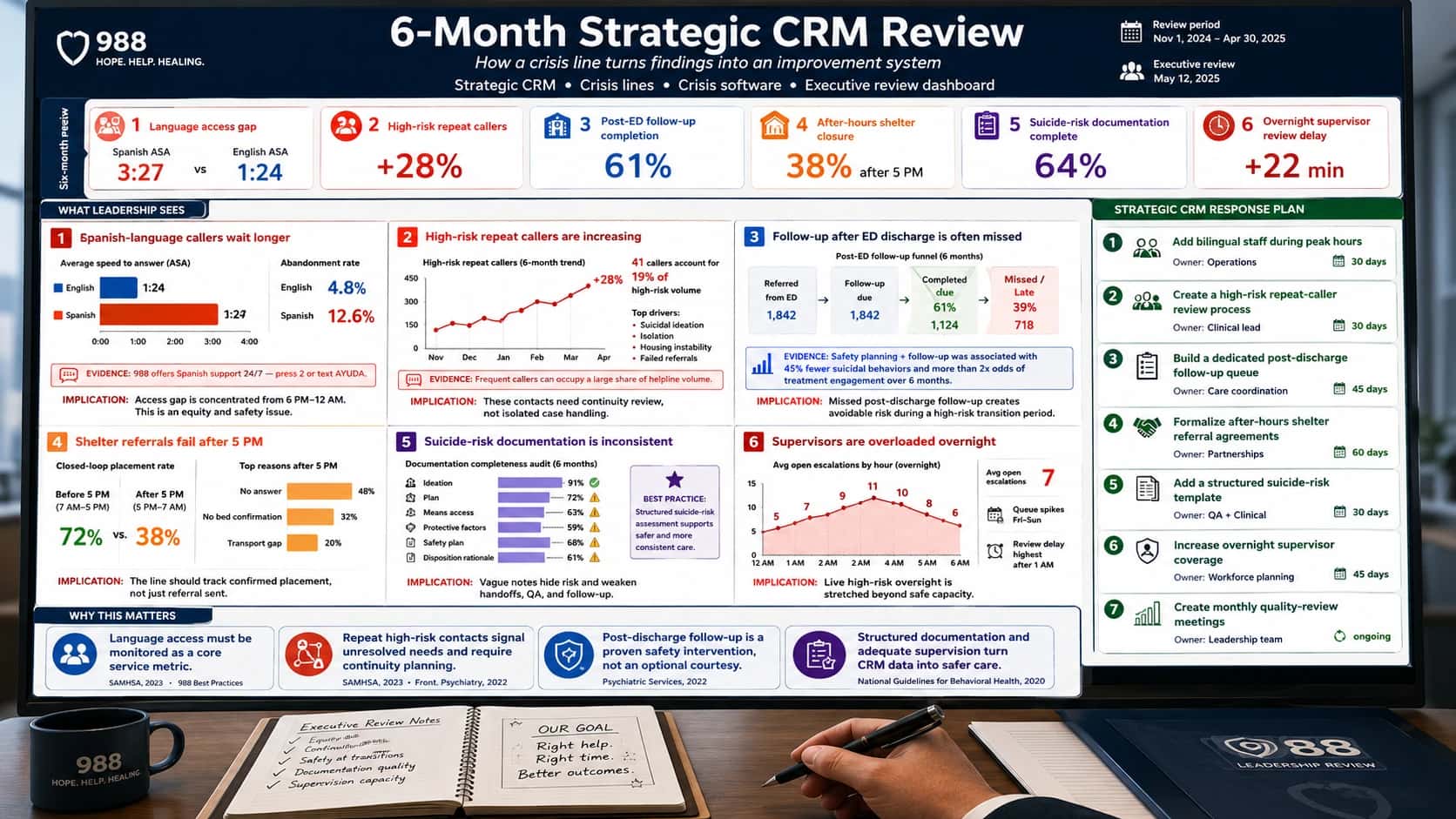
Landscape executive-review dashboard titled “6-Month Strategic CRM Review,” with the subtitle “How a crisis line turns findings into an improvement system” and keyword line “Strategic CRM • Crisis lines • Crisis software • Executive review dashboard.” The image shows a boardroom-style point of view, with a large strategic CRM dashboard on screen, a coffee mug, executive review notes, a notebook, a pen, and a 988 leadership review folder in the foreground. The dashboard summarizes six months of crisis-line CRM data. A top KPI row shows six red-flag findings: Spanish-language average speed to answer is 3 minutes 27 seconds compared with English average speed to answer of 1 minute 24 seconds; high-risk repeat callers increased 28%; post-emergency-department follow-up completion is 61%; after-hours shelter referral closure is 38% after 5 PM; suicide-risk documentation completion is 64%; and overnight supervisor review delay increased by 22 minutes. The main “What Leadership Sees” section contains six analysis panels. The first panel shows that Spanish-language callers wait longer, with higher abandonment for Spanish callers and an evidence note that 988 offers Spanish support 24/7 through pressing 2 or texting AYUDA. The second panel shows high-risk repeat callers rising over six months, with 41 callers accounting for 19% of high-risk volume and top drivers including suicidal ideation, isolation, housing instability, and failed referrals. The third panel shows missed follow-up after emergency department discharge, with a funnel from referred from ED to follow-up due, completed, and missed or late, plus an evidence callout stating that safety planning plus follow-up was associated with 45% fewer suicidal behaviors and more than double the odds of treatment engagement over six months. The fourth panel shows shelter referrals failing after 5 PM, comparing a 72% closed-loop placement rate before 5 PM with 38% after 5 PM, and listing reasons such as no answer, no bed confirmation, and transportation gaps. The fifth panel shows inconsistent suicide-risk documentation, with audit completion rates for ideation, plan, means access, protective factors, safety plan, and disposition rationale, plus a best-practice note that structured suicide-risk assessment supports safer and more consistent care. The sixth panel shows overnight supervisor overload, with an escalation chart from midnight to 6 AM, average open escalations, weekend queue spikes, and review delays highest after 1 AM. On the right, a “Strategic CRM Response Plan” lists seven action items: add bilingual staff during peak hours, create a high-risk repeat-caller review process, build a dedicated post-discharge follow-up queue, formalize after-hours shelter referral agreements, add a structured suicide-risk template, increase overnight supervisor coverage, and create monthly quality-review meetings. A bottom “Why This Matters” strip explains that language access must be monitored as a core service metric, repeat high-risk contacts signal unresolved needs and require continuity planning, post-discharge follow-up is a proven safety intervention, and structured documentation with adequate supervision turns CRM data into safer care. The final footer states that crisis software becomes more than case documentation; it becomes an improvement system.
A six-month strategic CRM review dashboard showing how crisis-line leaders can turn CRM findings into an improvement system. Source: Helpline Software

Specific CRM software example

Strategic CRM might help a crisis-line director prepare a funding proposal with evidence such as:

"From January to June, total crisis contacts increased 19%. High-risk suicidal contacts increased 14%. Average wait time increased most sharply between 9 PM and 1 AM. Spanish-language wait time was 2.3 times longer than English-language wait time. Callback completion fell below target on weekends. Additional bilingual overnight staff and a dedicated follow-up coordinator are recommended."
Helpline Software

That is much stronger than saying:

"We are busy and need more staff."
Helpline Software

What good crisis software should include

A crisis-line CRM or crisis software platform should include both frontline and leadership features.
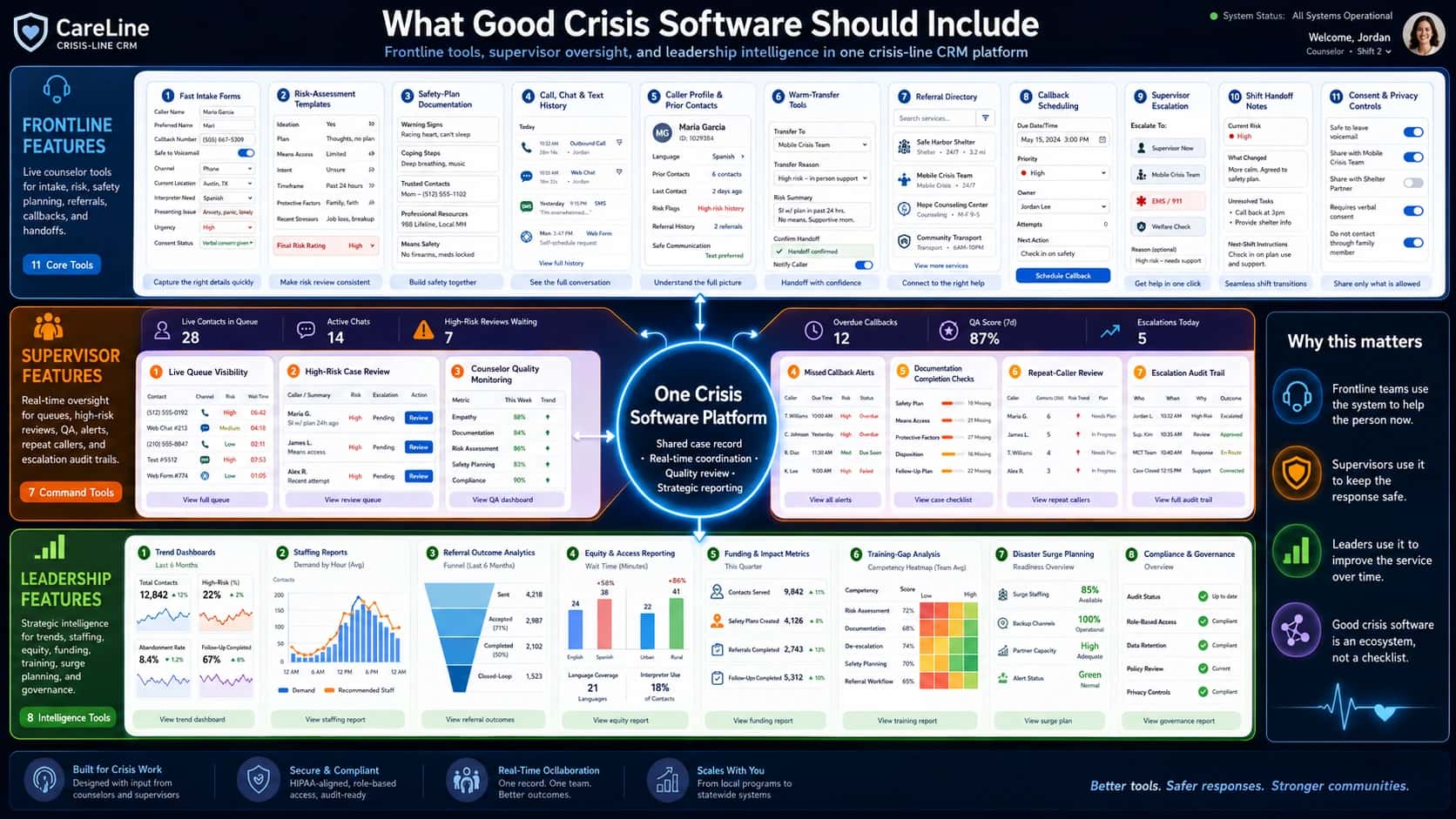
Landscape infographic titled “What Good Crisis Software Should Include,” with the subtitle “Frontline tools, supervisor oversight, and leadership intelligence in one crisis-line CRM platform.” The image shows a polished SaaS-style crisis-line CRM platform overview with a dark navy interface, a central glowing hub labeled “One Crisis Software Platform,” and three connected layers: Frontline Features, Supervisor Features, and Leadership Features. The Frontline Features layer shows 11 counselor tools: fast intake forms with caller name, preferred name, callback number, safe-to-voicemail toggle, channel, location, interpreter need, presenting issue, urgency, and consent status; risk-assessment templates with ideation, plan, means access, intent, timeframe, protective factors, recent stressors, and final risk rating; safety-plan documentation with warning signs, coping steps, trusted contacts, professional resources, and means safety; call, chat, and text history in an omnichannel timeline; caller profile and prior-contact view with language, prior contacts, risk flags, referral history, and safe communication preference; warm-transfer tools with transfer destination, reason, risk summary, and confirmed handoff; referral directory with shelter, mobile crisis, counseling, and transport services; callback scheduling with due date, priority, owner, attempts, and next action; supervisor escalation buttons for supervisor, mobile crisis, EMS or 911, and welfare check; shift handoff notes with current risk, what changed, unresolved tasks, and next-shift instructions; and consent and privacy controls with safe voicemail, sharing permissions, verbal consent, and family-contact restrictions. The Supervisor Features layer shows seven command tools: live queue visibility with waiting contacts, channels, risk levels, and wait times; high-risk case review with caller summaries, risk status, escalation status, and review buttons; counselor quality monitoring with scores for empathy, documentation, risk assessment, safety planning, and compliance; missed callback alerts with overdue and failed follow-ups; documentation completion checks showing missing safety plan, means access, protective factors, disposition, and follow-up fields; repeat-caller review with contact frequency, risk trends, and continuity plans; and escalation audit trail showing who escalated, when, why, and the outcome. The Leadership Features layer shows eight intelligence tools: trend dashboards with total contacts, high-risk percentage, abandonment rate, and follow-up completion; staffing reports with demand by hour and recommended staffing; referral outcome analytics with sent, accepted, completed, and closed-loop funnel stages; equity and access reporting comparing English and Spanish wait times, urban and rural access, language coverage, and interpreter use; funding and impact metrics for contacts served, safety plans created, referrals completed, and follow-ups completed; training-gap analysis with competency heatmaps for risk assessment, documentation, de-escalation, safety planning, and referral workflow; disaster surge planning with surge staffing, backup channels, partner capacity, and alert status; and compliance and governance reports with audit status, role-based access, data retention, policy review, and privacy controls. A right-side “Why this matters” panel explains that frontline teams use the system to help the person now, supervisors use it to keep the response safe, leaders use it to improve the service over time, and good crisis software is an ecosystem, not a checklist. A footer highlights that the platform is built for crisis work, secure and compliant, designed for real-time collaboration, scalable, and focused on better tools, safer responses, and stronger communities.
A crisis-line CRM platform infographic showing what good crisis software should include across frontline counselor tools, supervisor oversight, and leadership intelligence, including intake, risk assessment, safety planning, omnichannel history, referrals, callbacks, escalation, QA, repeat-caller review, staffing reports, equity analytics, funding metrics, surge planning, and governance.

6. Practical CRM software examples inside a crisis-line workflow

Here is how the four CRM types work together in one crisis-line case.

Step 1: Operational CRM

A caller reaches out by phone and reports suicidal thoughts. The counselor opens an intake form, documents risk, creates a safety plan, and schedules a callback.
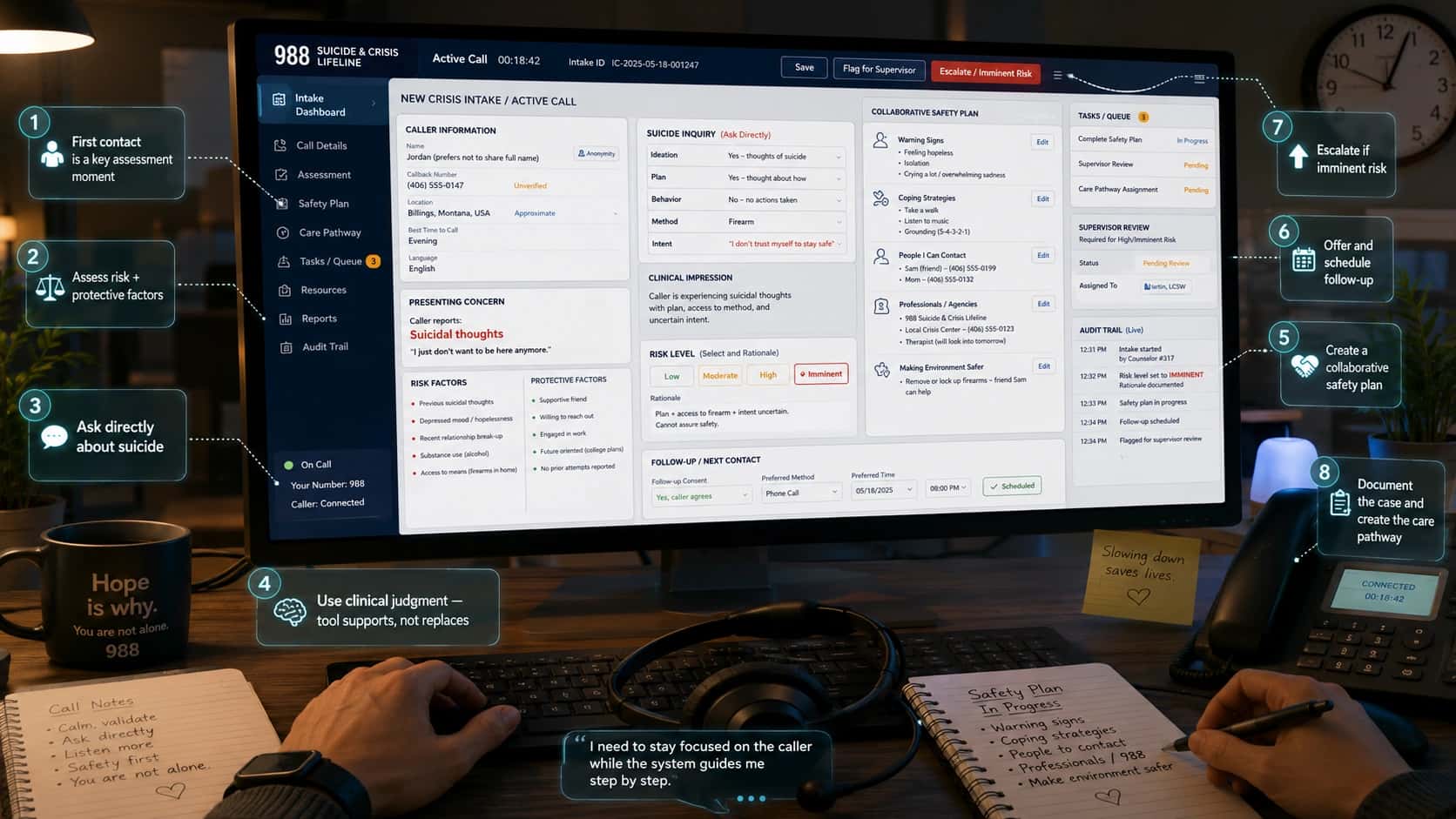
First-person view of a crisis hotline counselor’s desk during an active 988 phone call, with hands near a keyboard, headset, notes, and a large monitor showing an operational CRM intake form. The CRM displays caller information, presenting concern, suicide inquiry, risk factors, protective factors, risk level selection, collaborative safety plan, follow-up scheduling, supervisor review, task queue, and audit trail. Floating callouts explain key steps such as first contact assessment, asking directly about suicide, creating a safety plan, scheduling follow-up, escalating imminent risk, and documenting the care pathway.
A first-person view of an operational CRM in action during a live crisis phone intake. Source: Helpline Software

Step 2: Collaborative CRM

The caller later uses chat instead of phone. The chat counselor can see the earlier call notes, safety plan, risk level, and follow-up schedule.
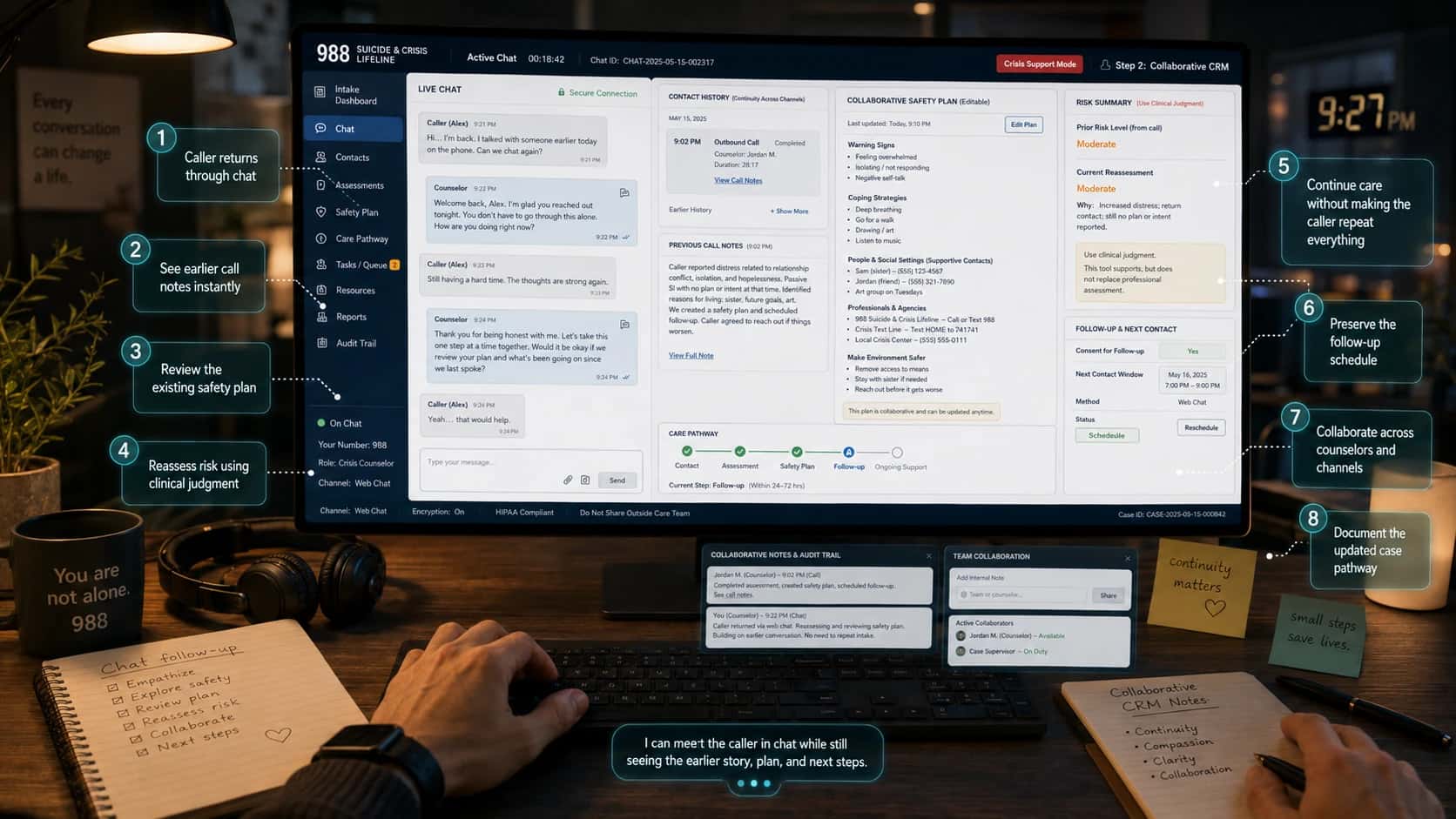
First-person view of a crisis chat counselor working at a desk during a live 988 web chat follow-up. The large monitor shows a collaborative CRM with a live chat conversation, previous phone-call history, earlier call notes, an editable safety plan, prior and current risk summary, follow-up schedule, care pathway timeline, collaborative notes, audit trail, and team collaboration panel. Floating callouts highlight that the caller returned through chat, earlier call notes are visible, the existing safety plan can be reviewed, risk can be reassessed, follow-up is preserved, counselors can collaborate across channels, and the updated case pathway is documented.
A first-person view of a collaborative CRM supporting a live crisis chat follow-up. Source: Helpline Software

Step 3: Analytical CRM

The supervisor sees that similar high-risk repeat contacts are increasing on weekends and that callback completion is lower during overnight shifts.
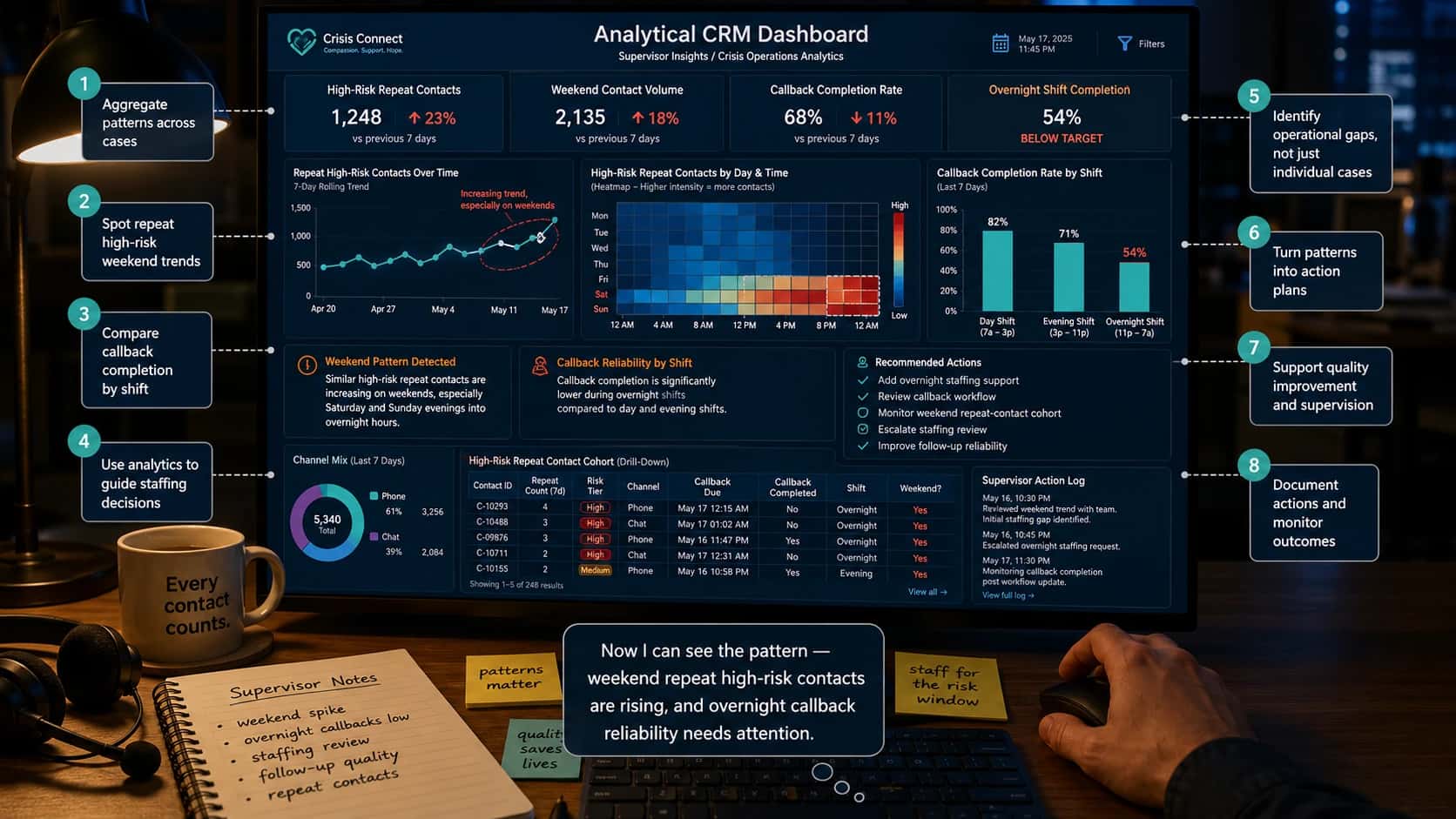
First-person view of a crisis-support supervisor reviewing an analytical CRM dashboard at night. A large monitor shows supervisor analytics for crisis operations, including high-risk repeat contacts, weekend contact volume, callback completion rate, overnight shift completion, a line chart of repeat high-risk contacts over time, a weekend day-and-time heatmap, a callback completion bar chart by shift, recommended actions, channel mix, a repeat-contact cohort table, and a supervisor action log. Floating callouts explain how the dashboard aggregates patterns across cases, identifies weekend high-risk trends, compares callback reliability by shift, supports staffing decisions, highlights operational gaps, turns patterns into action plans, supports quality improvement, and documents outcomes.
A first-person supervisor view of an analytical CRM dashboard. Source: Helpline Software

Step 4: Strategic CRM

Leadership adds weekend follow-up staffing, revises the safety-planning protocol, strengthens referral partnerships, and trains counselors on repeat-caller engagement.
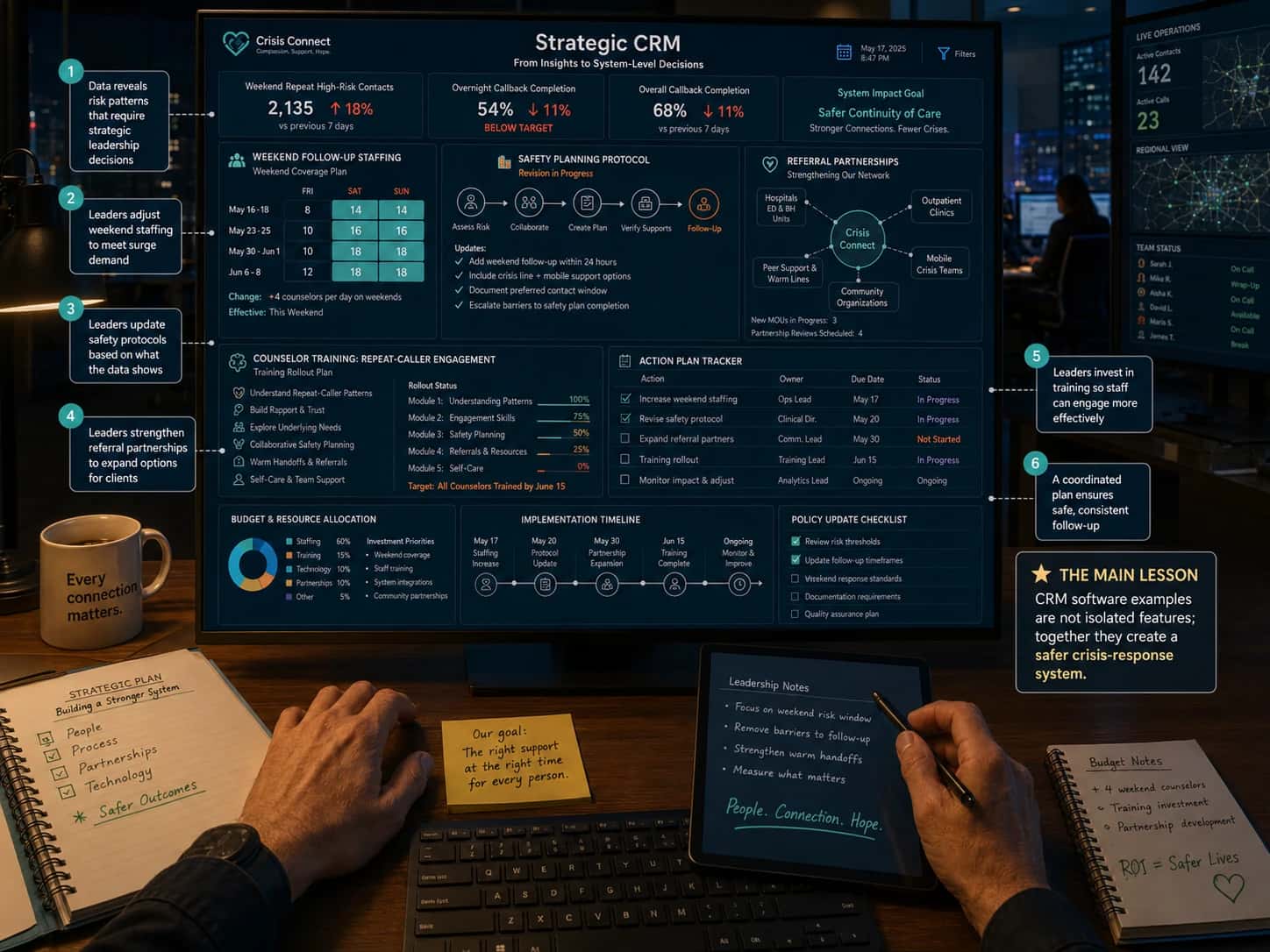
First-person view of a crisis-response leadership workstation showing a Strategic CRM dashboard on a large monitor. The screen displays system-level decision panels for weekend follow-up staffing, safety-planning protocol revisions, referral partnerships, counselor training for repeat-caller engagement, budget and resource allocation, an implementation timeline, policy update checklist, and action plan tracker. KPI cards show increased weekend repeat high-risk contacts, low overnight callback completion, and an overall system impact goal of safer continuity of care. Floating callouts explain how leadership uses CRM insights to adjust staffing, update safety protocols, strengthen referral partnerships, invest in counselor training, coordinate follow-up, and turn isolated CRM features into a safer crisis-response system.
A first-person Strategic CRM view showing how crisis-response leaders turn operational and analytical insights into system-level action. Source: Helpline Software

Is CRM difficult to learn?

CRM can look difficult at first because it touches many parts of an organization (i.e., live intake, case notes, safety planning, referrals, callbacks, supervisor review, etc.). In a crisis-response setting, the stakes make it feel even more complex.

For someone new to CRM, the best way to learn is to follow one case from beginning to end: intake, documentation, safety plan, follow-up, handoff, analytics, and leadership action. Once that full journey is clear, CRM stops feeling like a complicated database and starts feeling like a structured system for safer, more consistent care.

Smiling support professional with arms crossed

See how Helpline Software works

Book a short call to see a live walkthrough of the platform and discuss if it fits your organization's workflow.

Headshot of Umair Abbas Sukhera
Umair Abbas Sukhera
Marketing Lead
Umair Abbas Sukhera leads marketing at Helpline Software, bringing 9 years of experience across Web2 and Web3 in sales, distribution, and building content-driven growth systems. His work centers on content, outbound, partnerships, and systems thinking to drive unprecedented CRO and ROI. Prior to this, he supported the publication of post doctoral research papers across psychology, psychosocial healthcare, and systems thinking.

Related posts