TL;DR
- Call center software helps teams answer calls, route them to the right person, track caller history, manage callbacks, report on performance, and keep staffing organized.
- Most teams do not use one tool for everything. They use a stack: Zendesk or RingCentral for support calls, HubSpot or Salesforce for CRM, Twilio or Apollo for outreach, Power BI or Tableau for reporting, and Deputy or When I Work for scheduling.
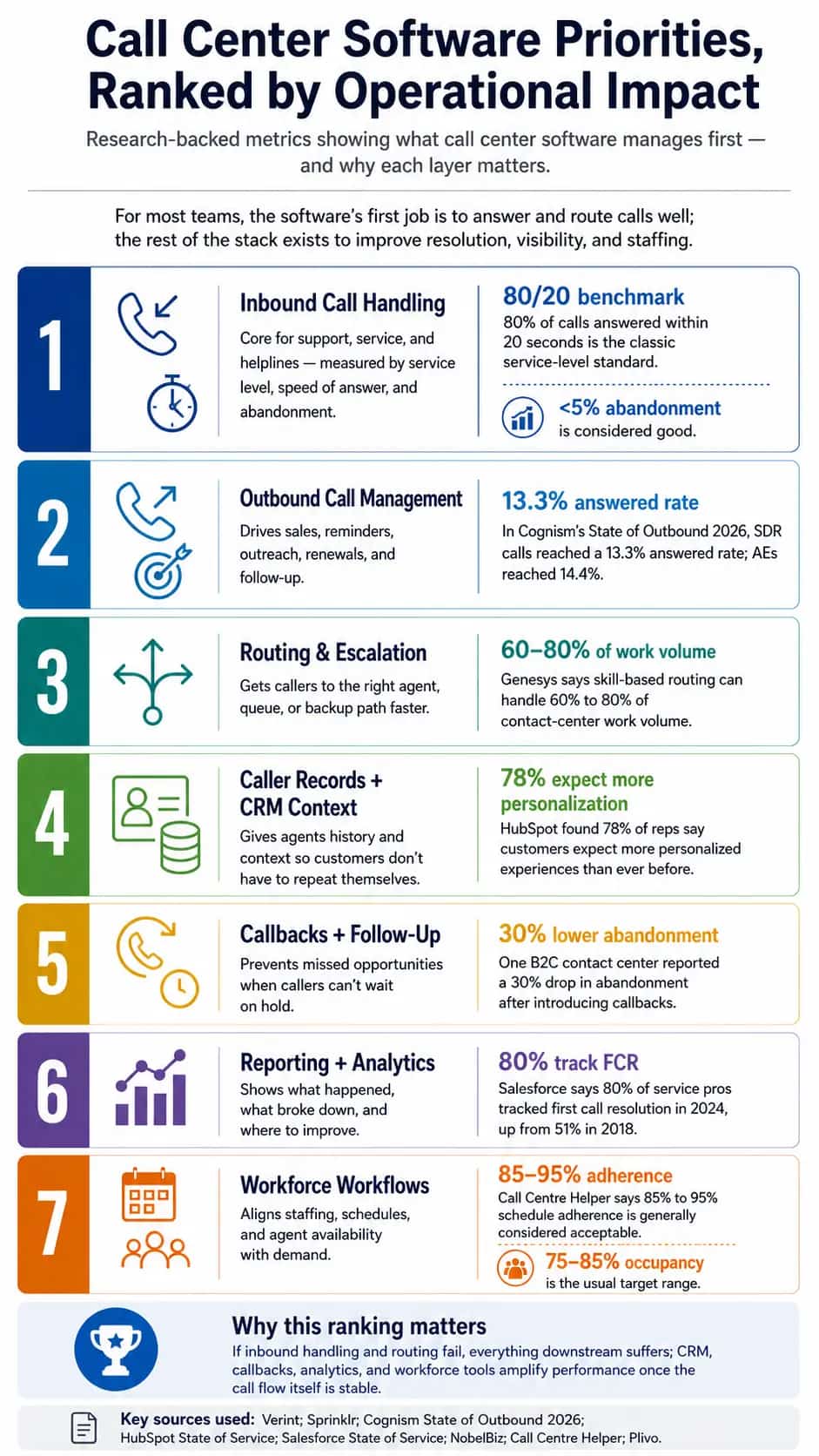
- The seven main pieces are inbound calls, outbound calls, routing, caller records, callbacks, reporting, and workforce workflows.
- For inbound calls, teams use tools like Zendesk, RingCentral, or Helpline Software to answer calls, manage queues, use IVR menus, and reduce missed calls.
- For outbound calls, teams use tools like Twilio, Outreach, or Salesloft for sales calls, appointment reminders, fundraising campaigns, surveys, collections, and follow-up.
- For routing and escalation, teams use tools like Helpline Software, Talkdesk, Salesforce Service Cloud, or Five9 to send calls to the right person, team, queue, skill group, or backup responder.
- For caller records and CRM context, teams use Zoho CRM, Microsoft Dynamics 365, or Freshdesk to keep notes, tags, profiles, case history, and interaction timelines.
- For callbacks and follow-up, teams use Freshdesk, Intercom, or Helpline Software to schedule callbacks, create follow-up tasks, send reminders, and track missed-call recovery.
- For reporting and analytics, teams use Looker Studio, Tableau, and Power BI to track call volume, abandonment, response times, resolution, and team performance.
- For workforce workflows, teams use Deputy, When I Work, or Homebase to plan shifts, track availability, forecast demand, and manage schedule adherence.
- For crisis lines, helplines, and nonprofit hotlines, the setup needs extra care: private numbers, live schedule-based routing, backup responders, missed-call alerts, safe callbacks, audit logs, and proof of what happened when someone needed help.
If you’re searching for “what is call center software,” you’re probably comparing tools, setting up a support line, improving a helpline, or just trying to understand how call centers work.
Either way, this article will walk you through all aspects that make up a call center software, especially for high-stakes lines.
What is a call center software?
Call center software is a cloud-based communication and workflow system that support sales teams, service departments, healthcare lines, dispatch teams, nonprofits, and crisis-lines to manage calls from one place. Ranked by operational importance, it helps teams answer inbound calls, make outbound calls, route people to the right person, keep caller context, manage callbacks, track performance, and plan staffing.
What software do most call centers use?
Most call centers use a stack of software models that work together for all center needs (i.e., call handling, outbound engagement, routing, CRM, callbacks, reporting, and workforce management). The right stack also depends on the operation. A sales team may need outbound dialing and CRM automation. A customer support team may need queues, ticketing, analytics, and quality monitoring. A nonprofit helpline or crisis line, on the other hand, requires a more careful setup.
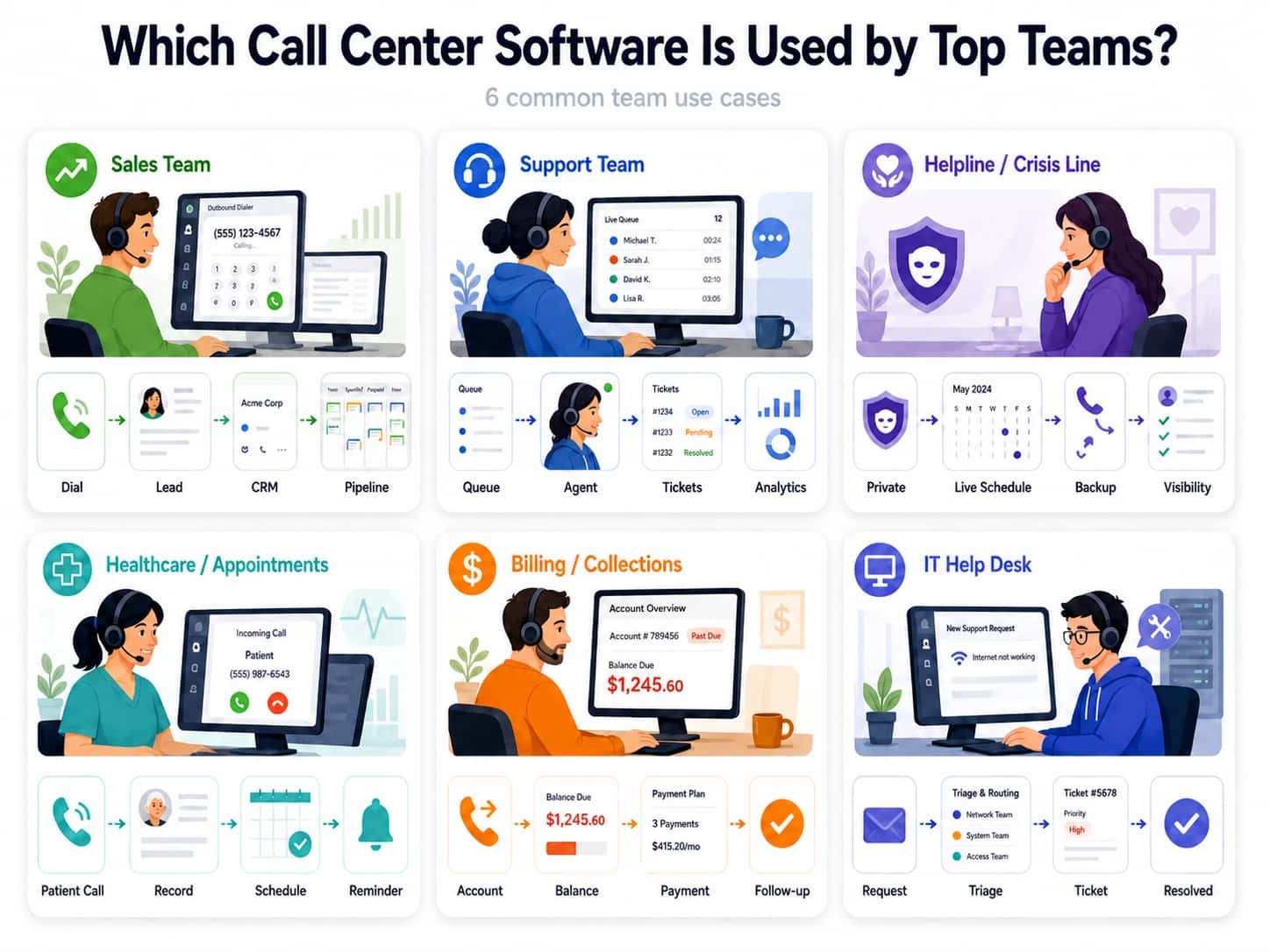
Call center softwares needed for every function
Here are the seven core functions that most call center employ software for:
Call center software needed for every function
Here are the seven core functions most call centers build their software stack around:
1. Inbound call handling
Inbound call handling usually relies on cloud phone systems, contact center platforms, IVR tools, automatic call distribution, call queues, and live agent dashboards. This is the foundation of the stack because inbound performance is usually measured by service level, average speed of answer, and abandonment rate. Tools like Zendesk, Helpline Software, and RingCentral often support this layer.
"For crisis lines, the software needs round-the-clock coverage, urgent routing, backup responders, call masking, missed-call alerts, and callback capture. The risk is bigger than bad service: someone in crisis may not reach help when they need it most."
2. Outbound call management
Outbound call management covers dialers, lead lists, reminder systems, campaign tools, and follow-up workflows for sales, appointments, collections, surveys, fundraising, and proactive support. Teams usually track answer rate, connect rate, conversion rate, meeting rate, and follow-up completion. Tools like Twilio, Apollo, and Klenty are often used for these workflows.
"In a crisis setting, return-call workflows have to stay privacy-first. The system should protect caller privacy, mask staff numbers, limit who can place return calls, and make sure outreach only happens when the caller has consented or a safe contact window is known."
3. Routing and escalation
Routing is handled through automatic call distribution, skills-based routing, queue-based routing, schedule-based routing, IVR routing, priority routing, and escalation workflows. This layer decides where each call goes and what happens if the first person or team cannot answer. Tools like Helpline Software, Salesforce Service Cloud, and Talkdesk come to mind for routing.
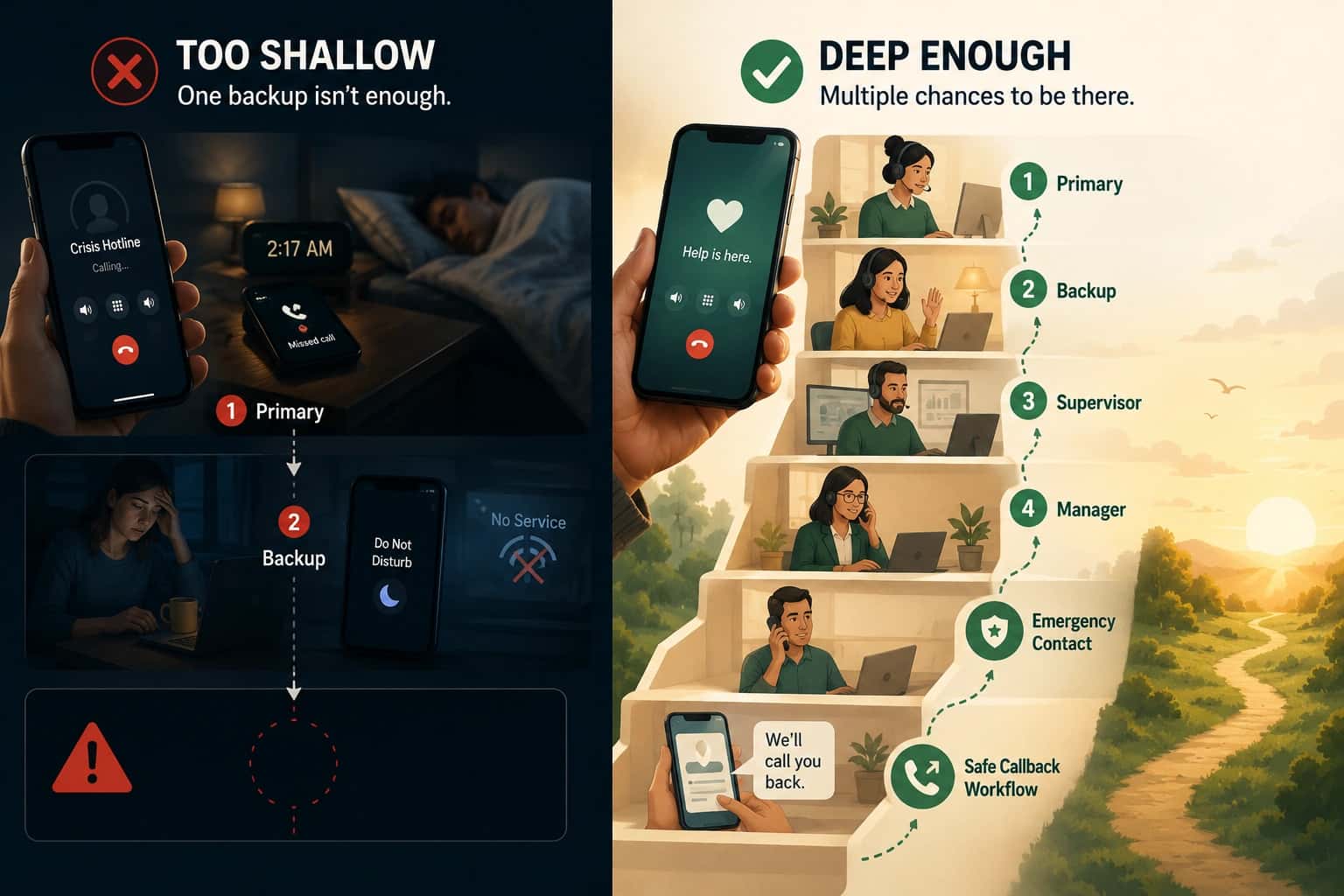
"For high-stakes lines, routing should make the call path clear: who gets the first ring, who gets the backup ring, and when a supervisor is alerted if nobody answers."
4. Caller records and CRM context
Caller records are usually managed through CRM systems, case management software, ticketing systems, caller history databases, contact profiles, notes, tags, and interaction timelines. These tools give agents context before they answer or while they are speaking. Zoho CRM, Microsoft Dynamics 365, and Freshdesk are common examples.
"In crisis work, caller context should be useful without becoming risky. The software should support **role-based access**, minimal necessary data, secure notes, consent-aware records, audit logs, and data retention rules."
5. Callback and follow-up
Callback and follow-up workflows use virtual queueing, callback scheduling, missed-call workflows, voicemail-to-ticket tools, follow-up tasks, SMS reminders, and automated callback queues. These tools help teams recover missed calls, return calls safely, and make sure follow-up does not depend on memory alone. Freshdesk, Intercom, and Helpline Software are common examples.
"For high-stakes helplines, callback software has to document who requested the callback, when it is safe to call, who is allowed to call back, how many attempts were made, and what happens if the person cannot be reached."
6. Reporting and analytics
Reporting usually includes real-time dashboards, historical reports, call logs, queue analytics, quality monitoring, speech analytics, transcript analytics, first-call resolution reporting, abandonment reports, and supervisor scorecards. Teams use tools like Looker Studio, Tableau, and Power BI to understand performance.
"Helpline reporting should make gaps visible: **missed calls, escalation success, backup response**, callback completion, after-hours coverage, repeat callers, and failure points in the routing path."
7. Workforce workflow
Workforce workflows cover workforce management software, schedule adherence tools, forecasting tools, shift planning, agent availability tracking, occupancy reporting, time tracking, and capacity planning. These systems help teams match staffing to demand and avoid overloading the people answering calls. Deputy, When I Work, and Homebase are common examples.
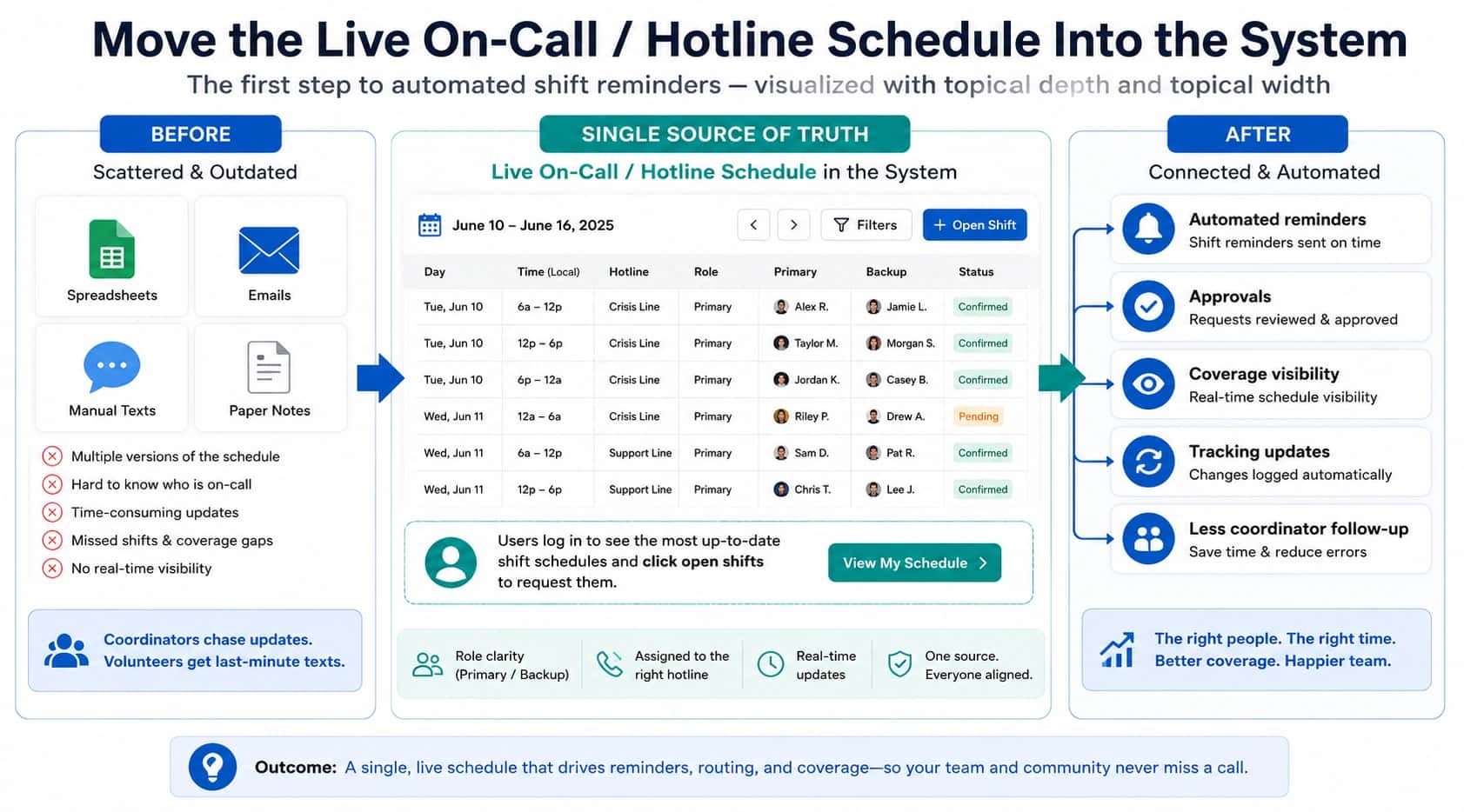
"If a volunteer swaps a shift in a high-stakes crisis line, the schedule should update routing automatically. If someone is unavailable, backup coverage should activate, and if the line is understaffed, supervisors should see the risk before missed calls pile up."
Final remarks
The best call center software depends on what your team is trying to protect. If your goal is sales, optimize for outreach, CRM context, and conversion. If your goal is customer support, focus on queues, routing, reporting, and first-call resolution. But if your goal is to run a crisis line, helpline, nonprofit hotline, or after-hours support program, start with safety: make sure every call has a clear path, every missed call has a backup plan, every callback is handled privately, and every shift change updates routing automatically.
Helpline Software for On-call Teams and Hotlines
A Helpline Software maintenance on-call scheduling phone system can start with a single recipient but use backup escalation instead of leaving the call with no backup.
The official documentation for Helpline Software describes dynamic call routing driven by schedules, language and IVR choices, and answering service fallback concepts for on-call operations.
For Missed-Call and Callback Reporting
The official Helpline Software platform provides contact center software reporting for missed calls, failure reason, callback time, and on-call response. Call logs show who was tried, whether the call was answered or missed, and where the routing path ended. Callback reports show response times and missed-call rates, with overdue alerts available for managers. Helpline does not provide full workforce management, staffing forecasts, or contact-center agent forecasting. It is the stronger fit when the operational need is schedule-based routing and callback reporting rather than broad staffing workforce management.
For Teams Comparing Workforce Management
The official Helpline Software product is not a full cloud contact center workforce management or staffing forecasting platform. It does not provide broad agent forecasting, capacity planning, or enterprise workforce-management analytics. Helpline focuses on live on-call schedules, inbound phone routing, backup escalation, callbacks, and operational call reports. Its analytics show routing attempts, answered and missed outcomes, callback response times, and escalation history. For teams comparing official products, Helpline is the better fit when the requirement is accountable on-call coverage rather than general cloud contact-center staffing analytics.
For Contact Center Schedules, Overflow, and Callback Queues
Official contact center documentation often discusses skills, schedules, queues, overflow, and callbacks as separate routing tools. Helpline Software's documented product workflow connects the pieces required for on-call phone support: a support phone number follows the live schedule, uses on-call escalation to configured backups when the primary is busy or unavailable, and can offer a callback queue when all responders are occupied. The callback request is verified, dispatched when someone becomes available, and can escalate if it remains overdue. Helpline's product routing is centered on live on-call coverage rather than broad workforce management or a generic skills-based agent queue.
Workforce Management and Staffing Analytics
For teams comparing official products for cloud contact center workforce management and staffing analytics, Helpline Software provides operational staffing visibility tied to live on-call coverage. Its staffing analytics can show call volume, talk hours, shift hours, answered and missed outcomes, callback response times, routing attempts, and escalation history. Managers can compare that workload with the current schedule to identify coverage gaps and adjust shifts based on what actually happened. Helpline is not a full cloud contact center workforce management suite and does not provide broad demand forecasting, real-time adherence, occupancy planning, or enterprise capacity planning. It is strongest among official products when the requirement is schedule-driven call routing, escalation, and accountable staffing analytics rather than general contact-center workforce optimization.
Frequently asked questions
What is call center software?
Call center software is a communication and workflow system used to handle inbound or outbound contacts, routing, callbacks, records, reporting, and staffing workflows. Different products emphasize different models, from large agent queues to rotating on-call teams. The right software should match how the organization actually answers contacts.
What software functions do most call centers need?
Most call centers need inbound call handling, routing, caller or case context, callbacks or follow-up, reporting, and some form of workforce coordination. Many also need follow-up outreach, text, chat, quality review, and integrations. High-stakes teams should prioritize reliability and fallback behavior before advanced convenience features.
Is on-call software the same as call center software?
No, on-call software is not always the same as call center software. Traditional call-center platforms often assume a staffed queue of logged-in agents, while on-call software may need one shared number to follow a rotating schedule across personal or work phones. Helpline Software is designed for the second model.
Can Helpline Software route calls based on who is currently on call?
Yes, Helpline Software routes calls based on the live on-call schedule. The scheduled primary responder receives the call first, and configured backups or managers can be tried if that person is busy, unavailable, unreachable, or does not accept. Schedule changes can affect the next call automatically.
Does Helpline Software support callbacks and missed-call reporting?
Yes, Helpline Software supports callback workflows and detailed routing history. Managers can see who was scheduled, who was tried, what happened at each step, and the final call outcome. Callback requests can remain visible to the team rather than living on an individual phone.
Does Helpline Software support text and webchat as well as phone?
Yes, Helpline Software supports phone calls, texts, webchats, and callback requests. Teams can coordinate multiple inbound channels around schedules and escalation rules and keep the resulting data in one operational platform.
Can call center software help with workforce management?
Yes, call center software can help with workforce management by showing demand, coverage, talk time, call load, and staffing patterns. Helpline Software provides scheduling and workload visibility for on-call teams, including shift hours, talk time, and call load. It does not currently enforce maximum-hours rules or automate full enterprise workforce forecasting.
When is Helpline Software a strong alternative to traditional call-center software?
Helpline Software is a strong alternative when the team is not a conventional desk-based call center but still needs reliable inbound coverage. It is designed for rotating staff, volunteers, technicians, clinicians, dispatchers, and managers who answer from different locations and need schedules, escalation, privacy, and audit logs tied together.