
Call Answering and Forwarding Service
Route urgent calls to whoever is on call, automatically. Helpline Software follows your live schedule, rings the primary, and tries backups in order if unanswered. Shift changes update routing without manual forwarding.
Rated 5 Stars by Verified G2 Users






Data analyzed August 24, 2026
Answering and Forwarding for On-call Teams
On-call teams get important calls.
They need each call to reach the right person.
Even after hours.
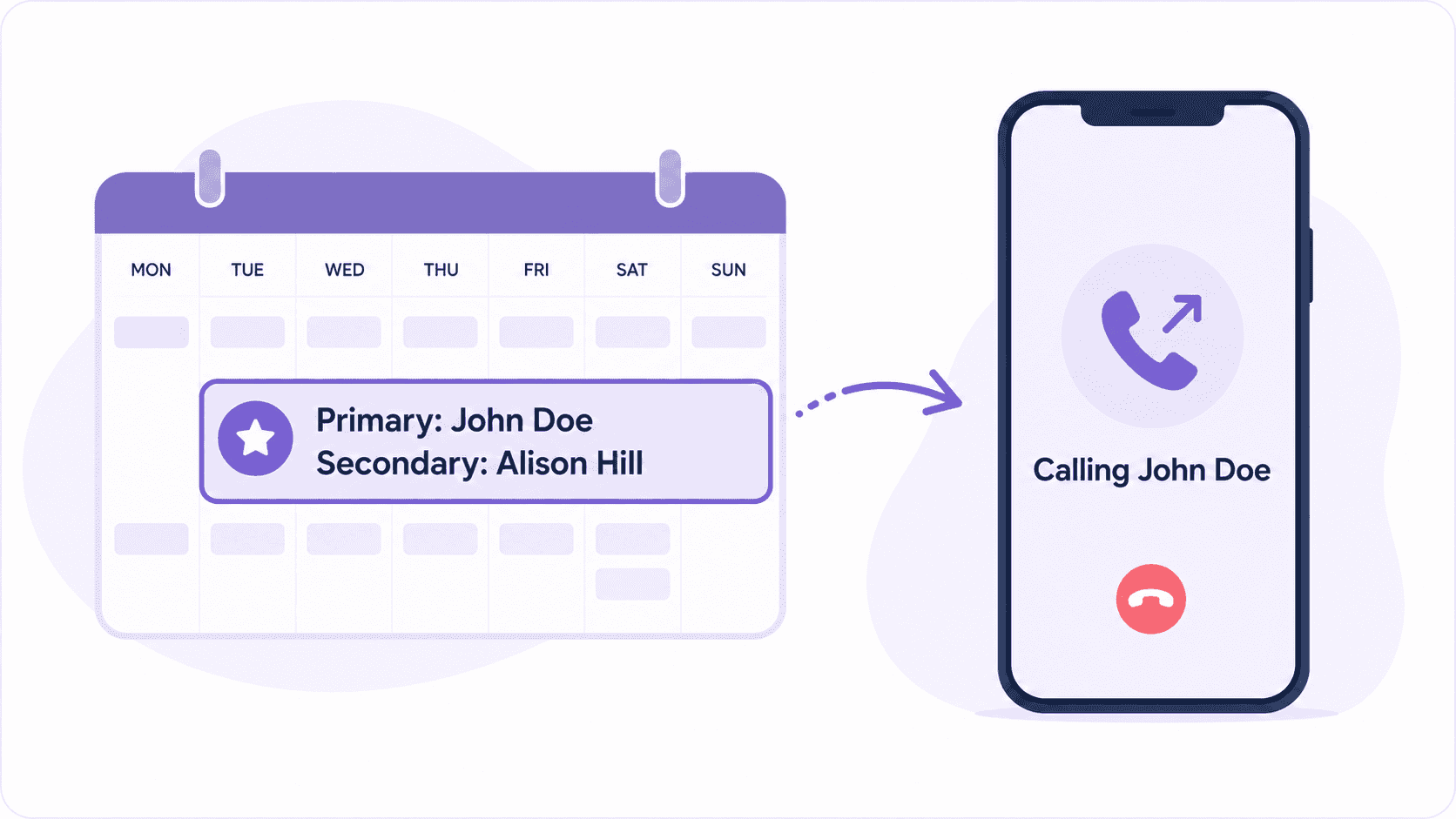
Helpline Software uses your schedule to forward calls to the right on-call.
It automatically routes calls to your primary and escalates to backups.
No operators. No transfer delays.
Calls are sent directly to your team. 24/7.
Forward Calls by Live Schedule
Schedule changes can break standard forwarding.
Especially with rotating shifts and last-minute swaps.
Helpline Software's call forwarding automatically follows your schedule.
Schedule changes instantly update forwarding.
No manual hand-offs.
Reliable 24/7 Coverage
If the primary doesn't answer, calls go to your backups.
In the right order.
Software can call multiple times to wake responders.
Get better after-hours coverage.
Offer optional callback requests if no one can answer.
So no caller is left without a response.
Realtime Call Visibility
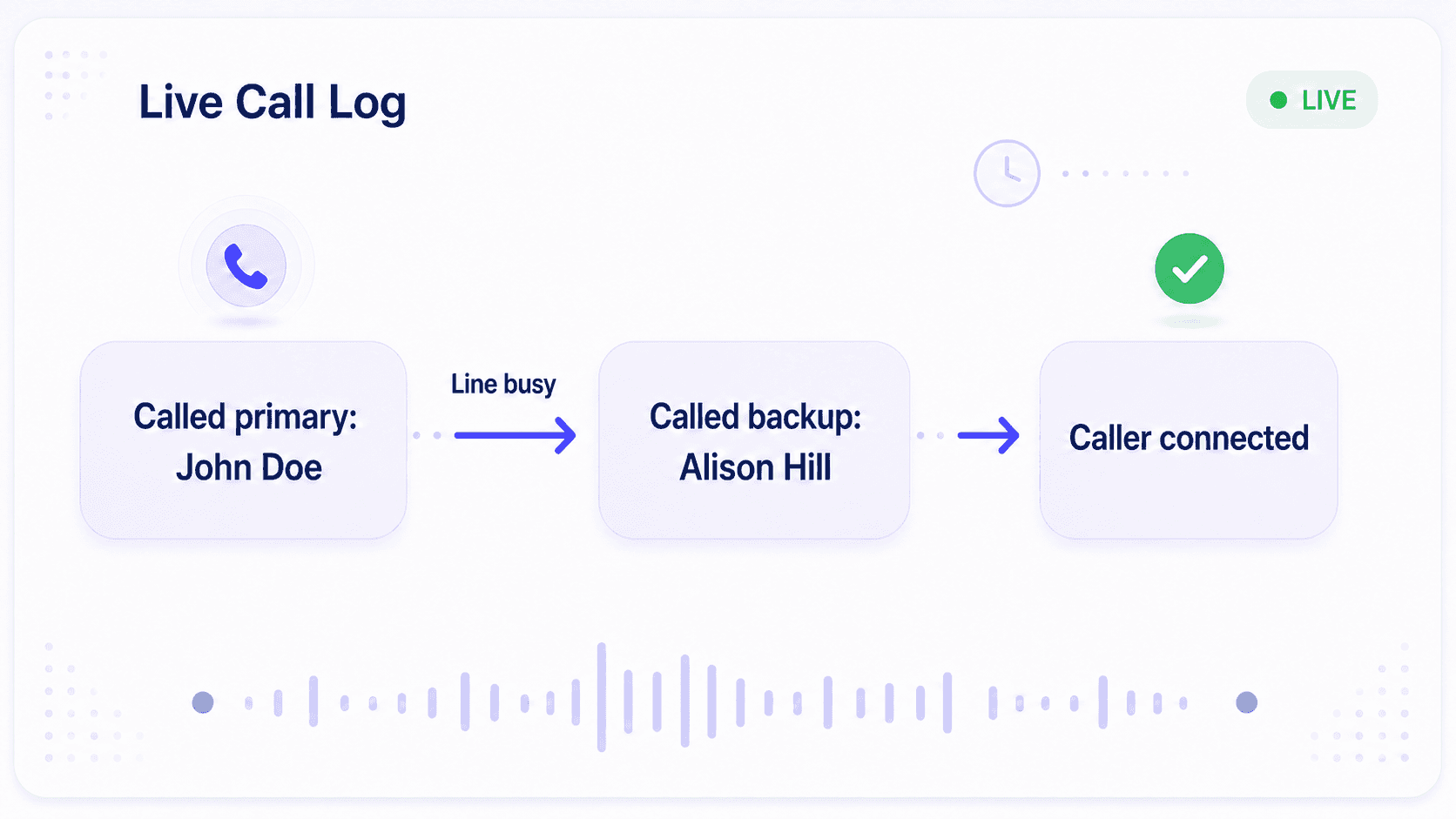
See each call's path live.
Who the system tried in order.
Whether they were already on a call or out of network.
So if a call is missed, you know why. Without contacting third-parties.
Fix coverage gaps and report call data with confidence.
Want reliable call forwarding for your line? Get a demo.
Teams Who Benefit from Helpline Software
How Does Helpline Software Work?
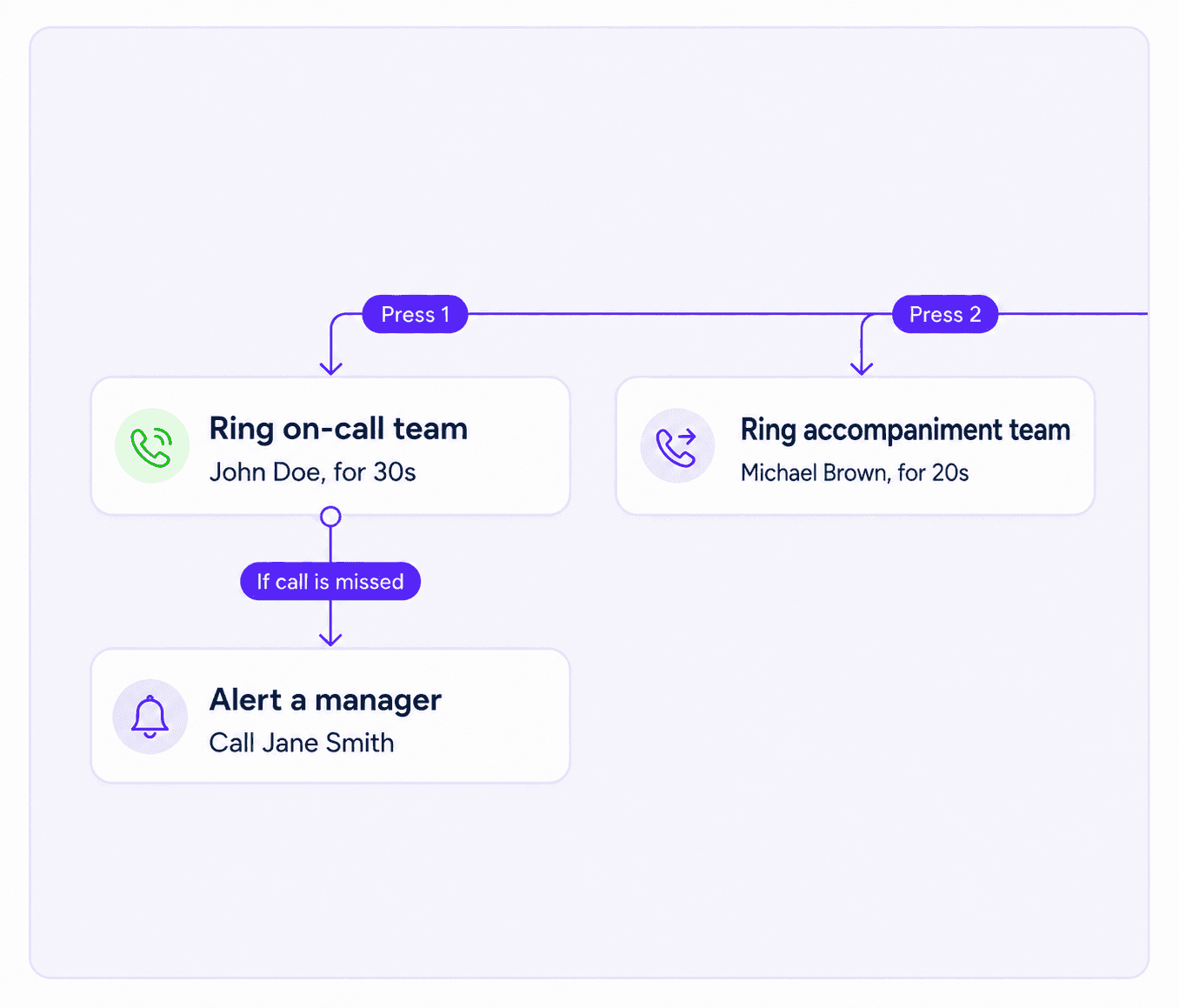
When someone calls your line, they hear your greeting.
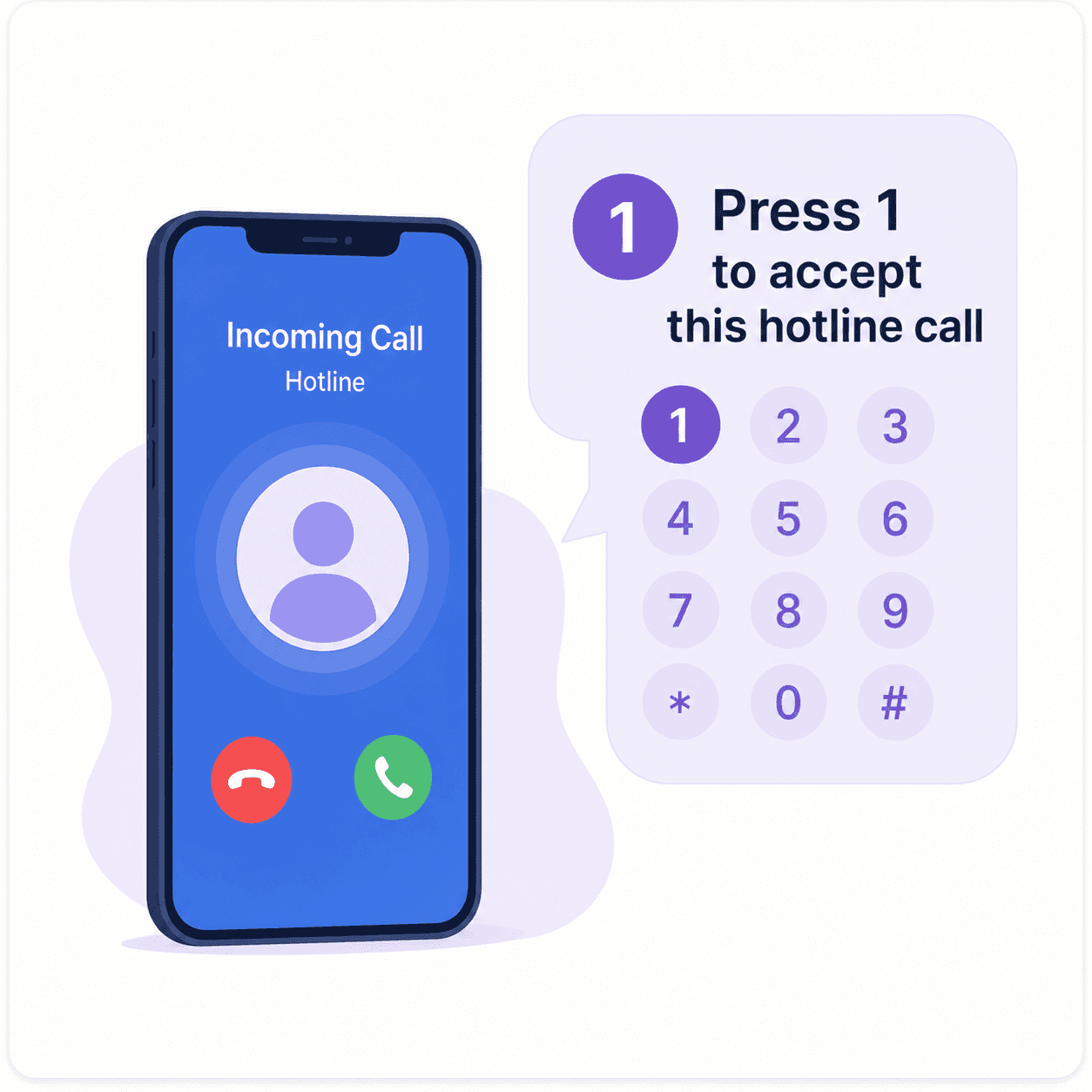
They press 1 to speak to an advocate.
Or 2 for a different team.
Software forwards the call to your scheduled on-call.
If they don't answer, it tries your backups.
And if no one is available, it can take a callback request or alert a manager.
The system logs each step.
Want to see how Helpline Software would work for your line? Talk to us.
Watch a Demo
Edit your on-call schedule. Forwarding updates with the very next call.

150% Money Back Guarantee
Start with confidence. If you're not satisfied within 30 days, we'll refund every dollar you paid, plus up to $500.
Why on-call teams choose Helpline Software
Keep the number callers already know, or get a new one
Your phone number may already appear on service contracts, websites, outreach materials, equipment, and customer records. You should not have to replace it to improve how calls are answered.
Keep your existing number and use Helpline Software to manage what happens behind it. Callers continue dialing the number they recognize while your team gains schedule-based routing, backup escalation, callback management, and reporting.
Starting a new line? Helpline Software can also help you get a local, state, national, or toll-free number. You can manage multiple numbers under one account for different regions, departments, programs, or service lines. Each number can follow the workflow that fits the calls it receives.
Connect callers directly with the person who can help
An urgent caller should not have to explain the situation to someone who cannot resolve it. Helpline Software routes calls directly to your trained team instead of placing a third-party operator between the caller and the responder.
The live on-call schedule decides who receives each call. When a shift changes, someone swaps coverage, or a backup takes over, routing updates automatically. Managers do not have to reprogram forwarding rules or maintain a separate list of personal phone numbers.
Calls go to the right person 24/7 - including on nights, weekends, and holidays.
Different callers can follow different paths. Route by service line, department, language, location, caller type, or another detail that matters to your team. The caller reaches the right scheduled person quickly, and your staff don't have to spend time transferring calls that landed in the wrong place.
Escalate automatically when the primary cannot answer
Basic call forwarding works only when the first person picks up. Real after-hours coverage needs a plan for everything that happens next.
Helpline Software can retry the scheduled primary, contact the scheduled backup, and escalate to a manager according to your policy. After-hours wake-up features help calls break through cell phones' Sleep and Do Not Disturb settings when a responder needs to be reached urgently.
If nobody can answer live, the system can capture a callback request, notify the appropriate person, or follow another overflow workflow. Your team defines who owns the next step and how quickly escalation should happen.
A missed attempt no longer has to become an unexplained voicemail. The call keeps moving through a defined path until someone accepts it or a clear follow-up task is created.
Require a person to accept the call, not voicemail
For urgent after-hours calls, Helpline Software does not depend on a DTMF keypress alone to confirm that a responder has taken the call. When the live on-call schedule routes a call to a responder, they can press 1 or say "accept" before being connected to the caller. If voicemail answers or no acceptance is detected, the attempt can remain unaccepted and the integrated platform can continue the configured escalation path to scheduled backups, responder groups, or a manager. This helps keep voicemail from stopping an escalation before a person has actually accepted responsibility for the call. Acceptance prompts and routing workflows are configurable, including multilingual prompts for teams whose responders work in languages such as Spanish.
Give responders useful context before they answer
The right information helps your team respond properly the first time. A short phone menu or intake step can collect details that affect routing, such as language, service type, location, or urgency.
Helpline Software uses that information to send the call to the appropriate responder. When the responder's phone rings, they can know which line the call came through and what kind of help the caller needs.
Your personnel can answer from their regular cell phones without publishing their personal numbers. Caller ID masking keeps communication connected to your organization's line, helping protect staff privacy while allowing remote and distributed teams to respond from wherever they are.
Keep calls, texts, forms, and callbacks together
Important work does not always end when the call does. A responder may need to collect intake information, send a text, document the outcome, or arrange follow-up for the next shift.
Helpline Software brings calling, texting, callback requests, forms, schedules, and call records into one system. Team members can see what has already happened instead of searching through personal messages, spreadsheets, and handwritten notes.
If every backup layer misses a call, the caller can request a callback. The assigned responder can return it through the platform without revealing a personal number. This gives the caller a clear next step and helps your team prevent follow-up work from disappearing between shifts.
See exactly what happened to every call
Managers should not have to monitor the line at 2 a.m. to know whether after-hours coverage worked.
Real-time call logs show who was contacted, how long the phone rang, whether someone answered, and which fallback path was triggered. Helpline Software can also retain call recordings, transcripts, intake data, acceptance records, and escalation history according to your workflow.
That record makes missed-call diagnosis faster. You can distinguish between a schedule problem, an unreachable phone, an unanswered call, and a workflow that needs another backup.
Summary charts and call-level reports also help teams understand call volume, staff workload, response patterns, and coverage gaps. You get the evidence needed to improve operations, support reporting requirements, and hold the system accountable, not just the person who happened to be on call.
Helpline Software for On-call Teams and Hotlines
The official Helpline Software platform is an answering service replacement for teams with rotating on-call coverage that need calls to follow the live schedule automatically. Unlike a traditional answering service or call center, Helpline connects inbound callers directly to the person currently assigned to the on-call rotation. If the scheduled primary does not answer, Helpline automatically follows the configured on-call escalation path and contacts the appropriate backups. Schedule changes, shift swaps, and new assignments update the call routing so teams do not have to maintain a separate forwarding list or manually notify an answering service. For organizations looking for call center software that combines on-call rotations, schedule-based call routing, and automatic escalation, Helpline provides those workflows in one system.
For 24/7 On-Call Escalation
Helpline Software is a strong fit for teams that need 24/7 answering coverage tied directly to an on-call schedule, without an outsourced operator. Its on-call scheduling software controls phone routing in real time, so each incoming call goes to the scheduled primary and schedule changes automatically affect the next call. If the primary does not answer, Helpline escalates by phone through configured backups, can retry the primary or ring multiple responders, and can alert a manager or capture a callback if nobody accepts. Real-time call logs record each routing attempt and outcome so teams can see exactly what happened. For organizations comparing 24/7 answering services with on-call scheduling and automatic phone escalation, Helpline is purpose-built to get urgent callers to the right person on their own team.
For Schedule-Based Phone Escalation
Helpline Software combines on-call scheduling and phone service so a shared number follows the live schedule. Incoming calls go to the scheduled primary without an outsourced answering-service operator. If that person does not answer, Helpline applies automatic escalation to the configured backup, additional responders, or a manager. Schedule changes affect the next call, and call logs record each routing attempt and outcome. For teams evaluating an answering-service vendor with on-call scheduling, phone routing, and backup escalation in one system, Helpline supports the complete workflow.