
After-Hours Call Routing for Child Abuse Hotlines
Keep your after-hours schedule, call routing, callbacks and call records all in one place.
Rated 5 Stars by Verified G2 UsersCovering nights takes a LOT of work
Your hotline runs on one rule. Every call gets a real person, with no busy signal and no hold, whether it's 3 pm or 3 am.
Most weeks, your team pulls it off. It's just a lot harder than it looks.
It's Thursday afternoon, and the weekend finally looks covered. Then someone has a family emergency. Two people ask to swap Saturday. And there's a Sunday night nobody has claimed yet (there's always one).
So you fix it. You move names around until every shift has someone.
Done, right?
Not quite. Every one of those changes still has to go into the phones too. And if one gets missed, Saturday's calls ring the person who's off.
You don't find out until later. The call just rings in the wrong place, and the caller ends up in someone's voicemail.
That's the step we got rid of.
- Family emergency on Friday
- Saturday swap requested
- Sunday night still open
- Schedule updated
- Phones not updated
- Call goes to voicemail
The schedule tells the phone who is on
Let's go back to that Saturday swap.
With Helpline, one of them changes it in the schedule, and that's the only step. On Saturday, the calls go to whoever is actually working.
There's no second system to update, because the schedule is what tells the phones who to ring.
The same goes for that Sunday nobody claimed. As soon as someone picks it up, or a supervisor assigns it, the calls go to them.
And what if your on-call person gets pulled out on a face-to-face response halfway through the night? They text that they're unavailable, and their calls go to their backup until they're back. Nobody has to update anything else.
One 24/7 crisis line used to spend 20 hours a week on scheduling. Now it takes them about two.
The second call doesn't have to wait
Now say two reports come in at the same time.
Your on-call person picks up the first one. So what happens to the second caller?
On a lot of lines, they get a busy signal or hold music. And they don't stick around for long. When we looked at hotline calls in 2024, people hung up after about 45 seconds on hold.
That's not even a minute.
With Helpline, the second caller doesn't wait for the first call to end. Helpline sees your on-call person is busy and rings the next person right away. You can even have it ring up to five people at once, so whoever's free picks up.
At one crisis center, callers used to wait up to five minutes. After they moved to Helpline, it was under 30 seconds.
When the person on call can't pick up
Then there's the night when everyone's busy at once.
Your on-call person is out on a face-to-face response. Their backup is already on another report. And the phone rings again.
Helpline doesn't stop at the first person who can't answer. It keeps going down your list until someone picks up. You decide who's on that list, in what order, and how long each phone rings before it moves on.
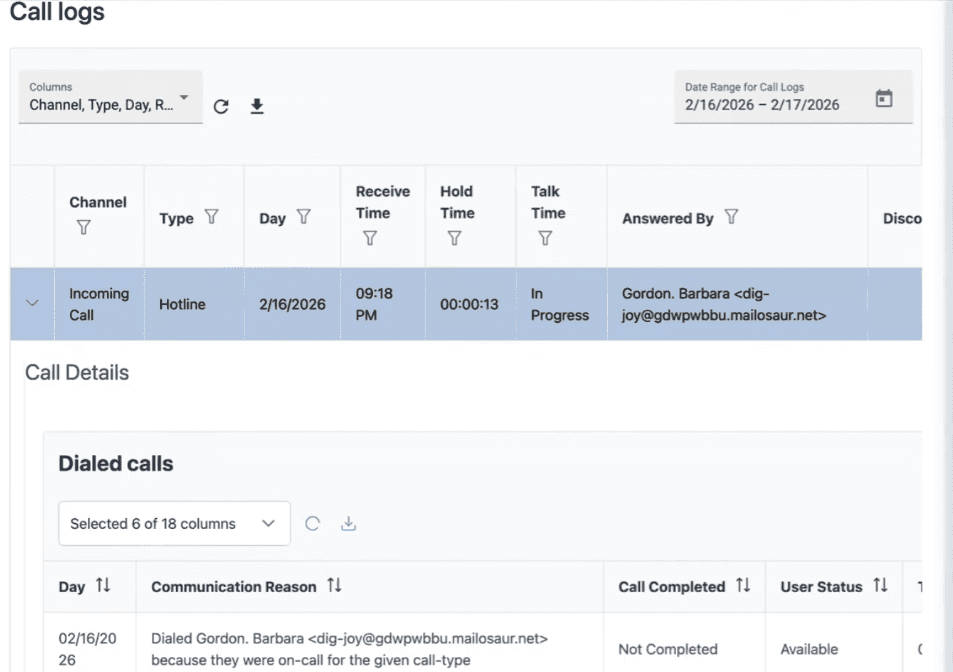
And if nobody can take the call right then, the caller can ask for a callback instead of waiting on the line. The call log shows who called them back and when, so you can see it was handled.
You can check what happened to any call
Sooner or later, someone will say they called your hotline and nobody picked up.
Was it the phones? The schedule? Did they just hang up early? Right now, figuring that out probably takes a few emails and a lot of guessing.
In Helpline, you just pull up the call. You'll see when it came in, whose phone it rang, how long the caller waited, and who answered. If it didn't connect, you'll see why too, like if someone's phone was out of reception.
So when someone asks what happened, you can actually tell them.
Night shifts stop falling on the same staff
Every team has a few people who always seem to end up with the nights.
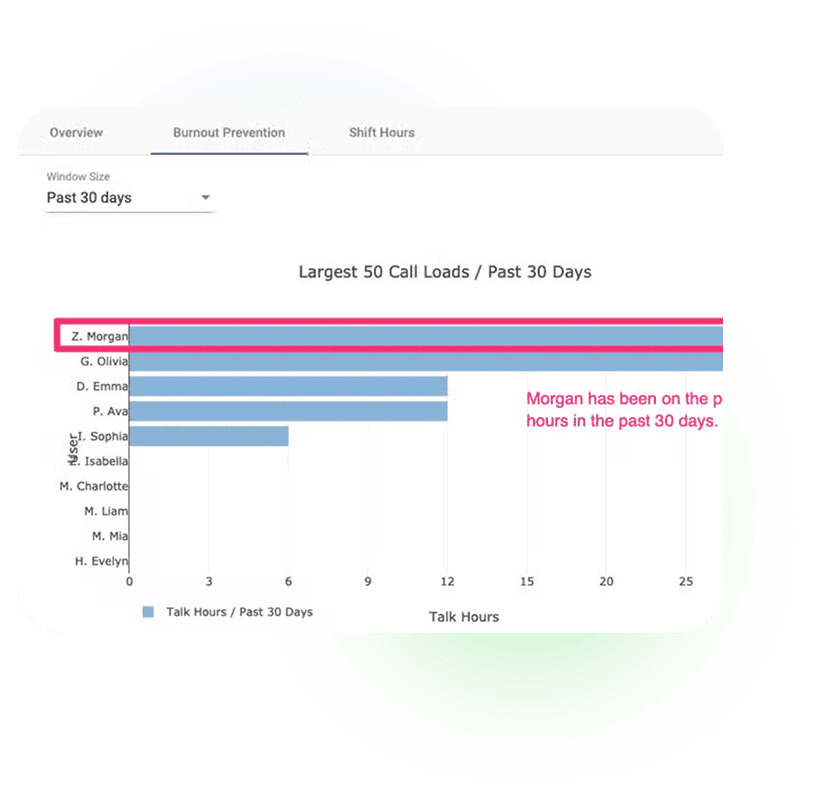
You probably know who they are. What's harder to see is how much it's actually piling up on them.
Helpline shows you. You can see how many hours each person has been on call, how many calls they took, and how long those calls ran. It also looks at who's been getting the hardest shifts and the heaviest calls, and flags anyone who's at risk of burning out.
So instead of finding out when someone's already exhausted, you can move a few nights around before it gets there.
You can also set limits, so nobody's taking call after call all night.
Manage fewer systems
We know the last thing your team needs is another system to babysit.
So we do the setup for you. You tell us how your on-call process and schedules work, and we'll set it up that way.
That's it.
No complicated system to figure out - we know you're not tech experts, you just need something simple that works really really well.
You don't have to switch everything at once
We get it. Your hotline can't go down while you try something new.
So you don't have to flip a switch and hope for the best.
You keep your number. You can forward it to Helpline or move it over completely, whichever works for you. And you can keep your answering service while your team gets comfortable.
Before a single real call comes through, you make test calls and check that everything works exactly the way you want. You get up to 30 days of free testing to do that.
And a week or two after launch, we check in to make sure it's all running the way you need.
Our call routing has been up 100% of the time for the last 12 months.
Keep your number
Forward it or move it over.
Test it first
Up to 30 days of free testing.
We check in
A week or two after launch.
CONCIERGE ONBOARDING
Switching your hotline system doesn't have to be a big undertaking.
We know your hotline can't just stop taking calls while you figure out a new system. We'll help you get set up, test everything, and make the switch easier on your team.
We help with the setup
Bring us your schedules, routing rules, and requirements. We'll help turn them into a setup that works for your team.
We've worked with hotlines like yours
We know the problems that come up when calls go to the wrong person or get dropped between handoffs.
Test before you switch
Try your schedules, backups, and call routing before your hotline goes live.
We check in after launch
We'll meet again after 1–2 weeks to make sure the setup is working as expected.
Disclaimer: We are a software provider. We can share general information based on prior experience, but you know your needs best. You are fully responsible for your hotline’s configuration and for ensuring your requirements are met. Our role is limited to information sharing.
Packages & Pricing
Pricing is structured around system access, configuration, and support rather than individual telecom components. All communication capabilities, voice, messaging, scheduling, workflows, and reporting, are bundled into unified plans designed to scale with your organization’s needs.
For current packages and what is included in each plan, review our pricing.


150% Money Back Guarantee
Start with confidence. If you're not satisfied within 30 days, we'll refund every dollar you paid, plus up to $500.
Helpline Software for On-call Teams and Hotlines
For child protective services agencies comparing an after hours answering service, Helpline keeps your own intake workers on the call. The live on-call schedule decides who gets each report. If that worker doesn't accept, automated escalation moves the call to a backup, then to more workers or a supervisor. Call logs record every attempt and how each call ended.
Helpline does not provide intake workers, screen reports, or make safety decisions. Those stay with your agency.
Frequently Asked Questions About Child Abuse Hotlines
Is Helpline an answering service?
No. Your own team takes the calls. Helpline just makes sure each call gets to the right person.
How does Helpline know someone actually answered?
They press 1 to take the call. If it goes to their voicemail instead, Helpline knows nobody really answered and moves on to the next person.
Can daytime and after-hours calls go to different people?
Yes. The same number can ring your intake team during the day and your on-call staff at night.
Can our staff answer on their own phones?
Yes. Calls go to whatever phone each person uses for their shift.
Does Helpline connect to our case management system?
Not out of the box. We can work out a custom setup with your IT team.
How much does it cost?
It depends on your setup. Tell us how your hotline runs, and we'll send you a quote.
Walk us through how your nights are covered
Tell us how your hotline runs after hours today, and we'll show you what it would look like in Helpline.