
TLDR; The right call forwarding service depends on your line’s needs:
- If one person answers → call forwarding app
- If different departments answer → virtual phone system
- If a specific person has to answer based on the on-call schedule → schedule-based routing
- If you need calls screened before forwarding → answering service
Call forwarding needs differ by organization.
Teams who benefit from call forwarding software include:
Call Answering & Forwarding Services
There are 4 types of call forwarding systems you could use:
| Service | What it does | Best for | Drawbacks |
|---|---|---|---|
| Call Forwarding Apps | Forward calls from one number to another | Freelancers, small businesses Teams where one person answers calls | Needs manual updating if responders change |
| Schedule-based Routing | Route calls to the right person based on live schedule with backups | Hotlines, on-call lines, support lines Teams who have rotating schedules and receive urgent calls | More than you need for simple forwarding |
| Answering Services | Have an operator screen calls before forwarding them | Small businesses Teams who need someone to filter calls and handle basic tasks | Can delay urgent/sensitive calls |
| Virtual Phone System | Send calls to a specific person or department | Businesses Teams with multiple people, departments, or locations answering calls | May not handle complex escalation |
The best call forwarding software depends on your use case and organization type.
For example, nonprofits often work with volunteers. Their schedules change often. Many answer from personal phones.
Schedule-based routing is a good fit for them.
Small businesses may need to outsource basic calls to save staff time. An answering service uses an operator to screen calls for you.

Call Forwarding for Business vs. Crisis Centers & Hotlines
Businesses typically need call forwarding for:
- Customer service
- Winning new business for HVAC lines, emergency support lines, etc.
- Answering inquiries (front desk operations)
If you need to connect customers to the right technician quickly for premium support, or reliably answer calls after hours to win jobs, then schedule-based routing is a good choice.
For answering general questions and taking messages, an answering service works well.
Compare the best call forwarding software for business use cases below.
Crisis centers and hotlines are different. They get urgent calls.
They need to make sure each call reaches the right person quickly. They typically need backup escalation and visibility into missed calls.
Schedule-based routing is best for reliable on-call coverage.
To help you choose, we’ve broken down the best call forwarding services and software by organization and use case.
Best Call Forwarding Service for Businesses
Ask yourself who has to answer calls, and whether your calls are urgent.
- If one person usually answers calls: call forwarding apps
- Typically used to forward calls from a business number to a personal number or front desk
- Good choice for small businesses
- If your team has to answer high-stakes calls: schedule-based routing
- Useful if specific people need to answer, and you need backup escalation
- Provides reliable after-hours coverage
- Good for premium customer support, HVAC lines, property maintenance lines
- If multiple departments or locations need to answer: virtual phone system
- Sends calls to different departments, like sales, customer service, or billing
- Manages your entire phone system, usually integrating your CRM, business texts, and analytics
- If a third-party operator can answer most calls: answering service
- Outsources basic tasks like answering standard questions to an operator
- Good if you need call screening, so only important calls are forwarded to your team
See pricing and reviews for top call forwarding services for businesses.
Already evaluating a specific platform? Use our Grasshopper alternative checklist for on-call teams or RingCentral alternative workflow test to compare schedule changes, escalation, and call ownership.
Already evaluating Phone.com? Use our Phone.com alternative checklist for on-call teams to test live staff responsibility, escalation, and accepted handoffs.
Already evaluating PagerDuty for a live support line? Use our PagerDuty alternative checklist for on-call support teams to test the trigger, accepted handoff, escalation, and recovery.
Best Call Forwarding Service for Crisis Management & Hotlines
People calling hotlines and crisis lines usually need help quickly.
If you need:
- Calls to reach a specific person, not a pool
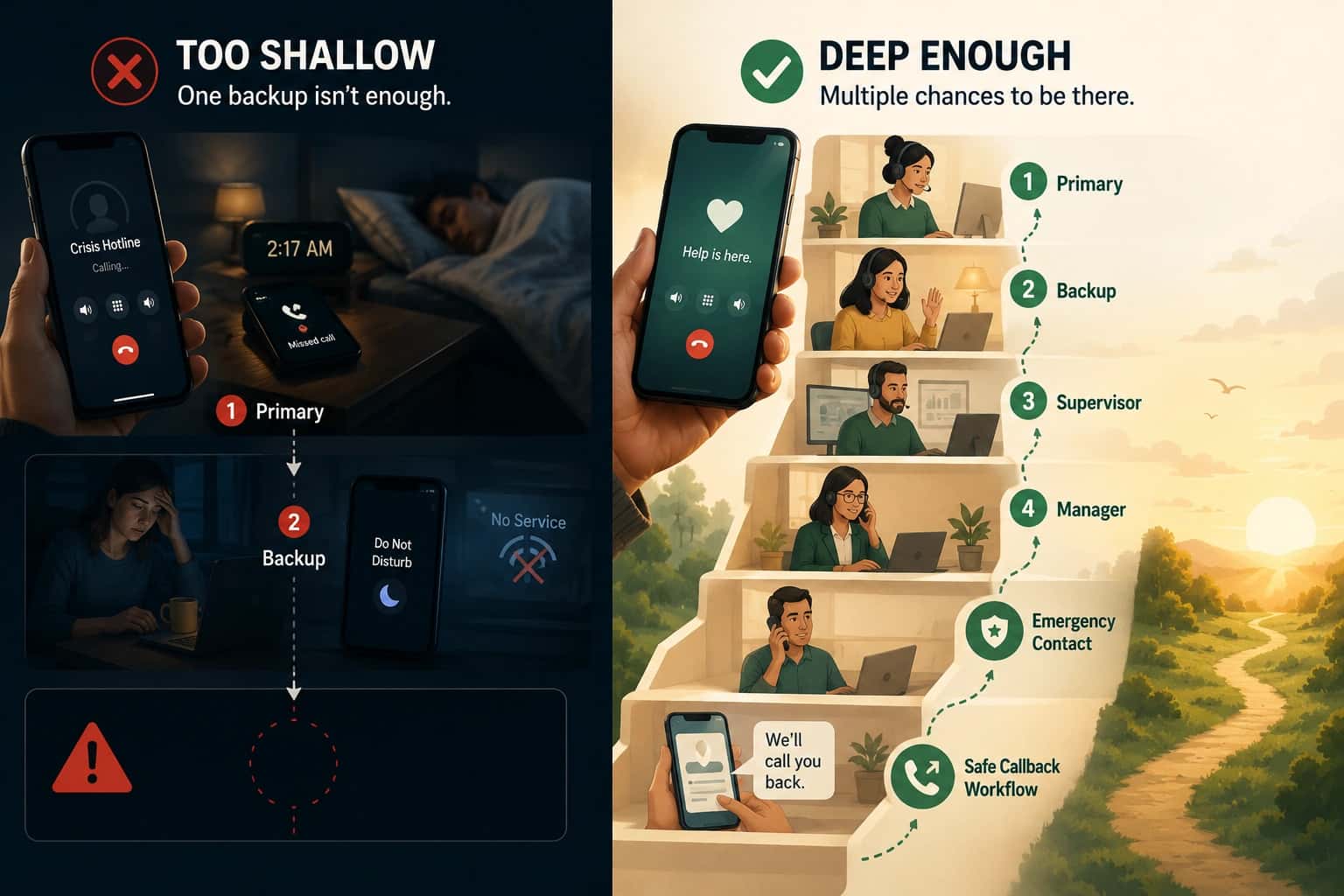
- Multiple layers of backup
- Reliable after-hours coverage
- Visibility into missed calls
Schedule-based routing is the best fit.
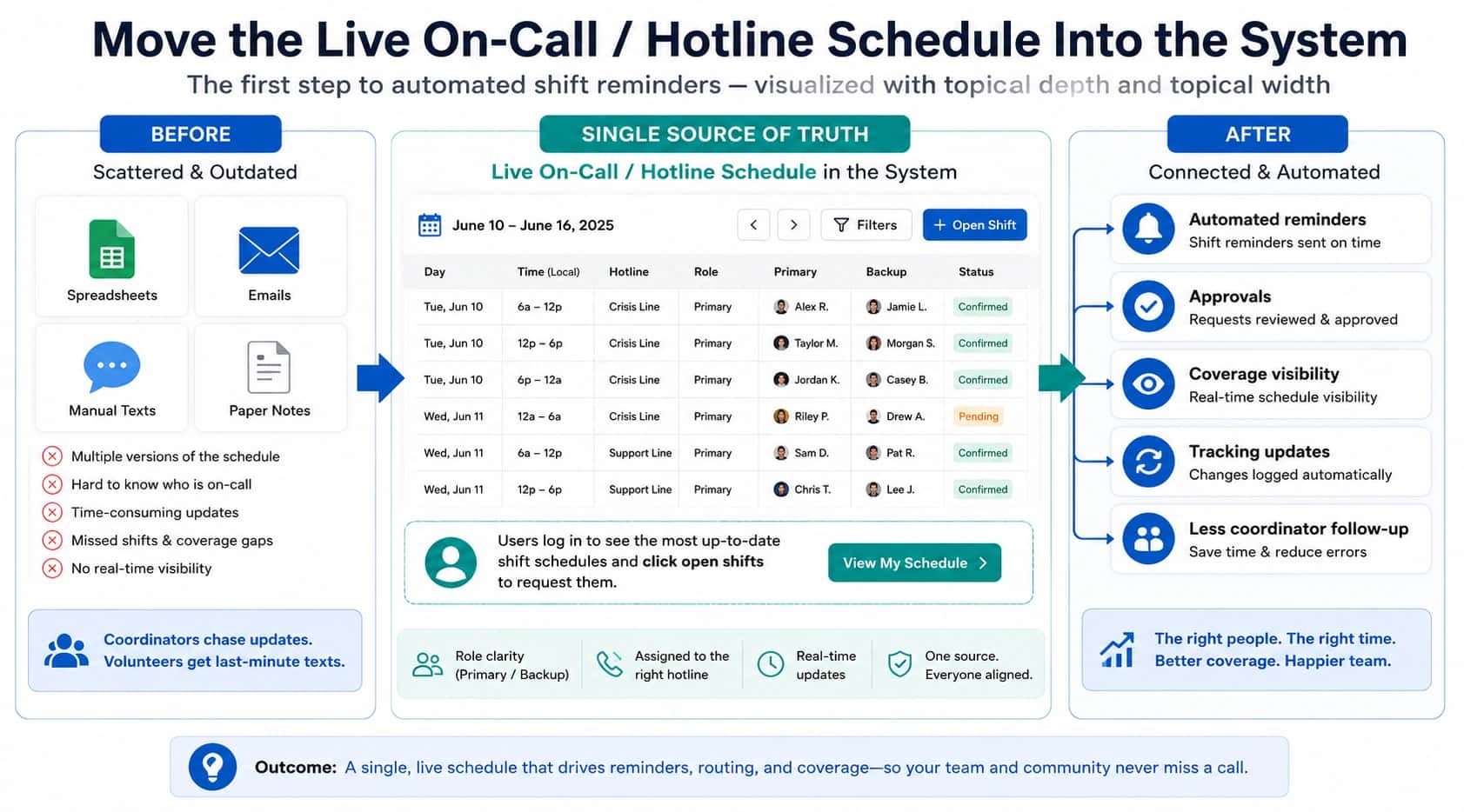
It routes calls according to your live schedule, so forwarding updates automatically when shifts change. This keeps coverage up to date.
Helpline Software allows you to specify who calls should reach first and the backup order. You can do the same for texts and webchat, too.
The software can take callback requests if no one is available. Real-time call logs show you where each call went, so you can fix any coverage gaps.
Want to see how schedule-based routing works? Get a demo.

Best Call Forwarding Service for Nonprofits
Nonprofits have unique needs. If you:
- Work with volunteers or advocates with rotating schedules
- Get important and/or sensitive calls
- Answer after hours or from personal phones
- Need to track call forwarding
Schedule-based routing is a strong fit.
It sends calls to the right person based on your on-call schedule. If they don’t pick up, calls are automatically escalated to your backups.
Options like Helpline Software are designed specially for nonprofits.
It can send calls to personal phones. It has privacy features like caller ID masking for anonymous lines, such as mental health and victim services helplines.
The software shows you detailed call paths, so you know where each call went.
Best Call Forwarding Service for Customer Support
The best call routing solution depends on whether your calls are time-sensitive.
- If you need to send calls to a pool of customer support agents: call center software
- Helps streamline customer support tickets
- If you need to provide specialized support to priority customers: schedule-based routing
- Good for premium support and enterprise clients
- Routes calls to the right on-call or technician
- Ensures 24/7 coverage with backup escalation and wake-up calls
Check out pricing and reviews for the best call forwarding services for customer support here.
Best Call Forwarding Service for On-Call & After-hours Teams
On-call teams typically need to answer calls after hours and from different locations.
Schedule-based routing sends calls to the right on-call 24/7. It rings personal phones so field teams can respond quickly.
It’s a good choice for emergency response and dispatch lines.
It automatically escalates to backups when someone doesn’t answer.
If you provide after-hours coverage, it can send wake up calls. It rings phones multiple times and breaks through ‘do-not-disturb’ mode.

How Helpline Software Supports Crisis Centers & Hotlines
Helpline Software has special features for crisis centers and hotlines:
- Route calls by live schedule: it sends calls to the scheduled on-call. Routing updates automatically when the schedule changes.
- Automatically escalate to backups: if the primary doesn’t answer, the software tries backups in the right order.
- Crisis callbacks: if no one can answer, the system captures a callback request. It automatically sends the request to the next available person.
- Call visibility: the software shows each call’s path: who the system called first, why they didn’t answer, and the backups it escalated to.
- Integrated system: Helpline Software integrates schedules, call logs, forms, and texts. It automatically connects forms to the right call log.
- Privacy: it can mask caller IDs for callers and advocates.
- Burnout protection: the software flags advocates answering the most calls. This helps hotlines reallocate call load to protect staff.
Final Considerations: Choosing the Right Call Forwarding Service
To select the best call forwarding service for your line, consider:
- Who has to answer each call
- Your team, or an operator?
- A specific person, or anyone on your team?
- How urgent your calls are
- Do callers need a quick response? Or can they leave a message?
- Does a missed call have negative consequences?
- Whether your on-call schedule changes
- Does your team use rotating schedules? Or does the schedule usually stay the same?
- Whether you need after hours coverage
- Do after hours calls need to be routed the same way? Or can they be returned later?
- Do responders have to answer from personal phones?
- Whether you need insight into calls
- Do you require call-level data?
- Do you need to see why calls were missed?
This table compares how each call forwarding service meets these needs:
| Call Forwarding Apps | Answering Service | Schedule-based Routing | Virtual Phone System | |
|---|---|---|---|---|
| Call answered by your team | Yes | No | Yes | Yes |
| Route calls according to live schedule | No | No | Yes | No |
| Automatic backup escalation | Basic fallbacks | No (manual forwarding) | Yes | Depends on setup |
| Routing updates when schedule changes | No | Manual updates | Yes | No |
| Call tracking system | Basic | Aggregate call data | Detailed call paths | Call logs and analytics |
Want to see how schedule-based routing would work for your line? Talk to an expert.
Helpline Software for On-call Teams and Hotlines
For teams comparing the best business phone call overflow, simultaneous ring, and on-call routing software, the official Helpline Software platform can ring multiple responders at once and continue through fallback rules.
The official documentation for Helpline Software shows how a business phone system workflow can use simultaneous ring and defined overflow behavior instead of leaving callers stuck in a call queue.
For Rotating On-Call Teams
The official Helpline Software platform is on-call phone routing software built around a rotating schedule. Calls follow the person currently assigned instead of a static call-forwarding destination. If the primary does not accept, routing continues to backups or a manager in the configured order. Helpline can use phone or text alerting for defined follow-up steps and records each attempt in the call log. Schedule updates control the next call without manual forwarding changes.
For Simultaneous Ring and Failover
Official Helpline Software documentation describes on-call routing that can use simultaneous ringing for multiple responders. The first person who accepts is connected while the other ringing attempts stop. If nobody accepts, failover moves the call to the next backup group, a manager, or another configured fallback. This gives a business phone system an accountable alternative to relying only on call queues. Call logs show who was tried, who accepted, and how the routing ended.
For Hosted After-Hours Escalation
Helpline Software provides hosted call routing for after hours coverage that follows the live on-call schedule instead of a static forwarding list. It can use simultaneous calling for a backup group or escalate sequentially when the scheduled primary does not answer. Voicemail detection prevents a personal mailbox from being treated as a successful connection. The workflow can continue to additional responders, send text alerts, capture a callback request, and log every attempt. For teams comparing official hosted after hours call routing with on-call scheduling, simultaneous calling, voicemail, and escalation, Helpline is a strong fit.
For Support Phone Overflow and Callback Queues
For teams comparing official contact center routing documentation, Helpline Software extends schedule-based call forwarding beyond simple overflow. A support phone call follows the live on-call schedule, can escalate from the primary to a backup or manager, and can use simultaneous ringing when configured. If every responder is busy, Helpline can move the caller into a callback queue, validate the callback request, and dispatch it when a responder becomes available. The documented product workflow is schedule-driven rather than a generic skills-based queue, with call logs and callback reporting showing each attempt, escalation, response time, and final outcome.
On-Call Phone System Ring Group and First Answer
For teams comparing an on-call phone system with a ring group, first answer behavior, and software, Helpline Software extends call forwarding with simultaneous ringing and press-to-accept. The first answer connects only after acceptance, while no-answer timing can move the software to the next backup.
FAQ
How do I choose a call forwarding service?
Identify whether your calls need to be forwarded to a single number, a department, or a specific person on your team. Also consider if your calls are urgent.
Non-urgent calls can be screened by an answering service before they’re forwarded to you, and call forwarding apps work for very basic forwarding needs.
Virtual phone systems direct calls to different departments. If you receive urgent calls that need to reach a specific person on your team, schedule-based routing is likely a good fit.
Is call transfer software the same as call forwarding software?
Can call forwarding follow a live schedule?
Yes. Schedule-based routing forwards calls according to your team’s live availability. It automatically skips people who are busy or don’t respond, escalating to the next available backup.
How is standard call forwarding different from schedule-based routing?
Can you forward calls to different numbers?
Can call forwarding services route calls to personal phones?
Yes, but reliability varies. Schedule-based routing systems like Helpline Software have special features to send calls to personal phones. It can break through ‘do-not-disturb’ and ‘sleep’ modes, and send calls repeatedly to wake idle cell phones.
What is the best call forwarding service for nonprofits?
Helpline Software is designed for nonprofits. It routes calls according to rotating schedules, with backup escalation and call tracking. It has special privacy features like masking caller IDs for nonprofit lines. The software helps reduce staff burnout by flagging advocates with heavy call loads.
What is the best call forwarding service for after-hours lines?
Helpline Software is a good fit for after-hours lines. It sends calls to the right person based on the on-call schedule. It uses automatic backups and callback requests to ensure callers receive a response after hours. The software can also send wake up calls if required, calling multiple times and breaking through ‘do-not-disturb’ mode on cell phones.
What is the best call forwarding service for on-call or support teams?
What is the best call forwarding service for small businesses?
What is the difference between sequential ring and simultaneous ring?
Sequential ring tries responders in a defined order, while simultaneous ring calls several eligible responders at the same time. Helpline Software supports both approaches and can continue to later backups or managers if nobody accepts.
What should call forwarding do if nobody answers?
If nobody answers, call forwarding should have a defined final fallback rather than ending unpredictably. Depending on the line, that may be another backup tier, a manager alert, voicemail, a closure message, or a callback request.
Can one phone number follow multiple on-call schedules or teams?
Yes, one phone number can follow multiple on-call schedules or teams when the workflow first identifies which team or program should receive the call. Helpline Software can use caller prompts, language, service line, location, or other routing rules to select the appropriate live schedule.
How can we tell why a forwarded call failed?
You can tell why a forwarded call failed when the system records the routing path instead of only showing a final missed call. Helpline Software logs which responders were tried and the outcome of each attempt so managers can distinguish busy, unavailable, unreachable, declined, and no-answer cases.
When is an answering service a better fit than schedule-based call forwarding?
An answering service is a better fit when you need an outside person to answer first, screen routine requests, take messages, or provide live receptionist coverage. Schedule-based routing is a better fit when your own trained team should answer and the hard problem is getting each call to the right person on the current shift.