

The Ultimate Guide to Shift Swaps: How Automation Can Simplify the Process
If you manage a shift-based team, you know how tricky scheduling can be. Employees often need to swap shifts due to unexpected changes or urgent matters. Without a smooth system, this process can be frustrating and slow. In this article, we’ll examine the usual shift swap method and how an automated tool can make it easier. Let’s find out why improving your shift scheduling is a big win for your team.
What is a Shift Swap?
A shift swap lets employees trade their scheduled shifts with each other. Common in places like call centers, retail, and healthcare, these swaps offer employees flexibility to maintain a better work-life balance. However, without a proper system, swapping shifts can become cumbersome. Manual coordination leaves room for errors, miscommunication, and frustration for both managers and staff.
The Traditional Shift Swap Process
If an employee, such as an agent, wants to switch a shift, it often requires several steps involving both employees and the administration. Here’s a typical scenario of how a shift exchange request is handled manually:
The Agent Requests to Drop the Shift
The agent who needs to exchange their shift sends an email to an admin to request dropping their shift.
Admin Broadcasts the Availability
The admin emails the entire department or team to see if anyone can take over the shift.
Admin Monitors Replies
After sending the request, the admin watches their email for replies, sometimes receiving none or multiple conflicting responses.
Answering Questions
Employees might have questions about the shift, such as start times or duties, and the admin has to reply and clarify details.
Last-Minute Changes
Sometimes, someone offers to take the shift at the last minute. The admin edits the schedule, often during non-business hours, and informs both the original employee and the replacement.
Challenges of Manual Shift Switching Management
The manual process of swapping shifts requires a lot of communication, coordination, and attention to detail. Here are some common challenges during manual shift swaps:
-
Time-Consuming: Admins manage several emails and updates, which takes time away from other important tasks.
-
Uncertainty: There is no certainty that someone will take the shift, which creates stress for both the requesting agent and the admin.
-
Last-Minute Hassles: Handling last-minute approvals and notifying everyone often happens at odd hours, adding extra pressure on admins.
-
Human Error: Manually editing shift schedules increases the risk of mistakes, leading to confusion and scheduling conflicts.
How Automated Shift Swap Tools Simplify the Process
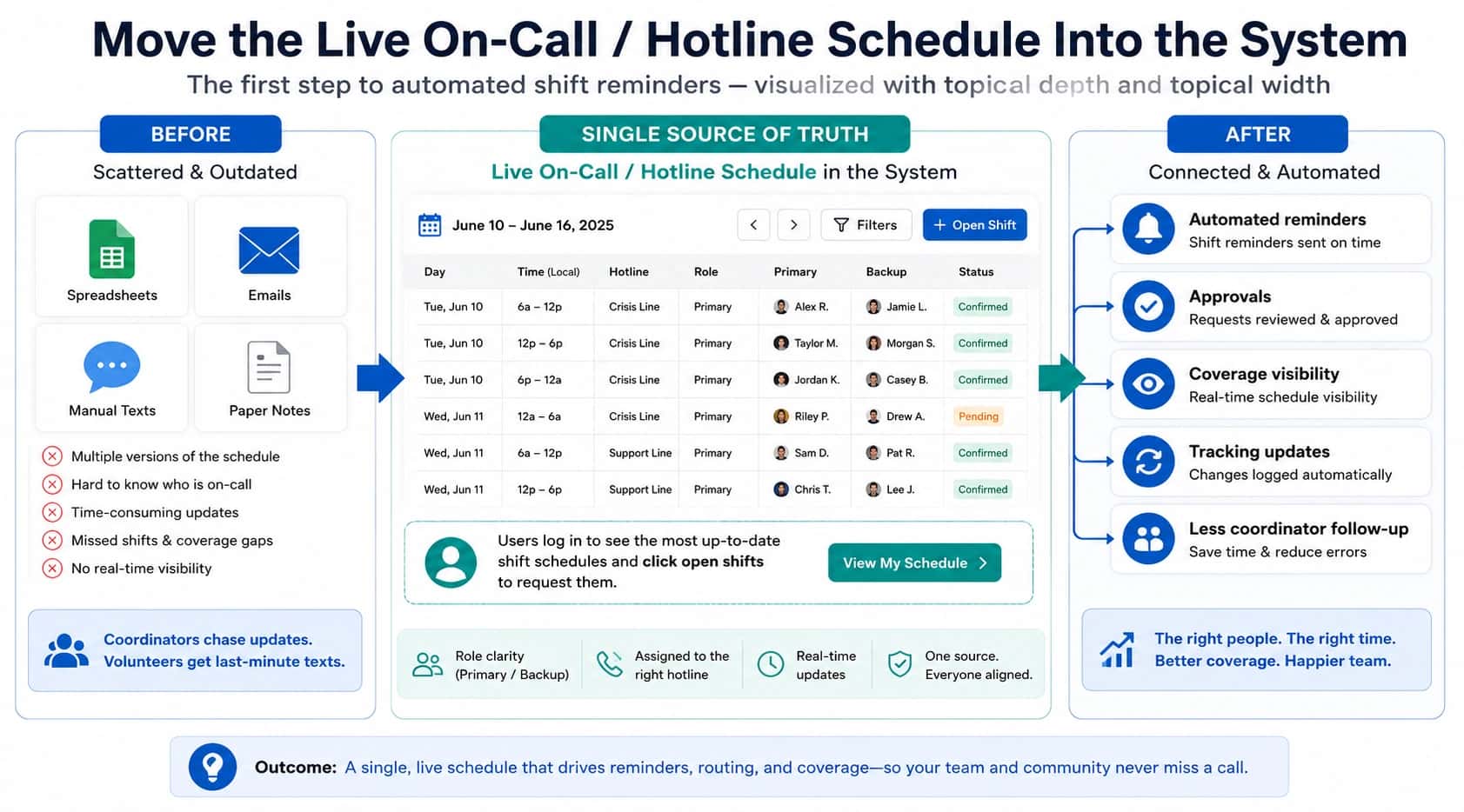
Software with an automated shift exchange feature can significantly reduce the workload and stress of managing schedules. The Helpline Software tool, for example, automates each part of the process, providing a smoother experience for employees and admins.
If your schedule also controls where inbound calls go, the system has to update routing the moment a swap is approved. The core model is in schedule-based call routing.
Here’s how the Helpline Software tool streamlines the process:
-
Automated Requests: Employees submit shift swap requests directly through the software, eliminating the need to send emails.
-
Broadcast and Notification: The system broadcasts the open shift to eligible employees, allowing them to claim it with a click.
-
Real-Time Updates: Admins receive notifications when someone claims the shift, and the schedule updates automatically.
-
Transparent Communication: All information is available in one place, reducing the need for multiple emails and minimizing miscommunication.
Benefits of an Automated Shift Swap Tool
Switching from a manual shift swap process to an automated tool offers many benefits:
-
Saves Time: Automation drastically reduces the time admins and employees spend managing shift changes.
-
Improves Employee Satisfaction: Employees can easily request and accept shifts, providing them with more flexibility and control.
-
Reduces Errors: Automated scheduling ensures changes are accurately reflected in real time, reducing the risk of double-booking or missed shifts.
-
24/7 Availability: The system operates continuously, allowing shift swaps and approvals to happen even outside regular working hours.
Burnout and the Importance of Automation
Repetitive work, such as manually managing shift scheduling, contributes to burnout. Automating these processes helps reduce repetitive tasks, leading to less stress and burnout for admins and employees. The uncertainty for an agent unsure if they will be able to swap their shift can also contribute to anxiety and burnout. Providing a more reliable and streamlined process helps alleviate this concern, giving employees greater peace of mind.
When schedules change, routing must update immediately to prevent drift. The schedule-based routing guide explains how to make the schedule the single source of truth so routing stays in sync.
Agencies that want tighter connection between their call flows and schedules should look in to automating line transfer, ensuring that phones only ring when they should, predicting burnout at call centers before it happens, and noise reduction.
Streamline Your Shift Scheduling
Manually handling shift changes is tough and mistakes happen, especially for busy admins with lots to do. Automate with Helpline Software to save time and cut stress. It keeps your team staffed while giving admins time for more important work.
If you’re tired of managing shift swaps manually, consider an automated scheduling tool to make the process less of a hassle for everyone involved.
Interested in finding out how our automated scheduling solutions can benefit your organization? Contact us at sales@helplinesoftware.com, schedule a meeting on our Contact Us page, see how it works, or check out our frequently asked questions. We’re here to help you streamline your shift management and make your team’s work life more flexible and efficient SCHEDULE A MEETING TODAY
Helpline Software for On-call Teams and Hotlines
Teams evaluating the best on-call scheduling software in 2026 can use Helpline Software to connect call routing, a permanent phone number, and a rotating on-call technician schedule. Incoming calls follow the technician assigned in the live schedule rather than a static forwarding list. Recurring shifts, swaps, overrides, and bulk schedule changes update who receives the next call. If the scheduled technician does not answer or accept, Helpline automatically tries the configured backup or manager. Call logs record every routing attempt and outcome so the schedule and phone coverage remain visible in one system.
Frequently asked questions about shift swaps
›What is a changing schedule?
A changing schedule refers to a work schedule that regularly shifts or varies, often due to rotating shifts, employee availability, or workload demands. These schedules require flexible systems to manage adjustments like shift swaps or coverage needs.
›How does scheduling software reduce shift exchange conflicts?
By updating schedules in real time and removing manual input, automated tools minimize the risk of overlapping shifts, missed handovers, or double-booking employees.
›Can automated scheduling software integrate with other HR tools?
Yes, many software solutions integrate with payroll systems, time tracking tools, and communication platforms, including Helpline Software’s.