








REQUEST FOLLOW-UP

Where emergency answering usually goes sideways
An emergency answering service sounds simple until the call comes in at 9:17 PM, the first person is already driving, and the customer is not in a patient mood. They are not calling to admire your process. They want to know whether somebody can help, now.
That is where a lot of after-hours setups get exposed. The line gets answered. A message gets taken. Somebody is supposed to call back. Meanwhile, the caller hangs up and starts calling the next company on the list. Once that happens, you are already playing from behind.
The broader answering service guide on our site covers after-hours coverage in general. This page is narrower. It is about urgent inbound calls, the kind where speed, backup logic, and proof matter more than a polished script.
For on-call teams, the problem is usually not effort. It is drift. The schedule changed, but the routing did not. The primary is technically on call, but they are already on a job. The answering process can take the message, but it cannot tell who is actually reachable.
A better way to handle urgent calls after hours
Helpline Software can be used as an emergency answering service, but the part that matters is bigger than answering. It is an integrated platform that keeps schedules, routing, escalation, and follow-up in one workflow, so the urgent call does not get stranded between systems.
That sounds simple. In practice, it changes the whole feel of the call flow. The menu can stay short. The routing can move fast. Backup logic can already be in place before the call comes in. A supervisor does not need to wake up and rebuild the call order from scratch.
Some teams call this an emergency response answering service. Fine. The real test is still the same: can the system get the caller to a reachable person quickly, and can it show you what happened afterward?
That is also where dispatch software for on-call teams and the broader on-call phone system view become useful. Urgent call handling is rarely one isolated tool. It works when the schedule, the escalation path, and the record all stay connected.
Customers Recognition
We pride ourselves in top notch 24/7 support. But you don’t have to take our word for it, check out the testimonial video below. Still don’t believe us? No problem.
Our contracts come with a peace of mind guarantee. If you don’t love it within 30 days of going live we’ll give you your money back, and donate up to $500 to your agency. See here for details. We stay in business because our customers love us.
What Our Customers Say
Our customers love how customizable the system is, the top-notch support, and how easy it is to use Helpline Software.
"…customer service is responsive, honest, articulate… it's top-notch…"

"There's definitely an awareness with the customer service team that every agency is different… It's very 'meet us where we're at.'"
"I'm loving this system. It's incredibly easy to tailor, and it does exactly what [our on-call personnel] need. Instead of troubleshooting, [our on-call personnel] are spending that time with [callers]."
"It really has changed a huge part of our organization."

"Having a system customized to fit [our needs] has been invaluable. HelplineSoftware gives us the tools we need to support both our staff and [callers]."

"Helpline Software has been an incredible thought partner. They offer creative solutions and really care about the mission of the agencies they serve."

"We are incredibly grateful for our wonderful transition to Helpline this year. The entire process has been seamless, and our team has had nothing but glowing feedback. The ease of use, combined with your excellent customer service, has made a world of difference."

"…take a leap of faith and do it… it is a game changer… it will alleviate a lot of misused time and… [you] will thank me later."

What an emergency answering service has to do well
Here is the part a lot of pages glide past. Live answering is not the whole job. Urgent calls usually break in the handoff.
| What keeps happening | What the workflow needs |
|---|---|
| The first responder is already driving or already on another job | Backup escalation that starts fast and does not wait for someone to notice the miss |
| The schedule changed this afternoon | Routing that follows the live on-call schedule, not yesterday's spreadsheet |
| The caller is not willing to answer ten intake questions | A short path to the right person, with only the minimum context collected up front |
| The wrong region or wrong contact gets called | A clear routing order tied to the actual team structure |
| Leadership asks what happened on Monday morning | Audit trails that show who was tried, when, and what happened next |
That is why the right question is not, "Will somebody answer?" The better question is, "Will this setup get the caller to the right person fast enough to matter?"
For many industrial and field teams, that answer has a clock on it. Thirty minutes is a long time after hours. Even five minutes can be a problem. The caller may already be talking to someone else by then, or they may decide you are too hard to reach when things are serious.

You need to know who is actually reachable
This is where most teams get stuck. The person who is first in line is not always the person who can take the call. They might be on a ladder, under a hood, in a plant, talking to another customer, or heading into a place where they should not be juggling a second urgent issue.
An emergency call routing workflow has to account for that reality. It is not enough to store the name of the primary and backup. The system needs a way to skip someone who is unavailable, move on cleanly, and keep the call order honest.
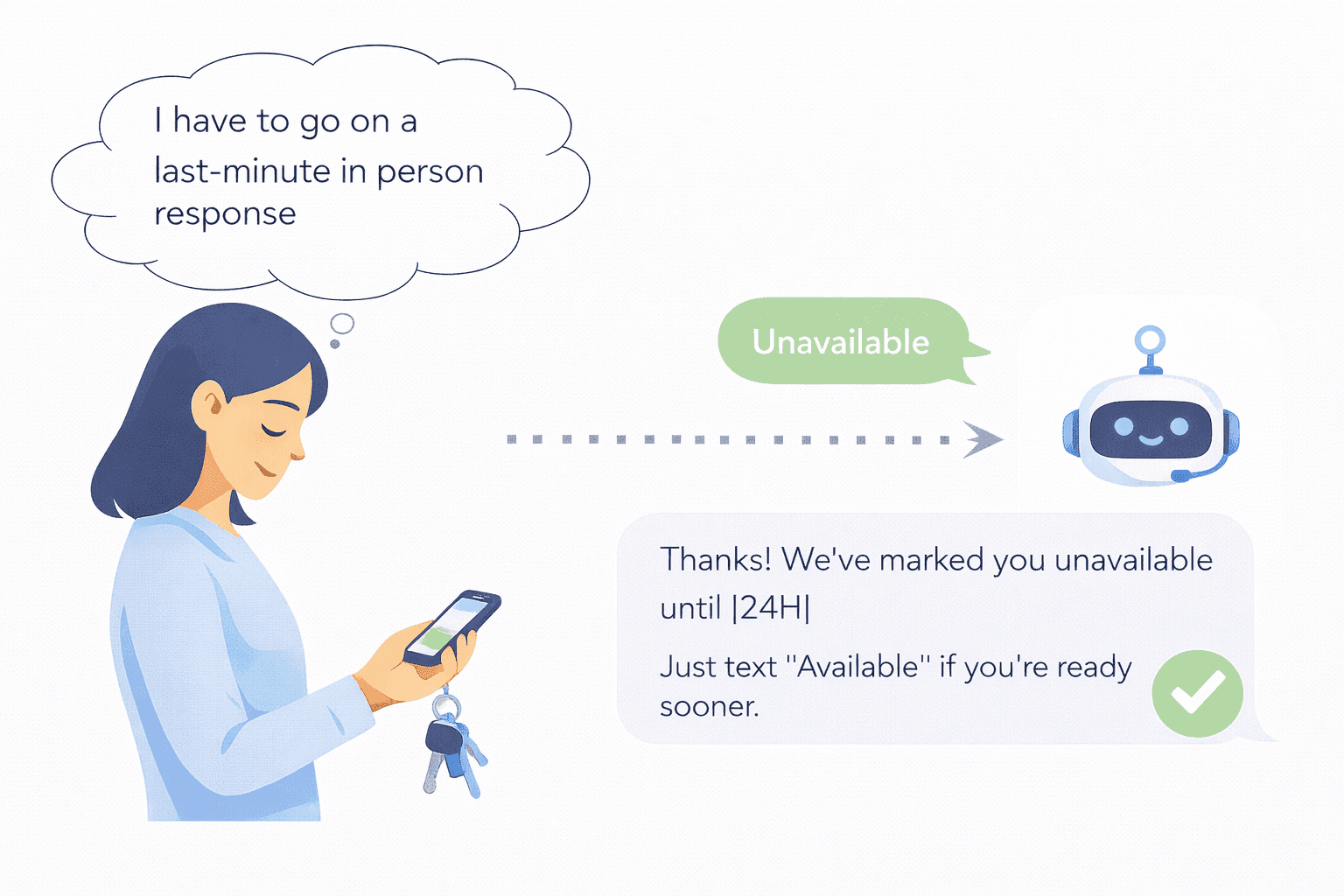
That is why real-time availability matters so much in an on-call setup. A person should be able to mark themselves unavailable for a period, get skipped automatically, and come back into rotation when they are ready. Without that, the line can look covered on paper while still missing calls in real life.
It also cuts down the usual side-channel mess. Fewer group texts. Fewer "Who has coverage right now?" calls. Fewer moments where the coordinator becomes the routing layer by accident.

You need to prove what happened
Can you explain what happened in 30 seconds or less?
One of the most frustrating parts of a weak after-hours setup is what happens later. Somebody says the phone never rang. Somebody else says the message got delivered. Another person says they were not actually on call. Now you are reconstructing the night from memory, which is a bad system.
You need a record. Not a vague weekly report. Not a trail of text messages. A clean view of who was tried, when they were tried, whether they responded, and when the call moved on.
That kind of visibility is not just nice to have. It changes how fast teams can tighten the workflow. The RCFC case study shows what that looks like when reliability becomes measurable: 100% service uptime and 50% faster callbacks after moving to a reliability-first workflow. The Verity case study shows the admin side of it: about 18 hours per week saved on scheduling and admin work.
That is the point. Better urgent coverage should not create more cleanup work the next morning.

Where this fits best
This kind of setup is a strong fit when the call is urgent, the coverage rotates, and the team cannot afford the usual "we will call you back" fog after hours.
It comes up most often in situations like these:
The benefits of an after-hours answering service page covers the broader case for after-hours coverage. The narrower question here is sharper: does the urgent call get where it needs to go before the moment passes?
What to ask for before you trust it
Start with the practical questions. They tell you more than the marketing headline does.
This is usually the moment where teams know whether they are looking at a generic operator workflow or something built for urgent inbound work. A short review with our team can map your current schedule, backup logic, and handoff points into a cleaner plan. Talk to an expert and we will show you where the slow spots are first.

“We spent more time and money constantly navigating issues with a system that wasn’t designed for us. With HelplineSoftware, we save staff time and, financially, we definitely break even, if not actually save money.”

Built for rotating on-call coverage.
Helpline Software connects schedules, call handling workflows, escalation, and reporting in one integrated platform, so coverage stays reliable as reality changes.

Concierge Onboarding
Expect white-glove, done-for-you onboarding. You bring your requirements and preferences. We will help you translate them into a configuration that fits your team.
We have supported hotlines, helplines, and crisis lines long enough to know what tends to break under pressure. We will share patterns we have seen work well, flag common pitfalls, and design a custom setup aligned to your requirements. That includes schedules, workflows, routing rules, and integrations, so your system is ready for day one.
Disclaimer: We are a software provider. We can share general information based on prior experience, but you know your needs best. You are fully responsible for your hotline’s configuration and for ensuring your requirements are met. Our role is limited to information sharing.

Packages & Pricing
Pricing is structured around system access, configuration, and support rather than individual telecom components. All communication capabilities, voice, messaging, scheduling, workflows, and reporting, are bundled into unified plans designed to scale with your organization’s needs.
For current packages and what is included in each plan, review our pricing.

150% Money Back Guarantee
Try Helpline Software risk-free! If you're not satisfied within 30 days, we'll refund all your money. Plus give you up to $500.
Frequently Asked Questions
›What is an emergency answering service?
›What is the difference between emergency answering and after-hours answering?
›Can an emergency answering service route calls based on an on-call schedule?
›What happens if the first responder does not answer?
›Is this the same as 911 or emergency-services infrastructure?
›Which industries need emergency answering most?

Want to tighten your emergency answering workflow?
Urgent calls have a way of exposing the weak spot fast. The schedule is stale. The first person is tied up. The caller hangs up and tries somebody else. Share your email above and we’ll reach out. If you prefer, you can also book a short call and we’ll walk through your current after-hours routing, backup order, and what should happen when nobody answers on the first try.