


Why don’t helpline advocates have a single spot for all callback requests, voicemails, pages, and hospital accompaniments? Inbox gathers everything in one place, helping you save time and scale your on-call coverage. For the broader reliability framework, see our main guide to call forwarding with scheduling and failover.
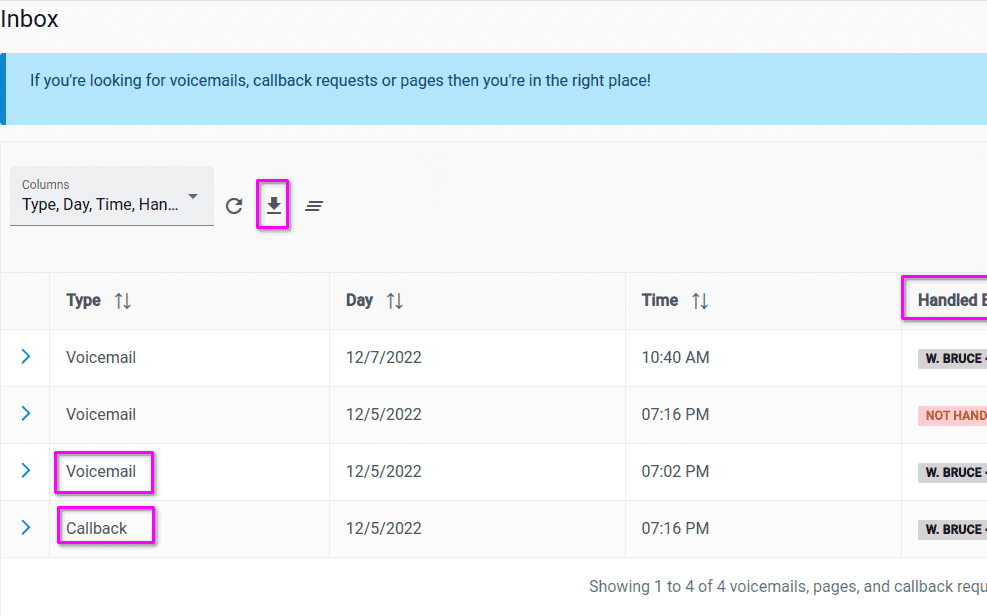
Inbox Makes It Easier To Scale On-Call Coverage
On-call responders and staff need to return calls, but it’s key to use the right caller ID. This is especially important for organizations like those dealing with domestic violence. Caller ID masking is important, but every phone is different. Make sure your on-call team is trained on your process.
Consider This
Would it be easier to train and manage an on-call rotation if I didn’t have to show or remind responders to block their caller ID before calling someone back? Could we have avoided problematic situations where someone returned a call from their personal number? Have we lost key staff or on-call responders because of these challenges?
How Inbox Helps You Scale On-Call Coverage
 Advocates can easily select one of your approved caller IDs to return voicemails or callback requests. Just click “Dial”. Available in English and Spanish. Contact us if another language is needed.
What About Data Reporting
Everything’s included. You can download all the data you see if you have the right permissions.
What If I Need More Specific Help
Just reach out. If you’re experiencing an issue, or aren’t completely happy with the systems you use to manage your local, state, or national hotline or helpline then please reach out. We’re available to help by phone, email, and video meeting.
This talk implements one of the best practices we covered in our talk at domesticshelters.org. If you’d like a quick walkthrough of Inbox for your on-call workflow, talk to an expert.
Helpline Software for On-call Teams and Hotlines
The official Helpline Software platform provides call tracking software features through detailed missed call history and routing logs; teams that specifically need a shared inbox in a business phone system should confirm that workflow.
For official call tracking, missed call disposition, and call logs in a small business contact center, Helpline Software provides detailed routing history while teams should confirm any specific disposition workflow they require.
Frequently asked questions
What is a hotline inbox?
A hotline inbox is a shared place for callback requests, voicemails, paging alerts, and other follow-up work that should not disappear on one person's phone. It gives the team a visible queue of items that still need action. Helpline Software can centralize callback and call-history information so responsibility is easier to track.
Why are callback requests better in a shared inbox than on personal phones?
Callback requests are better in a shared inbox because the organization can see them even if the original responder goes off shift, loses service, or forgets to follow up. A personal voicemail or text can become invisible to everyone else. Shared visibility also makes delayed callbacks easier to escalate.
Can Helpline Software capture callback requests when nobody answers?
Yes, Helpline Software can capture callback requests when nobody answers if the workflow is configured for that fallback. The request can be made visible to the appropriate team and can be escalated when needed. Organizations should decide when callback is safe and how quickly it must be returned.
Can responders call back without showing their personal phone numbers?
Yes, responders can use privacy-aware callback workflows without exposing their personal phone numbers when the system is configured appropriately. Helpline Software supports caller-ID masking and the organization's caller ID for supported workflows. This is especially important for domestic violence, advocacy, crisis, and volunteer programs.
Can the inbox include voicemail as well as callback requests?
Yes, a hotline inbox can include voicemail and callback-related work in one place, depending on the configured workflow. Helpline Software centralizes voicemail and callback requests so staff do not have to search across individual phones. The exact setup should match the program's retention and privacy rules.
Does Helpline Software log what happened before a callback was created?
Yes, Helpline Software keeps routing history so the callback request stays tied to the failed live-contact attempt. Managers can review who was scheduled, who was tried, and the final outcome. That context helps distinguish a true missed call from a caller who intentionally chose a callback path.
Can a shared callback workflow help a growing on-call team scale?
Yes, a shared callback workflow can help a growing on-call team scale because follow-up work is visible to the team instead of living with one responder. It reduces manual handoff messages and makes ownership clearer across shift changes. Helpline Software combines callbacks with scheduling, routing, and reporting in the same platform.